


Eahso
Members
-
Joined
-
Last visited
Everything posted by Eahso
-
I have a MacBook Pro and a PS4, the main reason I want GTA V is to play LSPDFR because I really enjoyed it the one time I got to play it on PC at a friends house, but because I have a MacBook I don’t have direct access to GTA V itself, so I dug up some research and discovered that the best way (except for buying a PC which is way too expensive for me) is to download Bootcamp, so I did that, bought GTA V on Steam and followed all instructions to download LSPDFR and other mods (ex. Stop The Ped). The problem is I manage to start GTA V and launch LSPDFR, I manage to interrogate pedestrians and walk around the streets as a cop, but as soon as I start a chase or something that requires a lot of action, the whole screen goes black and I have to restart the computer. I don’t have a lot of storage (256 GB, about 20 after everything is downloaded +everything on Mac) should I buy external storage or what is the problem, can someone please help me?
-
By default do you mean 1.0f or “default” because when I put 1.0f it still crashes.
-
I start GTA V with LSPDFR automatically installed and if I just do a couple of "Stop The Peds" it works fine, but then when I start driving for any reason (pursuit, catching up to another car...) the game completely crashes. I am playing GTA V on my MacBook Pro through Bootcamp. I have linked my Rage Plugin Hook log below.RagePluginHook.log
-
So.... somebody help
-
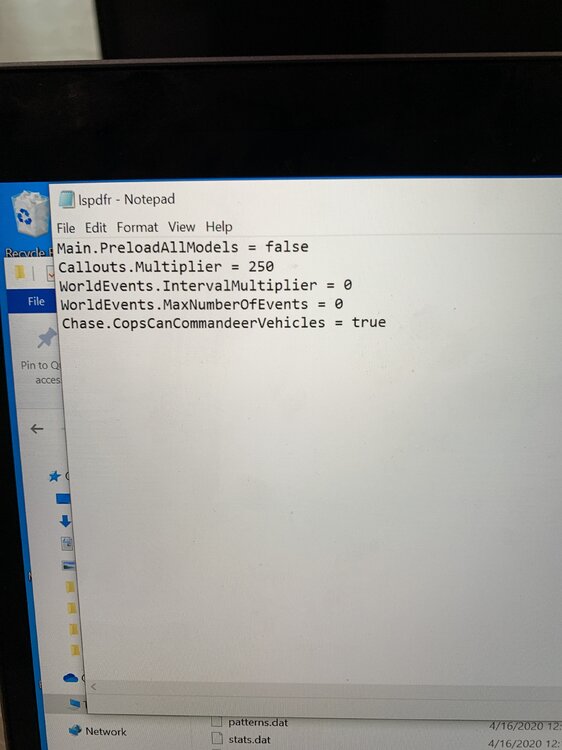
Yes, this but what do I edit
-
Where can I find this, I found the LSPDFR folder but I don’t know where to find the correct document.
-
Ok lo provo questo pomeriggio e poi faccio sapere/I will try it out in the afternoon and then will let you know
-
Ok thanks
-
Is this the log RagePluginHook.log
-
Can somebody please explain to me why whenever I do a Traffic Stop, both Stop The Ped and the auto Traffic Stop menu come up and duplicate each other, how do I prevent this, btw I already changed Traffic Stop to “None” on keys. Can somebody please help?
-
Can somebody please explain me why the whole GTA V game crashes when I am in/after a pursuit? I am playing GTA V through Bootcamp on MacBook, don’t know if this helps.

