Skip to content
View in the app

A better way to browse. Learn more.

LCPDFR.com

A full-screen app on your home screen with push notifications, badges and more.

To install this app on iOS and iPadOS
  1. Tap the Share icon in Safari
  2. Scroll the menu and tap Add to Home Screen.
  3. Tap Add in the top-right corner.
To install this app on Android
  1. Tap the 3-dot menu (⋮) in the top-right corner of the browser.
  2. Tap Add to Home screen or Install app.
  3. Confirm by tapping Install.

ParkerWBA2006

Members
  • Joined

  • Last visited

Posts posted by ParkerWBA2006

  1. I wanted to attach a new light bar to an unlocked model. I successfully scaled the light bar and got it to attach to the vehicle, however when I try to export the model, there is 0kb of data inside the "model_hi" and "model" file. I exported the _hi file first then the .ytf file. I don’t know what I’m doing wrong can anyone please help

  2. Can someone reply to this with the original global.gxt2 file if anyone has it.

    It is located in: mods\update\update.rpf\x64\data\lang\american_rel.rpf\


  3. 5 hours ago, MattexD said:

    Remove Arrest Manager, British Policing Script, LSPDFR+, PoliceSmartRadio, Interop.WMPLib, Traffic Policer and update RegularCallouts to 1.1.1.0, Section136Callouts to 0.0.9.2

    What is “Interop.WMPLib"

  4. Can someone please help, my game was working perfectly fine and recently I have been experiencing very bad lag after like 25 mins of playing, it gets to the point where I just quit the game and reload it back up, any help would be great

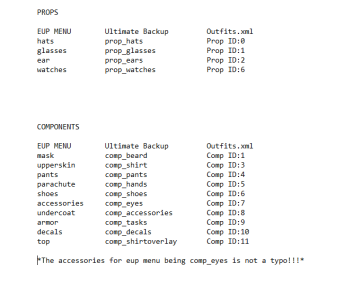
  5. 10 minutes ago, rican a55a551n said:

    Not to step on treads toes but if you join benjolols discord they have a converter, it uses your wardrobe lines and converts it to what UB uses. just copy and paste.

    Oh really! Thank you sm for that mate been sitting here for hours writing all these lines to perfect my game but I appreciate it thank you

    Where is that located in the discord server 

Account

Navigation

Search

Search

Configure browser push notifications

Chrome (Android)
  1. Tap the lock icon next to the address bar.
  2. Tap Permissions → Notifications.
  3. Adjust your preference.
Chrome (Desktop)
  1. Click the padlock icon in the address bar.
  2. Select Site settings.
  3. Find Notifications and adjust your preference.