


Faren
Members
-
Joined
-
Last visited
Everything posted by Faren
-
After downloading Realistic Driving V my GTA 5 has been crashing on loading screen the only thing i downloaded since the crash was some cars that worked before and even so i switched them out with other cars to test but it still crashed so the only other thing is Realistic Driving V it has a uninstall.oiv but it made no changes.
-
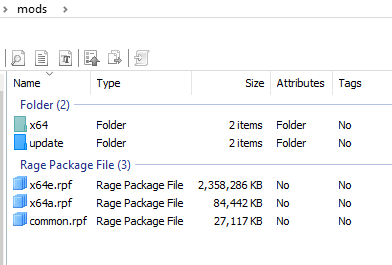
can i delete the x64a.rpf because thats part of the mod
-
i can just delete both of the mods because i dont need them how can i see and delete stuff from a ovi pack? thank you
-
So i wanted to explore the other side of modding the know the superhero stuff i got a iron man mod that i know works then that got a bit boring so i went and i got a spider man mod didn't work at all so then i got another spider man mod it worked just fine no issues
-
plz help this is what my mods folder looks like just for some help
-
yes if i rename my mods folder it will let me play but i dont have added cars guns etc
-
so one day i just hopped on gta and my game crashed at loading and populating game so i looked it up and i found if i rename my mods folder causing it not to work my game will load after that my game now crashes almost instantly plz help me
