ringpolice
Members
-
Joined
-
Last visited
Everything posted by ringpolice
-
bump one more time? still have not gotten this fixed
-
Am I allowed to bump? I believe so, imma throw it, 16 hours ago, bump ❤️
-
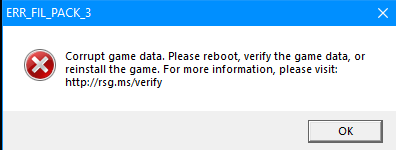
Hello, so I recently just went to change the default window tint on the sheriff2 model through the vehicles.meta, through the /mods/ folder, once I did this, I went to start RPH and it said I have corrupt game files, I deleted the vehicles.meta and ran the verify game files to reinstall it, which it successfully did, yet it hasn't fixed the issue... did I do something wrong? - I've tried verifying game files - I've tried removing the replacement sheriff2 model files and replacing with default - I've tried replacing the vehicles.meta in the /mods/ folder with the one through default gta files (update.rpf/common/blah blah../vehicles.meta) - I've tried restarting my pc None of the above seem to be working