


juja8
Members
-
Joined
-
Last visited
Everything posted by juja8
-
Ohhhhh, so should I just uninstall the entire pack? Because now other stuff isn't working and other stuff is. My realistic weapons pack that I installed is now working, however my sirens and gunshot sounds and rate of fire have gone back to default, my EUP menu no longer works because it says it's not installed. And none of the cars i have installed are spawning anymore, just the default cars.
-
Let me do that, I'm not sure it'll work because like I said, my NYSP car pack no longer exists for some reason. Yes it does exist. But when I do Spawn POLICE2 in console, the default LSPD car spawns. Also when I try to load my EUP, it says that i haven't installed it....
-
It honestly amazes me the fact that you knew exactly what it was. The other person helping me is A Stranger. XD
-
Alright, so now I have an issue. Originally I had someone also helping me stop my RPH from crashing on loadup. They got it to stop, however now, the cars I installed yesterday no longer are in game, the original cars that I'm pretty sure I deleted the files for are now back... The realistic guns I installed are now working, but the rate of fire and sound has gone back to default. My sirens have went back to default as well. And my backup is working normally again. This just happened now, you both where helping me at the same time. XD
-
Alright, working on that. Alright, it seems to be working. Could you bare with me for like 10 min so I can make sure it's not gonna crash half way through? Okay it's working, however now, the car pack I installed yesterday is not. And that's weird because I deleted the original car files from the game when I installed these...
-
Let me check, thanks for helping me btw. I really appreciate it. This communities support services are amazing. Alright, the last one, I completely understood because the file was easy to read. This one, I have no idea what this even is. You're gonna have to walk me through this one if there are changes I need to make. XD Alright, so now I have an issue. Originally I had someone also helping me stop my RPH from crashing on loadup. They got it to stop, however now, the cars I installed yesterday no longer are in game, the original cars that I'm pretty sure I deleted the files for are now back... The realistic guns I installed are now working, but the rate of fire and sound has gone back to default. My sirens have went back to default as well. And my backup is working normally again.
-
To restart RPH I just have to reopen it right?
-
Is this what it's supposed to be?
-
Not sure if this is related to the issue. I recently downloaded the New York State Police car pack, now I am unable to run RPH. It always crashes on start up. Here is the console, at the very bottom is where it tells me LSPDFR has shut down. Please help 😞
-
I recently installed the New York State Police car pack. I replaced my 'Police 2' with a charger from said pack. Now whenever I call for backup, LSPD units do not spawn only sheriff units spawn, in the middle of Los Santos. How do I fix this, and If I can, how do I change my backup unit cars to the cars from my NYSP pack?
-
I recently downloaded and installed a New York State Police car pack. I replaced a Dodge Charger with ‘Police 2’ now whenever I call for backup. Only Sheriff cars spawn and come to my location? How do I change the cars they’re driving to the ones from the NYSP pack, if I can’t do that is there at least a way to fix my backup so LSPD units spawn and not Sheriff units?
-
I watched that and moved my EUP file to my plugins folder, nothing has changed.
-
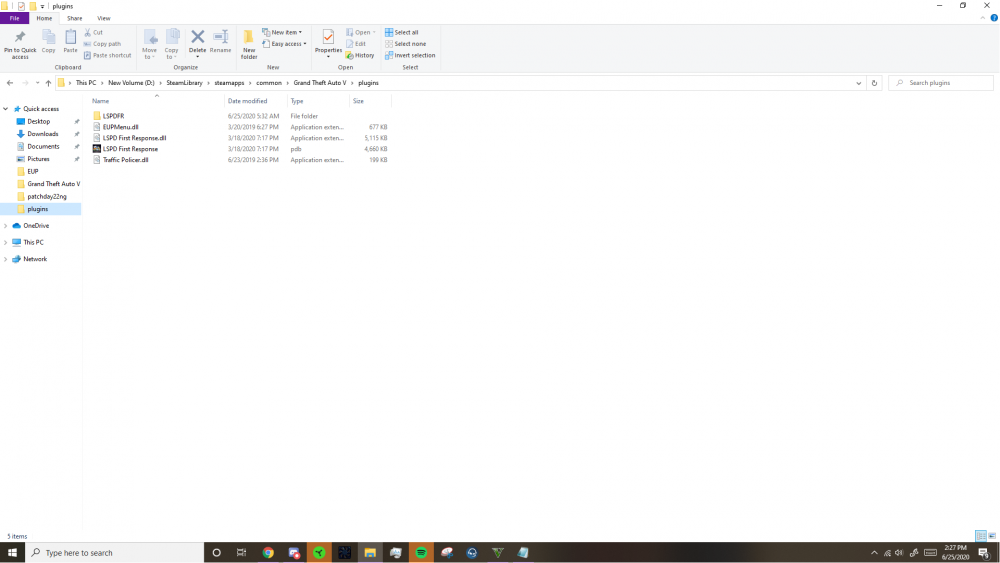
Is this what is supposed to be in my plugins folder? Also, my EUP is working half way. When I make my ped in the station, I have new clothes like police hats, vests, shirts and things like that. But when I hit F11 my EUP menu doesn't show up.
-
Alright I reinstalled them, should I send you a screenshot of my plugins folder so you can make sure all the right stuff is in it?
-
Alright I'll try that and get back to you.
-
Got anything else I can try? I'll do what you say but I'm so new to this, I barely got these plugins installed the first time. I'm not sure how to do it again...
-
There, thanks for helping me out.
-
I have Traffic Policer and EUP. These are my only plugins. I have them set to load on startup, neither of them do. When I attempt to load them off console, I get an error message. What should I do?
-
I just finished all the steps to installing these new plugins, except the last one. When I hold shift on startup and go to plugins, none of my new plugins show up. If I had to guess, I think it’s because I have my plugins installed in the wrong files. However, I don’t know what files they should be installed in or how to move them from where they currently are to where they should be. If it helps, the only plugins I have are EUP and Traffic Policer. Please help me.
-
Alright I'll see what I can do.
-
Well in process explorer under PID it has the number 11124 does that mean anything?
-
does PID stand for process id? Would that list the process?
-
Do you have any idea what process it could possibly be?
-
I can't find it in task manager, imma keep looking though don't leave meh! Again I really appreciate your help.
-
No one second. It says the same thing. I right clicked, hit run as administrator, clicked the gunpoint icon hit the RAGE thing and hit kill. Same message.
