Skip to content
View in the app

A better way to browse. Learn more.

LCPDFR.com

A full-screen app on your home screen with push notifications, badges and more.

To install this app on iOS and iPadOS
  1. Tap the Share icon in Safari
  2. Scroll the menu and tap Add to Home Screen.
  3. Tap Add in the top-right corner.
To install this app on Android
  1. Tap the 3-dot menu (⋮) in the top-right corner of the browser.
  2. Tap Add to Home screen or Install app.
  3. Confirm by tapping Install.

Isaac 121

Members
  • Joined

  • Last visited

Everything posted by Isaac 121

  1. @M.Williams I feel you im trying to learn how to make the cars alone but its kinda hard:/
  2. It would not let me post more than 1 picture:( sorry about that
    • 700 downloads
    • Version 2.0.0
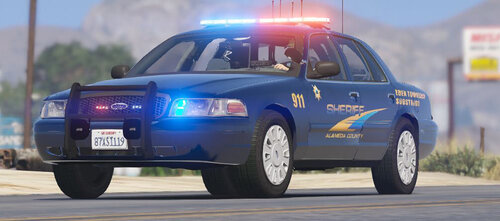
    TO ALL THE PEOPLE THIS IS MY FIRST EVER PACK IT WAS NOT GOOD LOL SO DON'T GET MAD I HAVE GOTTEN WAY BETTER)Full Credit to Ripple for the Amazing Freaking pack! this is my first ever Texture pack so please don't flame me lol please Comment/dm me on ig:isaacvibestho for ideas or problems! bugs: None if there are please comment and let me know *i am trying to get Polecat to use this for one of his LSPDFR vids so please help me spread the word!* Please download the pack here:

Account

Navigation

Search

Search

Configure browser push notifications

Chrome (Android)
  1. Tap the lock icon next to the address bar.
  2. Tap Permissions → Notifications.
  3. Adjust your preference.
Chrome (Desktop)
  1. Click the padlock icon in the address bar.
  2. Select Site settings.
  3. Find Notifications and adjust your preference.