



Ultimate TeeJaay
Members
-
Joined
-
Last visited
Everything posted by Ultimate TeeJaay
-
 Is it fixed yet?
 -
Excellent vehicle as usual, however, could you fix one minor detail. The tails seem to have some sort of weird issue where they appear to have LEDs that are out.
-
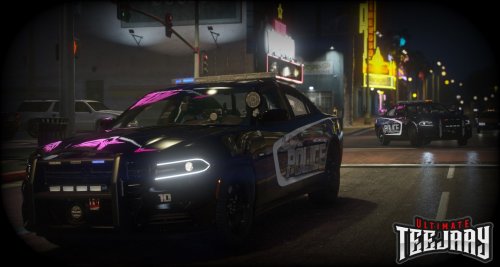 At some point I will likely make an additional one that says Vinewood. Keep an eye out 🙂
 -
Vehicle: 2016 Dodge Charger This skin is not based on any real life department or entity, it was created as a specialty patrol car for the Vinewood strip. Install instructions are in the readme, I have included an ELS model in order to assist with the install. I take no responsibility for the model as it is not mine and I am currently searching for the owner to properly cite. I am open to suggestions on future skins as well as suggestions to make this skin better. Have a Good day!
-
.thumb.png.770bf2a47de2f5d5d88c03595b4cf772.png) Overall, a very great pack! The vehicle links are provided in the ReadMe file and work like a charm. I believe they are 4K files as well and are extremely detailed as far as accuracy goes with the North College Hill, Ohio theme. Great pack!
Overall, a very great pack! The vehicle links are provided in the ReadMe file and work like a charm. I believe they are 4K files as well and are extremely detailed as far as accuracy goes with the North College Hill, Ohio theme. Great pack!


.thumb.png.770bf2a47de2f5d5d88c03595b4cf772.png)