

LuisVM420
Members
-
Joined
-
Last visited
Everything posted by LuisVM420
-
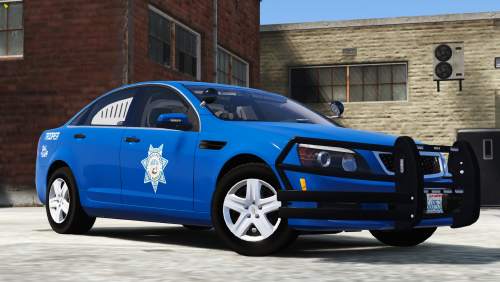 I made this livery pack a little while ago for a RP server that ended up not opening. I am now releasing it to the public for free, feel free to use it in your server! No credits needed. The pack was originally made for RedSaint's Code 3 Mega Pack, though it works on other packs as well, you just have to find out if it'll work for your pack. You can find the Code 3 Pack here: The liveries are quite simple (Not as simple as Connecticut SP, though.) but still look sleek and make any freeway or highway look better. The liveries are for the following vehicles: 2010 Dodge Charger 2014 Dodge Charger 2020 Ford Police Interceptor Utility BMW Bike Boat 2015 Chevrolet Caprice PPV 2018 Dodge Charger 2011 Ford Crown Victoria Police Interceptor (2020 Explorer) 2015 Ford F-150 2018 Ford F-250 2017 Ford Police Interceptor Sedan (Taurus) Harley-Davidson Electraglide 2016 RAM 2500 2018 Chevrolet Camaro 2018 Dodge Durango Wildlife Ranger Quad-type vehicle 2017 Chevrolet Silverado 2018 Ford Mustang 2014 Chevrolet Tahoe PPV 2018 Chevrolet Tahoe PPV 2016 Ford Police Interceptor Utility (2016 Explorer) 2019 Chevrolet Silverado I will not be providing support for the liveries as they are an abandoned project, some liveries might be glitched/bugged. See the screenshots and judge yourself. Please note that the Code 3 Pack is not included, you must buy it yourself on the RedSaint website. I do not condone any leaking/ripping of assets. I hope you enjoy and I wish you all the best