AikoCutie
Members
-
Joined
-
Last visited
Everything posted by AikoCutie
-
Right, all of that is completely wrong, I suggest watching a tutorial on installing eup
-
Where did you install the eup? please send a screenshot of the entire window.
-
Right, the trunk control mod has to go into the GTAV > Plugins folder, Not plugins > Plugins, So I suggest you remove the second plugins folder as that is useless
-
Please send a screenshot of where you installed the trunk control, include the pathway of the folder. Also If you;re installing eup uniform, they wont appear in rage as its a "gta" mod.
-
Please link the trunk control mod, also installing uniforms pack on lspdfr. Are you talking about eup? You have to be more specific. Also, any mods in your plugins folder will appear in the rage plugin hook settings.
-
I recommend change your plugin time threshold to 60,000. You can do this in rage settings. I would also recommend updating both police smart radio and traffic police from the following links: https://bit.ly/TrAfficPolicer https://bit.ly/PoliceSmarTR While we are at this, when you crashed was it a random crash? or does it crash when you go to a specific area
-
As unfortunate as it is, when lspdfr is loaded you will receive significant frame drops, the only thing that I can recommend is to use fewer lspdfr plugins, lower down graphic settings
-
If the mods folder is the issue, then only you can know what the problem is if you retrace what you download.
-
Please send a screenshot of the entire window where you installed those replacement vehicles, keep in mind you need OPENIV to install mods
-
Please send your ragepluginhook.log. This is in your main directory.
-
You gotta link the "skins and vehicles" that you are trying to install, Whats exactly the problem? game crashing when installing them? or do they not pop up in game? you gotta be specific with your issue
-
 That is correct, however, if people use the holster sounds plugin. The plugin will break if you use the intimidate animation, it's been confirmed with the developer, So making a completely new holstering animation would be great.
 -
Hi, this is really good, however, i have one request, is there any possibility that when you're doing the vest grab animation, is it possible to make it so your character doesn't lean a bit forward to grab the vest? instead they are having their back straight while grabbing it.
-
.png.38ff01a9099f2d556d1e1e124a4a9e27.png) they look nice, will it ever be released?
they look nice, will it ever be released? -
Where did u get these files from?
-
Load fully into gta5 story mode then tab out and launch rage.
-
Ok
-
make sure you have scripthookv.dll and dinput8.dll downloaded
-
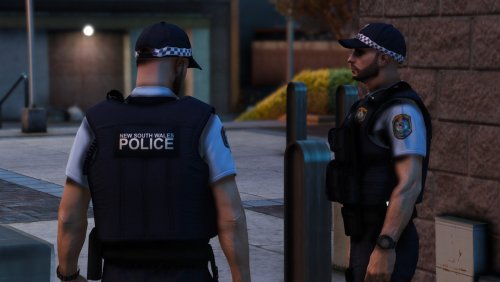 hi hope ur doing well, just wondering if you were ever considering making a vest like this
 -
-
-
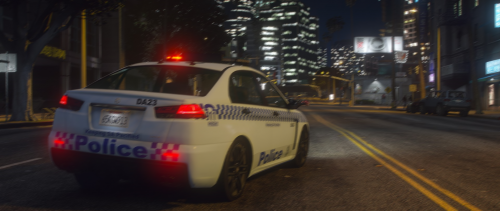 yo, is it possible to make the sirens a bit louder? it sounds quiet in game for me
 -
 Hi, have you ever though of adding a prone animation? where you hold ctrl to prone, and press ctrl to crouch. Love the plugin btw
 -
-
 you could've tried at least making your own description.



.png.38ff01a9099f2d556d1e1e124a4a9e27.png)