


AikoCutie
Members
-
Joined
-
Last visited
Everything posted by AikoCutie
-
When you crash do you get a rage has crashed notification? Also is the crash always at random places or at a specific place
-
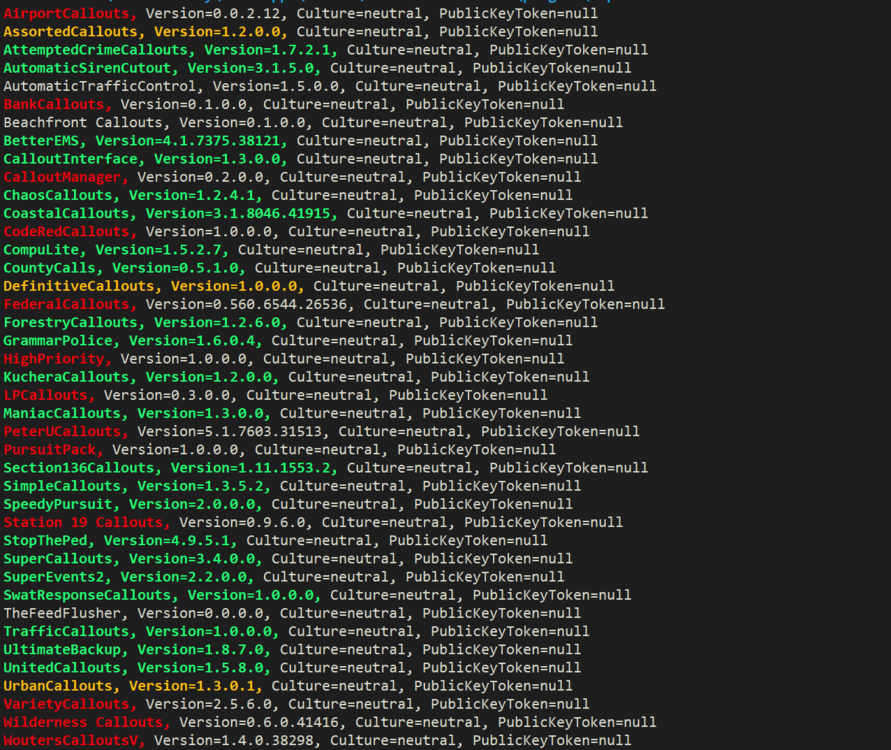
Firstly remove the ones in red and update the orange. The red ones are outdated / can cause issues. Quote me again when you have finished. Download for assorted callouts https://bit.ly/ASsortedCallouts
-
Please send your RagePluginHook log This is a text file called RagePluginHook. If you can see file extensions, it has a .log one. It is in your main GTA V folder. It is not inside of your logs folder.
-
Please send your RagePluginHook log This is a text file called RagePluginHook. If you can see file extensions, it has a .log one. It is in your main GTA V folder. It is not inside of your logs folder.
-
Put RageNativeUI.dll and .xml into your root GTA V folder. https://github.com/alexguirre/RAGENativeUI/releases
-
remove Alpr Plus and better ems, Reinstall the manual lspdfr. See if that helps
-
Please send your Ragepluginhook log, this can be found in your main directory and not your logs folder.Make sure you have the updated RNUI. Put RageNativeUI.dll and .xml into your root GTA V folder. https://github.com/alexguirre/RAGENativeUI/releases if that still doesn't work, send a rage plugin hook log, found inside your main directory and NOT your logs folderSend another log.For the error, reinstall ipt.common from callout interfaces download, see if that helpsArrest Manager https://bit.ly/ARRestManager Assorted Callouts https://bit.ly/ASsortedCallouts LSPDFR+ https://bit.ly/LspDFRPlus Computer+https://bit.ly/CoMpUtErPLUS Traffic Policer https://bit.ly/TrAfficPolicer Police SmartRadio https://bit.ly/PoliceSmarTRYeah cause the folder is named LSPDFR1, remove the 1 and make It LSPDFRThe gameconfig should still be working with the latest gta 5 versionupdate ragenative ui https://github.com/alexguirre/RAGENativeUI/releasesSend a screenshot, no idea what your talking aboutHow you normally install Lspdfr plugins. Into plugins/lspdfr folderif renaming your mods folder to _mods worked, that means something went wrong with a mod you installed or a meta file you changed (or its just gta being gta), either try and remember what mod you installed recently and uninstall it / revert the meta file, or, I'm afraid you are going to have to restart your mods folder. Also, if you haven't already, install the required game configs. **Modified Gameconfig** https://bit.ly/3yt6yMy mods > update > update.rpf > common > data **Heap Limit Adjuster** https://bit.ly/3iqYFBM Place the .asi file into your main GTA V folder. **Packfile Limit Adjuster** https://bit.ly/3rXa2Vq Place the .asi and .ini files into your main GTA V folder.Please send your Rage plugin hook log. Found in your main directory. Also send a screenshot of your plugins folderWhere are you deleting it from?Yeah which is why i already told him to update both gta and lspdfr, maybe you should read the forums before answering.You've been playing for a while which is good for lspdfr, I recommend adding your gta 5 main folder to your Anti virus exceptions if you haven't already.If you have scripthookvdotnet installed, remove it. Its causing issues to peoples games for now.
 Maybe an animation where the personal reloads the magsWebsite is down ATM, no eta



