Skip to content
View in the app

A better way to browse. Learn more.

LCPDFR.com

A full-screen app on your home screen with push notifications, badges and more.

To install this app on iOS and iPadOS
  1. Tap the Share icon in Safari
  2. Scroll the menu and tap Add to Home Screen.
  3. Tap Add in the top-right corner.
To install this app on Android
  1. Tap the 3-dot menu (⋮) in the top-right corner of the browser.
  2. Tap Add to Home screen or Install app.
  3. Confirm by tapping Install.

juancarloscp52

Members
  • Joined

  • Last visited

Everything posted by juancarloscp52

  1. It's normal with this 3d model, textures should be ok ingame
  2. True, corrected to locked, totally my fault. Yes, the model is from glitchgamers as said in the description but with new liveries and in an addon format.
    • 7,927 downloads
    • Version 1.0.1
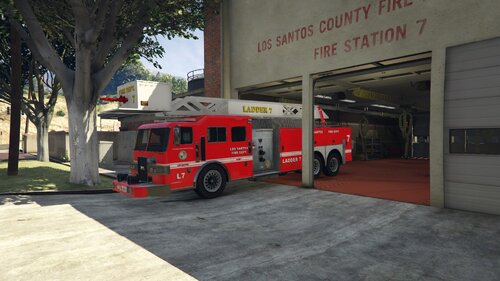
    GTA V. LOS SANTOS FIRE DEPARTMENT: Ladder truck addon. Includes multiple numerations: 1,7,12,32,55. Five liveries (every numeration). From livery 0 to livery 4 GAME NAME: ladder Installation: Move folder "ladder" to: mods/update/x64/dlcpacks/ Include in mods/update/update.rpf/common/data/dlclist.xml the line: dlcpacks:/ladder/ in order to be recognized by GTAV Credits: Liveries and Handling by juancarloscp52. Original 3D model by "Glitch Gamer" on lcpdfr.

Account

Navigation

Search

Search

Configure browser push notifications

Chrome (Android)
  1. Tap the lock icon next to the address bar.
  2. Tap Permissions → Notifications.
  3. Adjust your preference.
Chrome (Desktop)
  1. Click the padlock icon in the address bar.
  2. Select Site settings.
  3. Find Notifications and adjust your preference.