


mysterycow
Members
-
Joined
-
Last visited
Everything posted by mysterycow
-
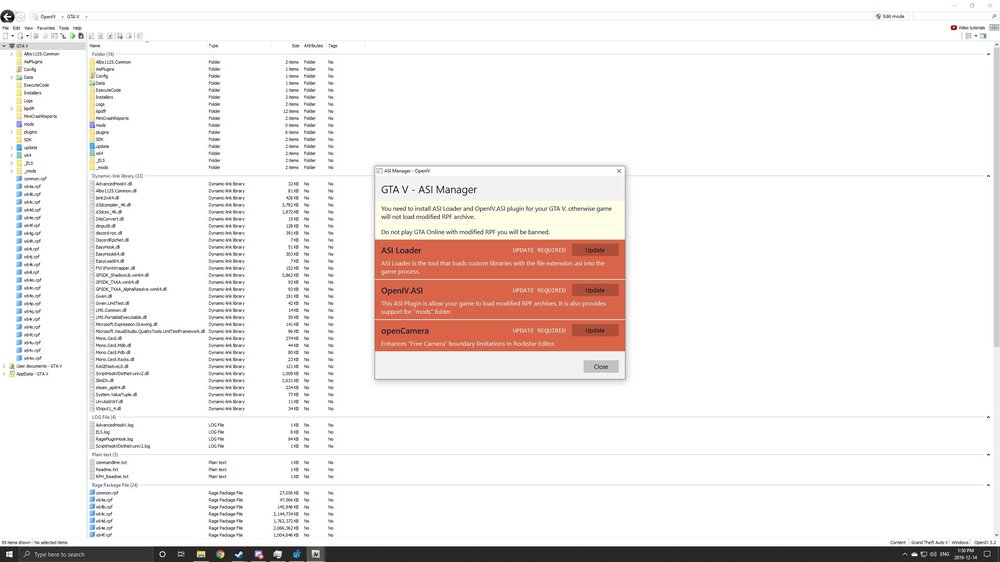
When I tried to install new vehicles, I noticed that OpenIV wanted an update. However, it doesn’t actually update and just says update required. This is preventing my game from launching. Is there a way to fix OpenIV?
-
Windows Defender. Haven’t installed anything else since I reinstalled windows. I did exclude GTA’s folder though.
-
I would like to preface this by stating that I have done extensive research to try and solve this problem on my own and I am hoping that you guys might be able to help! When I try to launch RPH, it (99 times out of 100) will tell me that there is a bad antivirus or insufficient permissions, so it won’t hook. These are some of the fixes I have tried: - Reinstall GTA5 (3 times) - Reinstall Windows - Set command line with DX11 and forced windowed mode - Ensured permissions for all users for GTA5 folder, GTA exe, and RPH are all fully allowed - Allowed GTA 5 and RPH through firewall - Made GTA folder an exemption on windows defender (no other AV installed) - Ran through steam first, then tried to launch RPH - GTA 5 folder is named correctly “Grand Theft Auto V” and only one folder exists - Registry checked and shows correct installation path Thanks in advance!
