Draxen
Members
-
Joined
-
Last visited
Everything posted by Draxen
-
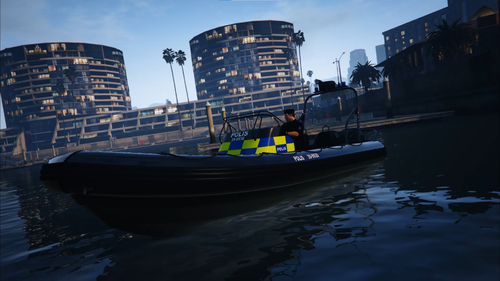 [SWE/ENG] https://www.youtube.com/watch?v=YTrtF3ZQkhA [Svenska] Hej! Detta är mitt första skin jag någonsin gjort, därav varför det ser skit ut. Men då folk var intresserade ut av det så publicerar jag det här. Installation: Du behöver Coastal Callouts för detta. Öppna OpenIV, gå till Grand Theft Auto V\lml\downloader\Coastal_Callouts_2.3_LML_PACKAGE\LML Package\Coastal Callouts\stream\vehicles, öppna poldinghy.ytd och lägga in filerna i den. Tryck på Save och så är det klart. [English] Hello! This is my first skin I have ever made, so that's why it looks so shit. People wanted to get the skin, so that's why I upload this. Installation: You need Coastal Callouts. Open OpenIV and navigate to Grand Theft Auto V\lml\downloader\Coastal_Callouts_2.3_LML_PACKAGE\LML Package\Coastal Callouts\stream\vehicles, open poldinghy.ytd, put the files there and hit Save and that's it. Coastal Callouts: https://www.lcpdfr.com/downloads/gta5mods/scripts/25465-coastal-callouts/
 -
Yeah just noticed! Thanks
-
Anyone knows anything about an update of ScriptHookDotNet? Since we need it to play with all the mods. I thought an update would be avaviable in just a day or two.
-
Hello! I've read diffrent installation tutorials including the one provided here, but there is still one thing I do not understand. For example, I wanted to install @SwedishModdings Volvo XC70 and it worked out all good. It was 4 files that went into C:\Program Files\Rockstar Games\Grand Theft Auto V\mods\x64e.rpf\levels\gta5\vehicles.rpf\ But then, when I want to install other police vehicles, for example to replace POLICE2, that car addon only has 3 files in it, and replacing it in the C:\Program Files\Rockstar Games\Grand Theft Auto V\mods\x64e.rpf\levels\gta5\vehicles.rpf\ dosen't work. Instead it should go into some DLC patch(???) wich I have no clue about. Thank you for helping and sorry if I made some kind of noob misstake.