


orangewarning
Members
-
Joined
-
Last visited
Everything posted by orangewarning
-
-
Wait. Since it requires an activation key to activate, can't you use that key to add to steam? Cause I remember you could do that with IV
-
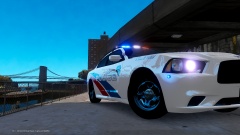 Amazing charger! Wow... compared to this, the charger I currently have is ugly as hell... lol
 -
Windows 7 Ultimate 64-bit Intel Core i5-2450M CPU 2.5GHz 4GB Ram Geforce GT 635M 2GB
-
perhaps you might want to try the bloom settings in your visual settings? And is the lightbar supposed to be white or is it supposed to be say blue or some other colour?
-
Ok this is a problem I have with my game. When I turn around(my character) I will see that the side that my character is backfacing the world sorts of goes transparent, all buildings roads missing. then I have to wait awhile without moving my screen for everything to go back to normal. I only have like 5/6 car mods and only 2 of it is 1mb, the rest are less than 1mb. So they are not high poly mods. And with my settings, in the game it says only 291/1995mb resources usage Which is quite low. So what is the problem? I dun have any graphics/enb mods installed. How can I solve this problem? I dun care if my FPS drop too 15 or stuff at least 15 fps will be more playable than no roads.
-
-
-
-
This is a texture i have created to replace the original NYCtaxi livery made by Mr. Bolleck for his 2003 Crown Vic taxi mod with an LCC taxi livery. Which is the original taxi company in the game. I intended to make this texture for my own use only. But seeing no other LCC taxi crown vics around, I have decided to upload this. All Credits go to Mr. Bolleck for his wonderful Crown Vic Taxi. P.S. I have also included Liberty City license plates for those who do not want to use Mr. Boleck's license plate.
- 4 comments
- 1 review
-
when i go into uv mapper mode my object disappears
-
i cant see the images. it all show as a frog in an icebox.
-
seems like running zmodeler as administrator works
-
I tried your tutorial. But the problem now is when i clicked on material editor, a message pops out and say " out of memory" What can i do?
-
that was one of my problems, thats why when i unticked that option when exporting, it solved my problem. Thanks! :)
-
I have recently added a lightbar to a merit and now i want to make textures for it. I actually managed to get a template.png for it and made a simple test texture but i do not know how to add it into my .wtd file as there isint any paintjob textures in it. Can anybody teach me how to add it in and make it really show in the game? Thanks in advance.
-
I was trying to add a lightbar to the default merit model to make my own police car. These are the steps i took. >I downloaded a lightbar from GPM >i downloaded general_veh_tex.rar and extracted it into a folder >place the game's merit.wft into the same folder >using sparkiv, saved all merit.wtd textures into the folder >open zmodeler 2.2.6, imported the merit.wft >then i added the three .png files (emerglights, emerglights_emis and emerglights_n) that came with the lightbar >then i imported the lightbar >i renamed it from lb_streethawk_els_h.wft to lightbar at the hierachy, and rename its chassis to chassis_light and moved the whole section under the merit.wft >then i proceeded to exporting the my merit.wft. When i exported, at the bottom part it said that emerglights.png was too big and had to be stored in a .wtd arvhive. >i then compiled all the necessary textures into a .wtd file using g-texture >after importing it into my vehicles.img i tested it >to my horror, the light bar was missing its glass cover and part of the tail lights cover was missing I cannot figure out how to solve this problem and there dun seem to be a solution wherever i looked. Could anyone here help me figure out whats wrong and if necessary, direct me the correct steps in adding a lightbar? Thanks in advance :) Edit : I solved the problem. It had to do with the exporting of models, the boxes i had to tick. And i had to convert the textures to .dds before adding to g-testure(silly me). Mods please close this threat as i have solved the problem. Thanks.

