ItsBaxim
Members
-
Joined
-
Last visited
Everything posted by ItsBaxim
-
Im assuming your using the default controls, if so i'd recommend downloading STP as the default controls can be very buggy sometimes. Stop the ped: https://bejoijo256.wixsite.com/bejoijo/post/stop-the-ped
-
I cant really see anything wrong, do you have Scripthook uptodate? If not heres the up to date version: http://www.dev-c.com/gtav/scripthookv/ Also Simply add these lines to your lspdfr.ini which is located at GTA/LSPDFR: WorldEvents.MaxNumberOfEvents = 0 (this one should already be in there so you just have to change it from 1 to 0) AmbientSpawn.SpawnFrequency = 0
-
Try removing ANPR hit.
-
ENB and Reshade are really hit or miss, sometimes they work and other times they do not. This being said i do not know what to do with ENB be cause it can be glitchy in particular but there should be no problem with reshade so i recommend just using reshade.
-
 I cant seem to find any charges regarding burglary devices or destructive devices?
- 202 comments
- 21 reviews
-
Thats good to hear! I was wondering if you have an estimate on when it would come out.
- 202 comments
- 21 reviews
-
-
-
when searching the ped i often find he has "prescription pills", i dont see any charges for that.
- 202 comments
- 21 reviews
-
-
In that case I recommend the topic below, it covers some plugins and callouts that are outdated and could cause your game to crash, not all will but some maybe.
-
Click Y to accept calls from dispatch. To fix the issue with not being able to arrest peds i recommend downloading STP plugin. Stop the ped: https://bejoijo256.wixsite.com/bejoijo/post/stop-the-ped
-
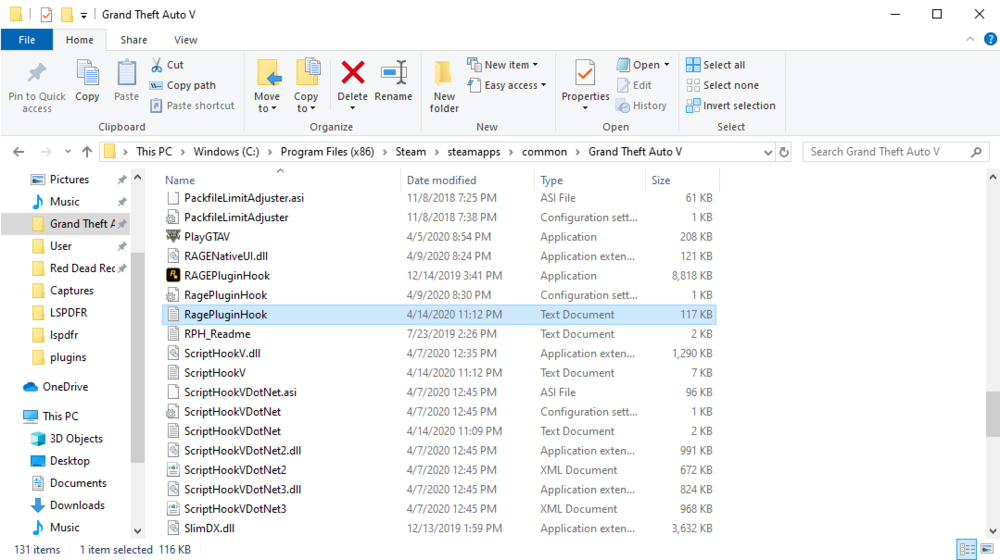
Please include your ragepluginhook.log and a picture of your plugins folder.
-
Simply add these lines to your lspdfr.ini which is located at GTA/LSPDFR: WorldEvents.MaxNumberOfEvents = 0 (this one should already be in there so you just have to change it from 1 to 0) AmbientSpawn.SpawnFrequency = 0
-
It shouldn't really matter the order you install them, make sure to try and run your game after each or couple installs to make sure the game can function. This way if it crashes you can narrow it down.
-
To use force duty you must open the command panel by pressing F4, after that you may type the command "ForceDuty". To fix you issue with the default arrest controls i recommend downloading STP (linked below). on that note i recommend looking through some plugins on the LSPDFR page that could further assist you with these difficulties. https://bejoijo256.wixsite.com/bejoijo/post/stop-the-ped
-
I had the same problem a while back. Follow the instructions bellow, they should help. Launch GTA V normally not using RPH, once you get to the screen where you can choose Story Mode, Online, Settings, etc., launch RPH and wait a few seconds and click story mode. It should say something along the lines of "Running story mode with RagePluginHook". I also recommend the topic below, it covers some plugins and callouts that are outdated and could cause your game to crash, not all will but some maybe:
-
I use NVR aswell as many others in the community and have no problems, make sure you've followed the instructions correctly. Also if it doesnt hurt please include your ragepluginhook.log, thanks.
-
Assuming this is a NVR texture conflict follow the instructions below: The way to fix this is to navigate to Mods/update/x64/dlcpacks/NVR_emissive. Once in there search police,fbi,sherrif and you may saftley delete the files, you will need OPEN IV for this which you most likely have. This way you may still have NVR installled.
-
I had the smae issue and this resolved it: Launch GTA V normally not using RPH, once you get to the screen where you can choose Story Mode, Online, Settings, etc., launch RPH and wait a few seconds and click story mode. It should say something along the lines of "Running story mode with RagePluginHook". If this does not work please include your ragepluginhook.log and your plugins folder.
-
Please include your rageplugin.log, also do you have the up to date scripthook?
-
Remove traffic policer.
-
Please INCLUDE your rph log.
-
Launch GTA V normally not using RPH, once you get to the screen where you can choose Story Mode, Online, Settings, etc., launch RPH and wait a few seconds and click story mode. It should say something along the lines of "Running story mode with RagePluginHook".
-
Please include your ragepluginhook.log file. this can be found in your GTA V main directory.