SergeantCode3
Members
-
Joined
-
Last visited
Files posted by SergeantCode3
-
☕ If you enjoy the project and would like to support its continued development, you can do so on Ko-fi. Support helps cover development costs, including the AI tools and services used during testing, design and iteration. Completely optional.
Radial Menu for Policing Redefined
Policing Redefined is powerful. Getting to the action should be simple.
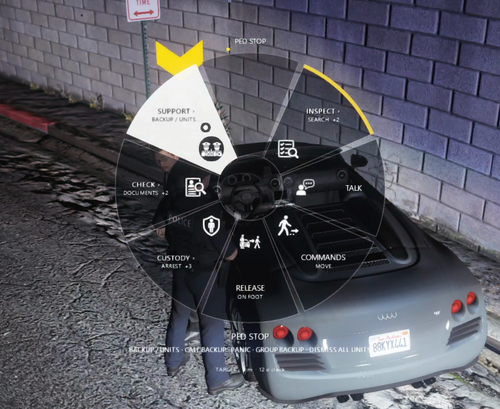
Radial Menu for Policing Redefined adds a context-sensitive interaction wheel designed to make PR faster and easier to use during normal patrol.
Instead of working through separate menus and remembering where each action is located, select the person, vehicle or supported unit you want to interact with, open the wheel and choose from the actions that make sense for the current situation.
The radial does not try to replace Policing Redefined.
It is a presentation and interaction layer built around PR's existing workflows, actions, conditions and supported animations. PR remains responsible for the underlying police logic; the radial simply gives you a cleaner way to reach it.
Why use it?
During a normal LSPDFR session you constantly move between different types of interactions:
talking to a pedestrian
requesting documents
running checks
searching a person or vehicle
controlling a traffic stop
arresting or releasing someone
managing a partner or K9
requesting support
opening your MDT
The radial brings these actions into one consistent interface instead of treating each situation like a completely separate menu system.
What appears on the wheel depends on your current target and the state of the encounter.
That means the menu stays useful without showing every possible action all the time.
Context-sensitive interaction
The wheel adapts to:
pedestrians
vehicles
traffic-stop situations
partners
K9
supported backup and units
Available actions change as the encounter develops.
If an action cannot currently be performed, the menu can show why it is unavailable. Before execution, the selected target and required conditions are checked again.
This helps avoid actions being triggered on the wrong person, vehicle or interaction state.
Fast target switching
Scenes are rarely limited to one person.
When multiple valid targets are available, switch between them directly from the radial using:
Mouse Wheel
Left Arrow
Right Arrow
The mouse wheel changes the selected world target rather than cycling through different action variants.
This is particularly useful during vehicle stops with multiple occupants or scenes involving several officers and units.
Built around Policing Redefined
Where supported, the plugin uses PR's existing:
actions
conditions
workflow logic
animations
configuration windows
For example, K9 appearance configuration continues to use PR's original interface.
The intention is simple:
make PR easier to operate without creating a second police system on top of it.
Reference PR build:
Policing Redefined 1.0.0.5
Other builds use member-checked compatibility handling. If a required PR function cannot be resolved, the affected radial feature is disabled instead of being executed blindly.
Traffic stops and vehicle interaction
The radial is designed to remain useful throughout the progression of a traffic stop rather than only at the first interaction.
Depending on context, vehicle and occupant actions can be accessed as the stop develops, while target switching lets you move between the vehicle and eligible people on scene.
Partner, K9 and support access
Supported partner, K9 and backup functions are also available from the radial.
The interface keeps these functions in the same interaction system instead of requiring a completely different control scheme each time you move from a suspect to a partner or support unit.
MDT / pdComp support
pdComp can be opened through its own functions, including its tablet animation.
Reference adapter version:
pdComp 0.4.2.0
pdComp is optional.
If you use another MDT, the plugin can also trigger a configurable keyboard shortcut.
Keybind mode is intentionally simple: it opens the external MDT but does not attempt to take over that plugin's records, citations or text input.
English and Polish
The radial interface includes:
English
Polish
Translated content includes radial labels, plugin help and plugin-owned notifications.
PR's own windows remain controlled by PR and therefore keep their original language.
Controls
Left Ctrl
Tap to open the latched wheel or hold to open it.
Mouse movement + Left Click
Highlight and select an action or submenu.
Mouse Wheel / Left Arrow / Right Arrow
Switch between eligible world targets.
Right Click / Backspace
Go back one menu level.
Esc / tap the opening key again
Close the radial.
F1
Toggle the compact help panel while the menu is open.
Some significant actions use held-click confirmation to reduce accidental execution.
Configuration
The included INI lets you adjust the parts of the interface that matter most.
You can configure:
opening key
wheel scale
interface language
help panel behavior
alternative MDT shortcut
Language:
Language=EN
or
Language=PL
The opening key is configured under [Input].
Wheel size is configured under [Presentation].
Requirements
Required:
GTA V
RAGE Plugin Hook
LSPDFR
Policing Redefined
Optional:
pdComp
Installation
Close GTA V and RagePluginHook.
Extract the archive.
Merge the included plugins folder with the plugins folder in your GTA V directory.
Keep the following together under plugins/LSPDFR:
RadialPresentationLab.dll
RadialPresentationLab.ini
RadialPresentationLab_UI
Start the game through RagePluginHook.
Load LSPDFR and Policing Redefined.
Go on duty.
When updating, keep your customized INI values and add any new configuration options introduced by the new version.
Release status
1.0.0-rc4 — Release Candidate
Offline validation has passed, while final in-game acceptance testing is still ongoing.
Compatibility testing is still being completed for:
Stop The Ped
Ultimate Backup
alternate Policing Redefined builds
some vehicle-control scenarios
different plugin combinations
For current limitations and runtime notes, check the README included with the download.
Reporting a problem
If something does not behave correctly, please include:
RagePluginHook.log
your RadialPresentationLab.ini
Policing Redefined version
pdComp version if installed
relevant dependency versions
clear reproduction steps
The more precisely the problem can be reproduced, the easier it is to fix.
Credits
Thanks to the creators and maintainers of:
Policing Redefined
pdComp
LSPDFR
RAGE Plugin Hook
Radial Menu for Policing Redefined is built to make those existing workflows quicker, clearer and more comfortable to use during normal patrol.
PL- 1,641 Downloads
- 16 Comments
Updated -
Roadside Devices 1.0.0
Interactive Breathalyzer & Drug Testing for Policing Redefined
Roadside Devices adds two interactive roadside testing devices to GTA V: the AlcoDevice A5 Breathalyzer and the VANTA M7 Oral Fluid Analyzer.
Instead of getting an instant result from a menu, you perform the actual testing procedure. Position the breathalyzer mouthpiece at the suspect's mouth, collect an oral fluid sample, operate the analyzer, read the results, and secure the collected swab.
The goal is to make routine traffic stops and DUI investigations feel more hands-on, without adding unnecessary menus or keybinds.
Roadside Devices integrates directly with Policing Redefined, keeping its original testing options available alongside the new interactive procedures.
AlcoDevice A5 — Interactive Breathalyzer
The AlcoDevice A5 introduces a hands-on breath alcohol testing procedure with a dedicated device interface.
Features:
Interactive mouthpiece positioning using direct mouse control.
Physical alignment with the suspect's mouth.
Breath sample collection and analysis.
Animated LCD with startup, system checks, sampling, analysis, results, and shutdown.
Visual device indicators and test progress.
Support for pedestrians and vehicle occupants.
Automatic camera positioning with manual camera alternatives when needed.
Blood alcohol results obtained from Policing Redefined.
Safe cancellation and emergency exit.
The entire test takes place through the device rather than a separate results menu.
VANTA M7 — Oral Fluid Drug Analyzer
The VANTA M7 provides an interactive roadside drug screening procedure, from collecting the sample to reading the result.
Features:
Interactive sterile swab handling.
Opening the swab packaging and extracting the collection tool.
Collecting an oral fluid sample directly from the suspect's mouth.
A dedicated 3D swab model.
Manual insertion of the collected sample into the analyzer.
Device startup and self-test sequence.
Progressive analysis with a monochrome LCD interface.
Five drug-family result indicators.
Positive, negative, and invalid result states.
Removing the swab and sealing it in a sample pouch.
Support for pedestrians and vehicle occupants.
Automatic camera positioning and Emergency CAM controls.
The procedure uses a single collected sample.
Drug screening results
The VANTA M7 displays screening results by drug family, including:
Cannabinoids
Stimulants
Opioids
Benzodiazepines
Hallucinogens
Results are displayed using simple indicators:
✓ — Not detected
! — Detected
? — Inconclusive / unavailable
A detected result can be highlighted with a subtle pulse.
The analyzer also includes its own startup, self-test, analysis, result, and shutdown screens.
Policing Redefined Integration
Roadside Devices is designed to work as part of the normal Policing Redefined workflow.
When interacting with a suspect during a pedestrian or traffic stop, the new testing options appear directly in the existing PR menus.
You can choose between:
Standard Policing Redefined tests
Drug Swab
Breathalyzer
Roadside Devices procedures
VANTA M7
AlcoDevice A5
The original PR options remain available and unchanged.
By default, Roadside Devices reads the suspect's alcohol and drug information from Policing Redefined, allowing both systems to use the same underlying results.
If the required data cannot be retrieved, the procedure will not generate a random replacement result.
Optional Radial Menu Support
Roadside Devices also supports integration with a compatible version of Radial Menu for Policing Redefined.
This allows both testing devices to be accessed directly through the radial interface.
Radial Menu is optional and is not included in the download.
Pedestrian & Vehicle Testing
Both devices can be used during pedestrian encounters and vehicle stops.
For vehicle occupants, the system uses dedicated camera positioning to provide a suitable view of the suspect and the testing device.
Where necessary, the player can switch between available camera positions before making contact with the suspect's mouth.
The testing procedure includes safeguards for interrupted interactions, invalid targets, and situations where a suitable camera position cannot be established.
Emergency CAM
Sometimes a vehicle's mirror, pillar, interior, or unusual seating position can obstruct the procedure.
Emergency CAM allows you to select an alternative validated camera angle before physical contact.
Controls:
Left / Right arrows: Switch camera position.
Up / Down arrows: Adjust camera height when available.
Enter: Return to automatic camera positioning.
Camera selection becomes locked once mouth contact begins.
Interactive Controls
Roadside Devices does not introduce a separate device selection menu or additional activation hotkeys.
Start a procedure from the Policing Redefined menu or a compatible Radial Menu integration, then follow the on-screen instructions.
A small procedure guide displays the current step and relevant controls.
For an emergency exit, hold ESC for approximately one second.
Installation
Requirements:
Grand Theft Auto V
RagePluginHook
LSPDFR
Policing Redefined (tested with version 1.0.0.5)
OpenIV for the included VANTA swab DLC installation
Installation steps:
Close GTA V.
Extract the downloaded archive.
Copy the Plugins folder into your main GTA V directory.
Copy the included VANTA DLC file to:
Grand Theft Auto V\mods\update\x64\dlcpacks\prie_vantaswab\dlc.rpf
Open OpenIV and navigate to:
mods\update\update.rpf\common\data\dlclist.xml
Add the following entry inside the Paths section:
<Item>dlcpacks:/prie_vantaswab/</Item>
Save your changes and restart GTA V completely.
The included README.txt contains additional installation instructions, usage information, and troubleshooting steps.
Important: The VANTA DLC must be mounted when GTA V starts. Reloading RagePluginHook plugins alone will not load a newly installed DLC pack.
Configuration
The configuration file is located at:
Plugins\LSPDFR\RoadsideDevices\RoadsideDevices.ini
Available settings include:
English or Polish language.
Policing Redefined or standalone test result source.
Optional Radial Menu integration.
Emergency camera controls.
Procedure guide visibility.
VANTA positive result indicator animation.
Device presentation options.
The default configuration uses Policing Redefined as the result source.
For normal gameplay, leaving ResultSource=PR is recommended.
Compatibility
Required: Policing Redefined
Optional: Radial Menu for Policing Redefined
Roadside Devices does not replace Policing Redefined's existing breathalyzer or drug swab tests. It adds alternative interactive testing procedures.
The download does not include Policing Redefined, LSPDFR, RagePluginHook, or Radial Menu.
Known Limitations
The testing cameras depend on vehicle geometry and the suspect's position.
Certain vehicles or unusual head positions may limit how naturally the suspect can face the device.
The VANTA 3D swab requires the included DLC to be installed and registered.
The device LCD uses a compact pixel font, so Polish diacritics may not appear on the physical display.
Version 1.0.0 — Initial Release
Introduced the AlcoDevice A5 interactive breathalyzer.
Introduced the VANTA M7 oral fluid drug analyzer.
Added pedestrian and vehicle testing support.
Added direct integration with Policing Redefined.
Added optional Radial Menu support.
Added interactive mouthpiece positioning and swab collection.
Added device LCD startup, analysis, results, and shutdown sequences.
Added sample pouch handling and sealing.
Added automatic camera positioning and Emergency CAM.
Added English and Polish localization.
Added configurable presentation and testing behavior.
Feedback & Bug Reports
If you encounter an issue, please include:
What you were doing when it happened.
Whether you were testing a pedestrian or vehicle occupant.
Which device was in use.
Your Policing Redefined version.
Relevant RoadsideDevices.log and RagePluginHook.log files.
Feedback, bug reports, and suggestions are welcome.
Roadside Devices 1.0.0 — Bringing interactive roadside testing to Policing Redefined.- 286 Downloads
- 20 Comments
Updated -
PR Interactive Evidence
Interactive two-stage presumptive narcotics field testing for Policing Redefined
PR Interactive Evidence replaces the instant narcotics-test result from Policing Redefined with a physical, hands-on field-testing workflow.
Instead of selecting a test and immediately receiving a result, you interact directly with the evidence and test pouch:
VERIFY → OPEN → COLLECT → SEAL → CRUSH → SHAKE → OBSERVE → INTERPRET
The goal is simple: make narcotics evidence processing feel like an actual gameplay procedure rather than another menu action.
QUICK START
There are no additional gameplay keybinds.
Open the narcotics testing system through Policing Redefined as usual.
Select the evidence item.
Choose the drug family you want to test.
PR Interactive Evidence automatically takes over.
Complete the procedure using the mouse and the instructions shown on the workbench.
Video Tutorial
https://streamable.com/gtl2dv
The video demonstrates both:
a successful test progressing through Stage 1 and Stage 2,
an intentionally incorrect family hypothesis resulting in NO MATCH.
FEATURES
Interactive field-test workbench
The procedure is mouse-driven and based on direct interaction.
You physically:
verify the selected evidence item,
open a fresh test pouch,
collect a sample using the required tool,
transfer the sample into the pouch,
seal the sample port,
crush individual reagent ampoules,
mix the pouch,
wait for the reaction to stabilize,
compare the reaction with the active reference,
interpret the result yourself.
The interface uses purpose-built evidence, test-pouch, reagent and workbench visuals instead of simply displaying a result notification.
TWO-STAGE TESTING
PR Interactive Evidence uses a two-stage presumptive testing system.
Stage 1 — Family Screen
The drug family selected inside Policing Redefined becomes your testing hypothesis.
A fresh family-screen pouch is used and the completed A/B/C reaction is compared with the active family reference.
You then decide whether the reaction is:
MATCH
NO MATCH
INCONCLUSIVE
A Stage 1 MATCH only supports the selected drug family.
It does not identify the exact substance and does not automatically mark the evidence as fully analyzed.
Stage 2 — Specific Identification
After a supported Stage 1 match, a second fresh pouch can be used for more specific presumptive identification.
Stage 2:
uses a new trace of evidence,
uses the same exact evidence item,
produces a specific discriminator pattern,
allows the closest matching candidate to be selected,
can commit the completed result back to the corresponding Policing Redefined evidence item.
The plugin tracks the exact PR evidence item that started the procedure.
If that item changes, disappears or can no longer be verified while the test is active, the session is cancelled instead of applying the result to the wrong evidence.
EVIDENCE-SPECIFIC COLLECTION
Different physical evidence forms require different collection methods.
Depending on the evidence, the workbench can use tools such as:
micro scoop,
sterile swab,
tablet scraper,
transfer pipette,
tweezers,
high-risk trace handling.
Powders, residues, tablets, liquids, syringes, plant material and other evidence forms are not treated as interchangeable objects.
Custom evidence
v1.0.0 does not provide full support for arbitrary custom drug items.
This version is built around the evidence profiles mapped from the audited Policing Redefined 1.0.0.5 build.
A custom item may work if its evidence description matches a supported profile.
Completely new custom descriptions or unsupported physical evidence forms may be blocked with messages such as:
UNSUPPORTED_EVIDENCE_MORPHOLOGY
or
Interactive Evidence test blocked: no safe assay plan
This is intentional fail-safe behaviour.
The plugin will not guess the evidence morphology, collection method or test pathway when it cannot resolve them safely.
More flexible custom-evidence support is planned for a future update.
REQUIREMENTS
Grand Theft Auto V Legacy
RAGE Plugin Hook
LSPDFR 0.4.9
Policing Redefined 1.0.0.5
Mouse input
Important compatibility note
PR Interactive Evidence v1.0.0 is intentionally built around one audited Policing Redefined 1.0.0.5 binary.
The plugin performs an exact compatibility check before enabling the PR integration.
If an unsupported Policing Redefined build is detected, PR Interactive Evidence fails closed and leaves normal PR functionality untouched.
If you receive an UNSUPPORTED PR BUILD message, install the supported PR version rather than bypassing the compatibility check.
A future Policing Redefined update may require an updated version of PR Interactive Evidence.
INSTALLATION
Install and verify LSPDFR.
Install and verify Policing Redefined 1.0.0.5.
Open the PR Interactive Evidence archive.
Drag the included Plugins folder into your Grand Theft Auto V directory.
Merge folders when Windows asks.
Launch GTA V through RAGEPluginHook.exe.
Go on duty.
When loaded correctly, you should see:
PR Interactive Evidence ACTIVE: drug-test interception armed.
There is no separate gameplay menu to open.
Use Policing Redefined normally and begin a narcotics evidence test through PR.
CONFIGURATION
Configuration file:
Plugins\LSPDFR\PRInteractiveEvidence\PRInteractiveEvidence.ini
The default configuration is recommended for the first run.
TROUBLESHOOTING
If the plugin reports an unsupported Policing Redefined build, install the supported PR version instead of disabling the compatibility gate.
If a particular evidence item is blocked, include the exact evidence item and selected test family in your report.
When reporting a problem, attach:
RagePluginHook.log
PRInteractiveEvidence.log
PRInteractiveEvidence_HOOK_STATE.txt
PRInteractiveEvidence_RUNTIME_STATE.txt if generated
Also describe exactly which workbench step failed.
IMPORTANT
PR Interactive Evidence is a gameplay simulation of presumptive narcotics field testing.
It is not:
chemical training,
a real reagent guide,
laboratory analysis,
a real-world drug-identification procedure.
The reaction system and chemistry are designed for gameplay.
VERSION 1.0.0
Initial public release.
Highlights:
interactive physical testing workflow,
two-stage presumptive testing,
evidence-specific collection tools,
mouse-driven direct manipulation,
exact evidence continuity,
PR result writeback,
compatibility safety gate,
fail-closed unsupported evidence handling,
purpose-built workbench, pouch, evidence and reaction visuals.
PR Interactive Evidence is an independent LSPDFR add-on designed to integrate with Policing Redefined.
It is not affiliated with or endorsed by the Policing Redefined team, G17 Media, Rockstar Games, Take-Two Interactive or manufacturers of real-world field-test equipment.- 790 Downloads
- 22 Comments
Updated