hapce
Members
-
Joined
-
Last visited
Everything posted by hapce
-
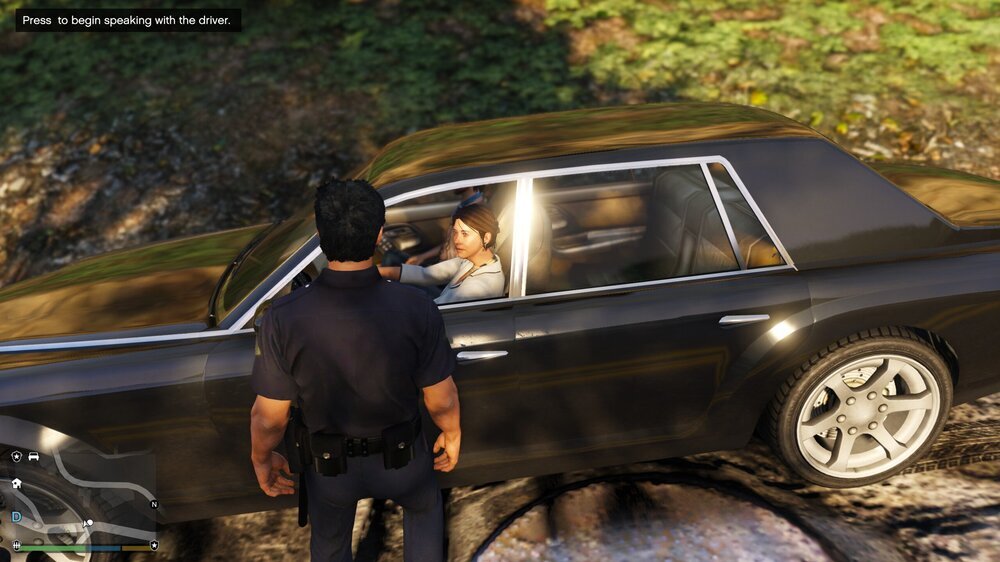
Hello, I reported yesterday '' Traffic Policer '' & '' Police Smart Radio '' person to talk to '' a colleague said you can just press E and then it works anyway, but with me it is absolutely not I already have Googled and not found and tried all the keys, please someone's solution I desperately slow really, what a pity because with lspdfr mega fun actually make ... Thanks in advance for
-
Hallo, ich habe mir gestern ''Traffic Policer'' & ''Police Smart Radio'' hab dann das Spiel wieder gestartet und kann seitdem nicht mehr wenn ich leute anhalte und zu ihn hingehe sie ansprechen da steht dann ''Drück um mit der Person zu sprechen'' ein Kollge meinte du kannst einfach E drücken und dann geht es trotzdem aber bei mir passiert dann absolut nicht ich hab schon gegoogelt und nicht gefunden und alle tasten ausprobiert hat bitte jemande eine lösung ich verzweifel langsam echt was schade ist weil mit lspdfr mega spaß machen eigentlich... Danke im voraus für Antworten