


Jaymack2350
Members
-
Joined
-
Last visited
Everything posted by Jaymack2350
-
Hey man, Is there anyway you could remote desktop my pc? I would like you to figure this issue out????
-
This is why you exist. HAHA! I had to extract my files and still getting a crash yet again. I dragged and dropped and got errors. I extracted and now it loads mostly and then freezes on the loading screen... I will start a separate thread. I don't want to hijack.
-
[1/14/2021 6:07:26 PM.223] LSPD First Response: [FATAL] Error loading outfits System.IO.FileNotFoundException: Failed to find file:lspdfr/data/outfits.xml Caused this > [1/14/2021 6:07:26 PM.223] LSPD First Response: [FATAL] Failed to initialize PlayerCharacterManager [1/14/2021 6:07:26 PM.253] LSPD First Response: [FATAL] Forced termination You may have not installed LSPDFR correctly. The new update is manual only. Re download it and extract it after downloading to your GTAV folder. Don't click and drag it. So sorry for the late response. I am probably wrong but it seems like a bad lspdfr install. I could be dead wrong. I am still new to this trouble shooting stuff but that is my assumption. couldn't hurt to re install lspdfr anyway just to try.
-
Hey, super sorry! I have super busy. I own my own business and it has been a nightmare this week. I don't have the crash report on hand anymore. I will relaunch the game and let it crash again and get it. unless there is a way I can get lucky and maybe it is saved in RPH somewhere?
-
Here is the link to the crash report. the previous time it tried loading and froze my entire pc which has never happened before. also, last time I played was early Novemebr before the updates. the link : http://forums.ragepluginhook.net/default.aspx?g=topics&f=12&name=Technical Issues
-
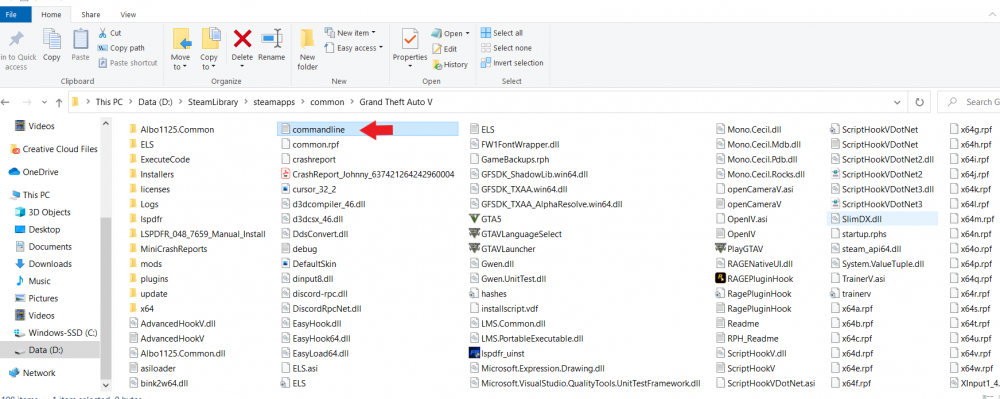
Have you cleared your command line in your GTAV folder? @Mud helped me a few months back and this was my whole issue. View the image I attached. Find the file with red arrow pointed at it named "commandline" open and erase all the text in it and save. Then try launching it. LMK if that helps.
-
Will do. Thank you again!
-
Deleting the commandline text did it! just incase anyone is reading. I went into my gtaV folder. found the commandline label and right clicked it like Mud said. then I clicked edit. highlighted all the text and hit backspace to delete. then hit the X to close the page and hit save. now it works like a charm! thank you so much Mud! Now I have to figure out why my els light are dim LOL HAHAHAHAHA. I am sure that will be easy. I am using radiance v and everything is set to very high or ultra. I am sure some research and surfing the forums will help.
-
By the way. Thank you so much for taking time to help me with this. You have no idea how much I appreciate you. I was hesitant to even post because I was afraid no one would reply tonight. What is ENB?
-
For sure. I just exed it out. let me load it and let it crash again. one sec Here is the latest report.
-
Will do. one minute Okay I rebooted. Tried to launch using RPH and it seemed like it went a little bit longer than the previous attempt but still crashed... What sucks is I am active duty army and hardly have time to play. I finally take leave and this crap happens... I wish there was a way to call in and have you walk me through your thoughts LOL. I also just rechecked my antivirus etc to make sure it didn't reset on me. that is all good to go.
-
Okay give me one minute and I will get back with you and let you know if it helps or not... I did the manual install. Now it crashes extremely fast. Here is the new crash log it generated.
-
I just had to shut gtav down using task manager. was stuck on the loading lspdfr black screen. wheel was spinning but hasn't done anything for several minutes. I did. I attached the file above. I will re attach it here. RagePluginHook.log Here is a copy and paste of it incase you aren't getting the file itself.
-
Okay, so by only changing the timeout to 60000, it has allowed me to get to the " loading lspdfr" screen that is totally black. but when the screen went black, it made that oh so familiar beep sound indicating lspdfr has crashed... I think we are onto something here. Here in the .log RagePluginHook.log
-
All I have are replacement vehicles for example fbi2 or police2 etc. no add ons. I do have EUP, ELS etc. I do not have a custom gameconfig installed. Where do I find it? I remember before the rockstar launcher cameout I had TONS of lspdfr mods working perfectly fine. But I did something. this is my 4th time doing a clean re install of the game. it is a steam version btw. I also vaguely remember I did have a gameconfig file but not since my latest install and don't remember how or where to find one etc. Thank you.
-
doing it now. Be right back and will let you know! Thank you! Nope, still crashed...
-
First off I have been scouring the internet for almost a week now. No clue what to do. whether I launch with RPH or Load RPH after I load in game it crashes. I have disabled all anti virus etc, allowed rph and gta v on defender. What can I do???? Here is my crash report copied and pasted below. any help would be great! Game works perfect as long as I don't load RPH. Also, When loading using RPH it will start loading story mode then after about 20 seconds it crashes. hence the crash report. Thank you!

