Skip to content
View in the app

A better way to browse. Learn more.

LCPDFR.com

A full-screen app on your home screen with push notifications, badges and more.

To install this app on iOS and iPadOS
  1. Tap the Share icon in Safari
  2. Scroll the menu and tap Add to Home Screen.
  3. Tap Add in the top-right corner.
To install this app on Android
  1. Tap the 3-dot menu (⋮) in the top-right corner of the browser.
  2. Tap Add to Home screen or Install app.
  3. Confirm by tapping Install.

Scott Reagan Designs

Members
  • Joined

  • Last visited

Files posted by Scott Reagan Designs

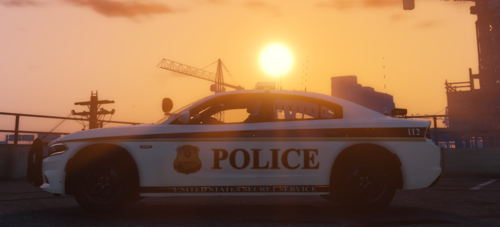
  1. This is my Department of Homeland Security Pack pack.
     
    The pack includes the following sub-departments in DHS:
    Customs and Border Protection Federal Federal Bureau of Investigation Police Federal Protective Service Immigration and Customs Enforcement Secret Service Uniformed Division Transportation Security Administration  
    If you have any suggestions on what I should make next, please join my discord (My Discord link: https://discord.gg/azdKgvB ), also if you notice any flaws please let me know on my discord as well and then ill get them fixed. 
     
    This pack includes skins for the vehicles below:
    2011 CVPI
    2014 CHARGER
    2015 TAHOE
    2016 FPI
    2017 SILVERADO
    2018 CHARGER
    2018 RAM
     
    The models that I used in this pack:
     
    • 1,061 Downloads
    • 2 Comments
    Updated

Account

Navigation

Search

Search

Configure browser push notifications

Chrome (Android)
  1. Tap the lock icon next to the address bar.
  2. Tap Permissions → Notifications.
  3. Adjust your preference.
Chrome (Desktop)
  1. Click the padlock icon in the address bar.
  2. Select Site settings.
  3. Find Notifications and adjust your preference.