


DaytonaJBeach
Members
-
Joined
-
Last visited
Everything posted by DaytonaJBeach
-
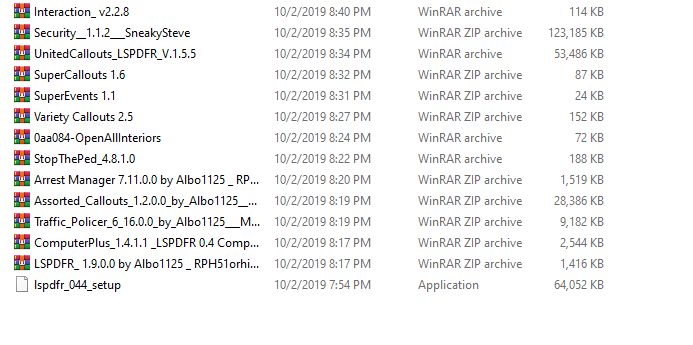
Took a risk on this one, installed all the mods I had and have been meaning to install. Like 13ish mods total. All use API 0.4.2/0.4.4 so I gave it a shot. Game loads up perfectly fine, no stalling or lag. Everything works like it should, until I enter the police station and select my character. I was able to customize my guy and all that, but the moment I confirmed it, the game went into a infinite loading loop. I'll add the picture of the screen it is on, the circle keeps spinning and I heard a plugin crash right before this screen. I'll include my RPH log as well as my mini crash report if I can find out how to upload it to this site. I installed ALL mods at once, gave it shot here. I didn't want to go one by one and load the game because my PC takes a bit to load it up. I looked through the RPH log but I can't figure out what I am suppose to be looking for. EDIT: No idea how to upload the rcrm file. RagePluginHook_03102019_035649.log

-
I don't believe I have that, I've only downloaded and installed plugins/mods for LSPDFR. I tried installing ELS but that crashed my game before it even loaded, I made sure Direct x11 was checked but that didn't help either.
-
Appreciate it man, I'll give all this shot quick and see what happens. My game has been acting up lately without lspdfr so I might look into upgrading my PC a bit anyway.
-
RPH settings being when it first pops up and gives you the options to go into settings or close? Like the RPH load icon? I'm just trying to get all these plugins to work together but between them overlapping other keys on my keyboard and like only 3 being the right API it's a little frustrating.
-
I removed everything LSPDFR, I'm starting with a fresh download to make sure I didn't overwrite any essential LSPDFR files. I'll add them in the order you put. It freezes when it gets to the black screen right before the sky loading. I did notice some of the plugins such as LSPDFR+ use LSPDFR API 0.4.2 but LSPDFR is 0.4.4, would using that plugin make the game act up? I do know one of the plugins uses LSPDFR 0.4 and not 0.4.4
-
Been using LSPDFR for a long time now, just ran into something I haven't before. Game freezes on the black screen right before it loads into the character and haven't figured it out yet. Hope to find some help, I do have a RPH log and some minicrashreports. I have a few plugins that I'll list below. Everything is up-to date (that I know of, I'm not sure if the plugins are compatible with the current version.) Plugins Arrest Manager ComputerPlus Interaction+ LSPDFR+ SuperCallouts SuperEvents Traffic Policer All of these mods worked flawlessly with LSPDFR before, I installed 2 other plugins/mods then it started crashing. Removed them completely, and it still freezes. Those two were BetterEMS and Vocal Dispatch. Again, I 100% removed them both, the game did work before installing them, now the game continues to freeze on the black loading screen. RagePluginHook_03102019_022844.log

