



1XERO1
Members
-
Joined
-
Last visited
Everything posted by 1XERO1
-
I only have Simple Trainer installed, and I have disabled shortcuts for it. This also only affects my player movement speed. All other entities move at proper speeds (i.e. NPCs), and my animation speed (running, punching, etc.) are performed at the same speed as before the bug occurs.
-
For some reason, my character will randomly bug after a foot pursuit, where trying to run will only put my character into the running animation, but will keep him at walking speeds. This also seems to affect vehicles for some unknown reason, which will get capped at exactly 13 MPH. How do I prevent it from happening and/or fix it when it does happen? Having to restart the game is rather annoying.
-
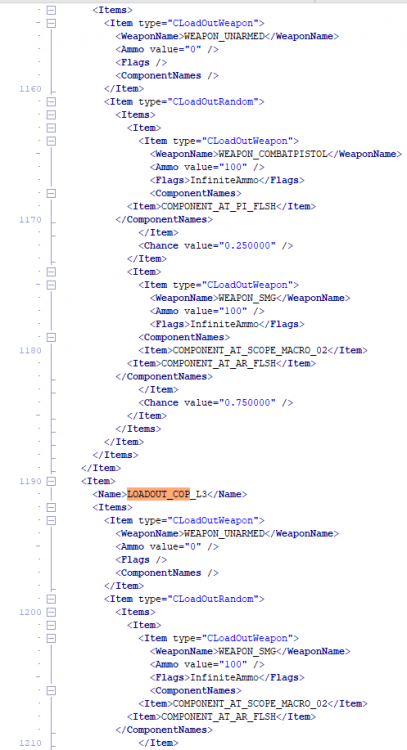
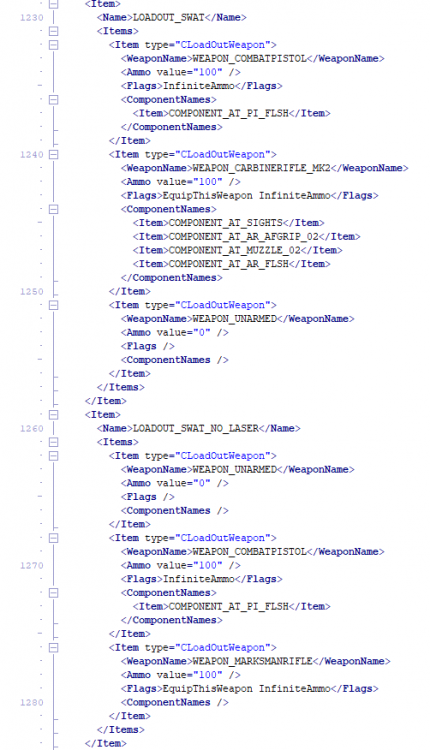
I've been messing around with the loadouts.meta, trying to give the cops in the game more "realistic" loadouts. However, I cannot seem to get it working. Currently, I've replaced their handguns to the combat pistol and added a flashlight (the handguns work perfectly fine) and added a flashlight onto the shotgun loadouts (again, this one works fine). The issues arise when I tried modifying the carbine and SMG. I attempted to add a scope and flashlight to both the carbine and SMG, and replaced the SWAT primary with the carbine mk2 (+ gave heli a marksman). The issue is, none of the cops spawn with these weapons. They only spawn with either the handgun or the shotgun, they all completely refuse to use the other weapons. What is even wierder is that ambiently spawning cops DO spawn with these weapons, such as the foot patrols in LSIA. I've also added pictures of the way I have my loadouts.meta setup. All help is appreciated 🙂
-
For some reason the LSPDFR tab isn't appearing for me, so I have no way to switch between characters. RagePluginHook.log Edit: It appears that LSPDFR is only half working. While it allows me to go on duty, and all the plugins and such work, it doesn't detect that I'm playing as my character. So, instead of showing my characters name in the pause menu, it simply says Micheal (last played character is SP).
-
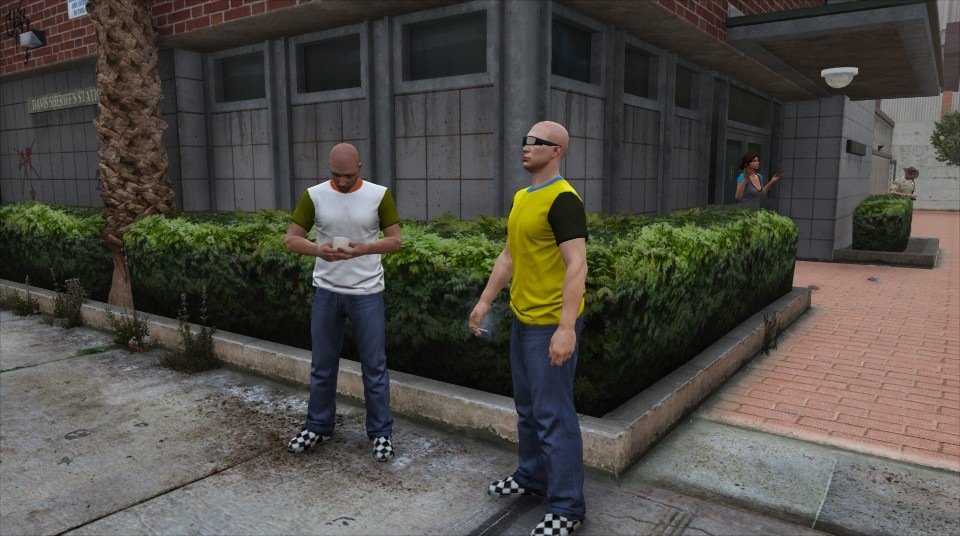
For some reason, officers that spawn ambiently don't have a uniform, instead spawning with generic clothing as shown in the picture. I'm using EUP, and I've already tried re-installing it with no success. Any ideas?
-
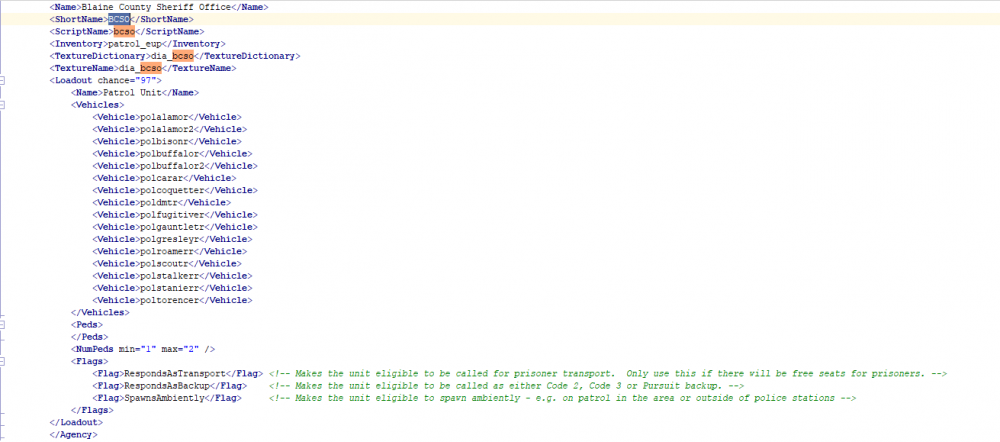
I tried adding BCSO as a custom agency. I've followed the same steps I have followed for the past few years. However, for some reason it is refusing to work. I added all the lines into Agency.xml, and added <agency>bcso</agency> to duty_selection.xml, under both <Peds> and <Vehicles>. Now, the vehicle selection does work. It shows up as BCSO, and it shows me the custom vehicles. However, when trying to select BCSO as the agency I'm patrolling as in the Police Locker, it doesn't show up. What am I doing wrong? How can I fix this?
-
LSPDFR keeps terminating when I attempt to load it. Any ideas on the issue? RagePluginHook.log
-
I managed to load into the game by running it in admin. It only worked once though. I also managed to load in by forcing it to load in windowed mode, same story. Its almost as if RPH is fixing every workaround I find to enter the game. Really fucking annoying.
-
I have. I've also tried adding the GTA folder and RPH program to the exceptions list.
-
Just insufficient permissions. Edit: It specifically says "Could not hook game process. Insufficient permissions or bad anti-virus." I also decided to re-install the game, hoping it was just a mistake on my part. No luck. I attempted to disable the "read only" option on the folder, but it keeps resetting, even after I press Apply and Okay.
-
That, somehow, seems to have reverted the PTT fix. Now I'm constantly getting the "Insufficient Permissions" error message.
-
Automatic.
-
RagePluginHook.log
-
I don't have any addon vehicles installed. Edit: Okay, changing the PTT somewhat fixed the issue, since now I get in ever 1/3 attempts. However now I've run into an annoying issue of LSPDFR crashing, because one mod not working wasn't enough.
-
I decided to re-install LSPDFR after a break.. After installing LSPDFR, and a few mods I used to play with, I attempted to launch the game. When launching the game by itself, it loads in with no problems. However, when attempting to load in using RPH (even with all plugins disabled), 9/10 I get an "Insufficient Permissions" message, whilst 1/10 it crashes even after, according to the custom message loader, everything has been successfully loaded. I've provided the RPH.log, RPH crash log as well as a list of the mods I'm attempting to use (with links). RagePluginHook.log RPH Crash log.txt mods list.txt
-
That could possibly be TrafficPlus+. Are the pathfinding nodes located in paths.rpf?
-
It does, yes.
-
As the title says - When I attempt to load LSPDFR, it crashes during loading. I recently re-installed all my mods, so everything is as up-to-date as can be. Any ideas as to why LSPDFR is refusing to work? RagePluginHook.log
-
 Okay, I'm really confused. Is this 8.3, or 9.3? Because the title says 9.3, but the file is called 8.3. Also, are the files supposed to not have a presentoutfits.ini included? Because after installing this (and the new S&R + Menu), several outfits are now broken. Lastly, I believe the discord links require an update, since the ones on this page simply don't work, and the ones on 5-mods give an "Unable to accept invite" error.
- 2,346 comments
- 236 reviews
-
 A really cool mod, it's really fun to play with. Although it would be nice if there was some sort of tutorial on how to set up custom loadouts and vehicles, because it's a complete mystery to me on how to do so, and the XML's look a lot more complicated compared to the UB/STP XML's I'm used to editing.
- 671 comments
- 28 reviews
-
-

- 5
-
-
Are you using custom vehicles? If so, are they addon? Chances are, the vehicle is broken and so isn't being seen as a police vehicle, so the game won't allow you to perform a traffic stop. Also, provide your RagePluginHook.log file (found in the GTA V directory) so I can check if it's something else causing this.
-
Nope, it's not caused by a plugin. Usually it's either LSPDFR is having a stroke, or the vehicles you are using have HQ textures which take up too much file size/the vehicles themselves are unoptimized and have too many polys. There are two fixes afaik. Go to the LSPDFR folder in your GTA V Directory, and open the lspdfr.ini file. There, you want to set Main.PreloadAllModels to false. If fix #1 doesn't work, you'll have to lower your texture settings in-game.
-
.thumb.png.9d0943161b37f863c291d6d6664edefb.png) I'm having a bit of trouble with the air unit during pursuits. It constantly lags behind and is only able to catch up and provide a spotlight when the suspect stops moving, even after setting it to the highest speed I can allow it to travel at. Anyt ideas why this is?
I'm having a bit of trouble with the air unit during pursuits. It constantly lags behind and is only able to catch up and provide a spotlight when the suspect stops moving, even after setting it to the highest speed I can allow it to travel at. Anyt ideas why this is?- 367 comments
- 33 reviews
-
-
- 1
-
-
 For some reason dispatch is having trouble correctly interpreting what I'm saying. It mainly has trouble with "ten eleven" and "in pursuit". I'm using US english. Whenever I say "ten eleven" (Which I pronounce as Ten Elevin), dispatch hears it as "ten en route". With "in pursuit" (which I pronounce as written), it either detects it as "en route", "10-1", or "suspect lost". Any idea on why it's having such as hard time understanding me?
- 1,357 comments
- 85 reviews
-
Any backup called using UB defaults to CustomRegions. DefaultRegions, to my knowledge, is only used if you're in an area that doesn't have a specified agency in CustomRegions.


.thumb.png.9d0943161b37f863c291d6d6664edefb.png)
