



1XERO1
Members
-
Joined
-
Last visited
Everything posted by 1XERO1
-
I have renamed the mods folder, which didn't help. I don't use lml. I'll remove scripthook now.
-
The most recent update seems to have broken my GTA V. After updating the game, I can't load into the game. The game will simply crash to desktop with no error message after a few seconds of loading. This occurs even when launching without RPH. At first I thought it could be that the gameconfig needed an update, but I've been told that this is not the case, and that I simply need to update my update2.rpf file. As I've already mentioned, I've already updated my game to the latest version, so I assume this file has already been updated. I've tried removing it and verifying file integrity, but it seems like Steam doesn't even know that update2.rpf is meant to exist, as it successfully verifies all files without ever repairing the update2.rpf file. I honestly have no clue what is going on or how to fix it. I'm not sure if this is of any importance, but I have 2 separate GTA V's that I made following this tutorial by DarkViperAU. I update 1 version, and then simply verified file integrity on the other. Not sure if this could be the cause of the problem.
-
 A nice, clean and small plugin to spice up traffic stops. Only complaint is the firearm sighting. It makes it sort of difficult to issue the correct citation/arrest report when the specific weapon type isn't stated after searching the person/vehicle, and can't be checked with the "Weapon Serial Check" function in STP.
 -
I'm using Albo's Modding DLC Pack to install addon vehicles. I'm trying to enter the custom vehicles.rpf, but OpenIV keeps giving me this error. I've already installed several vehicles previously, and it was working fine yesterday. It seemingly got corrupted overnight. Any ideas on what caused this, and if there is a way to revert it?
-
This seemed to do the trick. So far, it all seems to be functioning as intended.
-
 How does the additionalGPUMemory setting work exactly? Is it 8GB + whatever I input i.e. If I set it to 3814, then it'll use 12GB of my GPU memory? Or will it only use 4GB of my GPU memory if set to 3814?
- 104 comments
- 33 reviews
-
LSPDFR has started crashing when I try to go on duty (again). I also get an "unhandled exception" error when trying to do the ForceDuty command (again.). I have added/changed a few things since playing yesterday, but even after removing them, the game has this issue. The things I changed are as follows: 1. I added the "Gruppe Sechs", "Gruppe Sechs Armored Division" and "Merryweather Security" configurations from Joe C Wilson's EUP Backup Configuration modification to my Ultimate Backup SpecialUnits.xml file, which uses ThreadRed's UltimateBackup+ UB config. 2. I added vehicles from Drewdy1's Gruppe Security Car Pack and Merryweather Security Pack to those UB configs. 3. I created a new custom agency for both Gruppe Sechs and Merryweather in my lspdfr > data > custom > agency_addons.xml file (by copying, pasting and renaming the already existing BCSO setup that I had, and replacing the cars with the ones linked above) 4. I added both of those agencies to duty_selection_eupfr.xml 5. I added the stantions_gru.xml file that comes with FoxyFox6576's Gruppe Sechs Corporate Security to my custom folder. Those are the only things that I have changed, and I have removed all those changes. However, LSPDFR still crashes. I've provided my RPH.log, as well as .txt files containing both the UB Gruppe Sechs and Merryweather config that I tried using, as well as the agency config I made. Edit: I've also confirmed that this is not an issue with my mods folder, or my other plugins. RagePluginHook.log lspdfr_security_agency.txt UB_Security.txt
-
Thanks, exactly what I was looking for 🙂
-
I hope this is the correct forum to post this in. I was wondering if anyone has or knows where I could get an UB EUP config that implements Merryweather and/or Gruppe 6?
-
.thumb.png.9d0943161b37f863c291d6d6664edefb.png) Air unit doesn't seem to be persistent. Everytime I request an air unit, I get an ETA, and then after the ETA is up (I assume) the air unit Code 4s - without ever even appearing. I have to force it through UB during pursuits, and it never stays around afterwards. Not to mention, it will now for some reason spawn on the ground, only a few meters away from me. No clue what is going on, or if there is a conflict. RagePluginHook.log
Air unit doesn't seem to be persistent. Everytime I request an air unit, I get an ETA, and then after the ETA is up (I assume) the air unit Code 4s - without ever even appearing. I have to force it through UB during pursuits, and it never stays around afterwards. Not to mention, it will now for some reason spawn on the ground, only a few meters away from me. No clue what is going on, or if there is a conflict. RagePluginHook.log- 367 comments
- 33 reviews
-
 For some reason the plugins doesn't change the damage taken. I still take vanilla GTA damage. The only thing that seems to work is the panic button on firearm discharge. Any ideas what the issue could be? RagePluginHook.log
- 629 comments
- 56 reviews
-
I was wondering if anyone knows of a mod that function similarly to Watch Your Death, but doesn't have the SHVDN dependancy? I'm using several plugins, so I need RPH, but since SHVDN has design flaws that crash the game when launched with RPH, I need something that doesn't function off of it.
-
Does this still work fine for you? Since RPH + SHVDN causes a game crash for me.
-
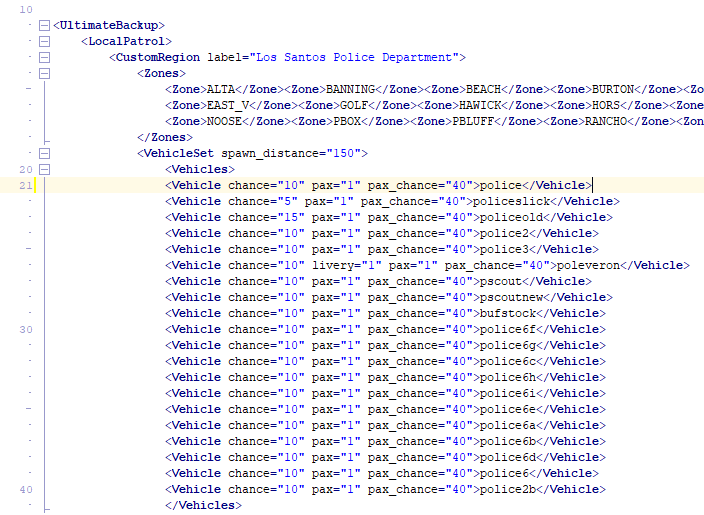
The video linked by TheLastKnight2 above shows how to do it. I'll still explain how to do it here, in case anyone else who needs help with this stumbled upon this support question. First off, you want to know the vehicle ID of the addon vehicle. If you've converted the vehicle manually into an addon, then it will be whatever you named the vehicle (lets say you named it "FPIU"). If the vehicle is already an addon, then the creator should have provided the IDs in either the mod description or in the readme file of the mod. If not, you can find the IDs in the vehicle.meta of the mod. Once you have the vehicle ID, you want to go to GTA V > Plugins > LSPDFR > Ultimate Backup and edit the CustomRegions.xml file. In here, you want to locate the agency that you want to add the vehicle to (such as LSPD). Now, find the <Vehicles> tag. Under this, there will most likely be the base vanilla cars, and they'll most likely be configured as: <vehicle chance="50">police</vehicle>. Simply copy that, make a space below and paste. Now replace "police" with "FPIU". You're LSPD backup should now also use your addon "FPIU" when calling backup. Here is a picture of how the CustomRegions.xml looks with several addon cars implemented for visual reference:
-
Are you using the LSPDFR backup menu, or Ultimate Backup?
-
LSPDFR keeps crashing after about 10-15 minutes playtime. I suspect it could be AmbientAICallouts, since all the crashes have occured during or right after an AAI callout. However, I'm not 100% sure, since I'm not sure what to make of the RPH.log. Any help is appreciated 🙂 RagePluginHook.log
-
I'm having an issue where GTA V is stuck on an infinite "loading Story Mode" screen. I've already confirmed that the issue is the mods folder, as disabling it fixes the issue. However, I have a relatively large amount of mods, so I'm not sure which one is causing an issue and disabling/deleting each mod individually is near impossible because I honestly don't remember half of the mods I've installed and what they change. Is there a way for me to check which mods are causing an issue? Is there some sort of .log file that states what did and didn't load correctly from the mods folder?
-
Alright, thanks.
-
Hey, I'm wondering if anyone would know if/how I can modify the firerate and firemode of a weapon? I'm trying to slightly increase the firerate of the Combat Pistol, and disable to auto-fire and occurs when holding down the shoot button. Thanks!
-
That fixed the issue! Thanks 🙂
-
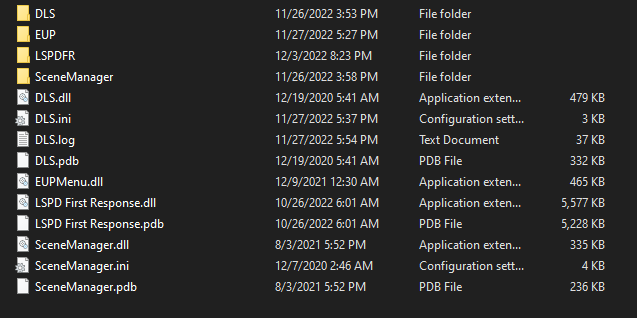
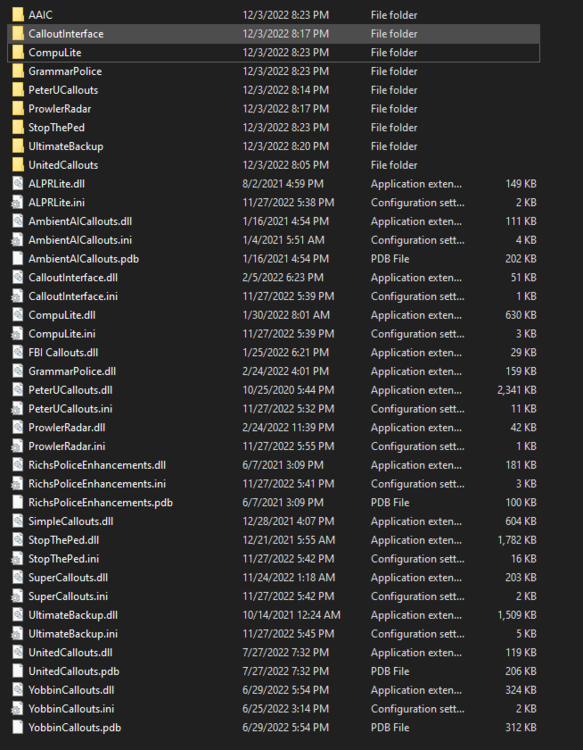
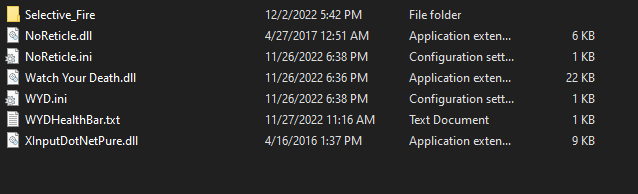
I'm having an issue with LSPDFR where attempting to load it almost immediately crashes the game. This is a complete desktop crash with no errors. So far, I have tried: - Launching RPH after loading Story Mode - Launching RPH in Admin mode - Removing all LSPDFR plugins within my "LSPDFR" folder - Re-installing LSPDFR - Disabling my mods folder (Edit: Something I also forgot to mention was that any attempt at launching the game through RPH alone would only cause the R* Game Launcher to open and put RPH in an indefinite "Attempting to launch game" state.) I've provided my RPH.log, as well as photos of my Plugins folder, LSPDFR folder and scripts folder. RagePluginHook.log
-
I'm currently editing my CustomRegion.xml file for UB. One of the LSSD vehicles that comes with w/'s LSSD Pack Extended (This one: https://www.gta5-mods.com/vehicles/lssd-pack-extended) has several different component options (The specific vehicle is the sheriffheavy). I'd like to have a standard patrol version (removed tactical platform) and one for SWAT (with tactical platform). Is there a way to set this up within the XML file (Like how Color= or Livery= set the specific color or livery of the vehicle)?
-
For some reason, after launching RPH (latest version provided with LSPDFR), my game received a "Lack of game memory" crash. I didn't think much of it and simply re-installed all base mods (Gameconfig, Heap limit adjuster, Packfile limit adjuster, etc.). Still got a crash, but was able to launch RPH by running the game first and then launching RPH. However, when I tried loading up LSPDFR with the LoadPlugin command, nothing showed up. I also noticed the console getting several errors for multiple files missing. I investigated, and found that both my plugins and scripts folders had, somehow, been wiped clean, with absolutely nothing in them. I have no idea how this happened, as I haven't touched this GTA file in ages. If its of any importance, I am using 2 different GTA folders and switching between them through .bat files (Specific method is this: ). I've also provided by RPH.log. RagePluginHook.log
-
asiloader.log RagePluginHook.log
-
If I recall correctly, it happens after I grab a suspect with STP.

.thumb.png.9d0943161b37f863c291d6d6664edefb.png)


