


DeputyBill
Members
-
Joined
-
Last visited
Everything posted by DeputyBill
-
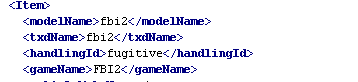
Now Police2's handling line ID is called fbi2 I can't change it to police 2 without lspdfr crashing. I really need help I can't fix police 1 or 2s handling line ID without the ability to edit it but once I do make edits that I know fixes the vehicles handling lines I'll either experience a crash during the black screen and Or if I do load I'll crash while going on duty so my only option is to revert back to the default vehicle.meta. I also added pictures of the vehicle.meta files I also added a crash log file RagePluginHook (1).log

-
So as I was saying the default police 1 handling I.D line for some reason is policet if I backspace and remove The letter T to get the handling to work properly the game will either crash during the blackscreen loading or Going on duty I change pice 2-3 and sheriff 1-2 without any problems at all. I really need some help.
