


DPZ
Members
-
Joined
Files posted by DPZ
-
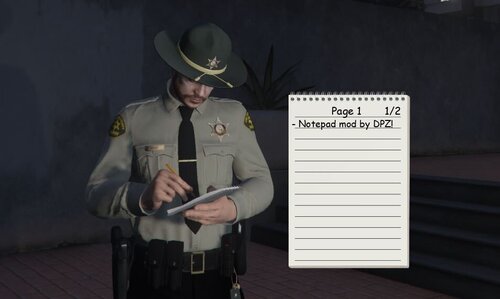
Some traffic stops or callouts can get complicated... You search a suspect, they have 3 different kinds of powder, you search another, they have 4 bags of pills... It can be easy to lose track! Time to take some notes with the NOTEPAD!
Features:
Take notes with an on-screen notepad 3 different styles including Clipboard, Notepad and Tablet Customize the font, color and positioning of the notes and page title Animations for the Clipboard, Notepad and Tablet depending on which style you have selected
Default Keybinds:
Open Menu: F12 Open Notepad: N You can change these keys inside the menu or the ini file, there's also options for modifiers!
Notepad Controls:
Enter key to type a note Arrow key left and right to change pages Arrow key up and down to select a note Delete key to delete a note
Installation:
Notepad.dll, Notepad.ini and the Notepad folder all go into plugins/LSPDFR Go on duty to load the plugin
Requirements:
Rage Plugin Hook RageNativeUI
Known Issues:
Certain hotkeys from other plugins may trigger when typing notes. From my experience, menus like Stop The Ped will not open, but things like Grammar Police radio or Roleplay+ animations will trigger if you hit any hotkey while taking notes. I'm trying to figure out a way to avoid this for a future update.
Showcase/Installation video made by Geoffrey_Gamer:
- 8,579 Downloads
- 22 Comments
Updated -
(Previously using ScriptHookVDotNet, NOW USES RAGE Plugin Hook!)
Roleplay+ is an animation menu featuring 60+ animations that you can easily key bind. I wanted to make a menu that features animations you can walk around while using.
Features:
Smoking animations Drinking animations Cop animations Arm animations Lean & Sit animations Exercise animations Dance animations Various object animations Walk Style animations Gestures animations Attach Submenu
Keybind System:
Press Shift + Enter on the animation you want to keybind, then press any key you want to assign. It will automatically save to the ini. To delete a keybind, press Shift + Enter, then press Spacebar. You can change the Menu key and the Stop Animation key inside the menu.
Does Shift+Enter minimize your game?
You can change the Shift modifier in the menu or ini file (InMenuChangeKeybindModifier=ShiftKey)
Installation:
Put Roleplay+.dll and Roleplay+.ini in the plugins folder, NOT plugins/lspdfr folder, just plugins!! Load the plugin through RagePluginHook, two ways to do this are: Open the RPH Console in game with F4 and type "LoadPlugin Roleplay+.dll" OR you can open your RPH settings and have Roleplay+ load when you launch the game.
Default Keybinds:
Open Menu: F6 Stop Animation: X
Requirements:
RagePluginHook RageNativeUI
Here is a helpful installation/showcase video:
3/22/2024 Minor Fixes
NEW Update v1.2
Update v1.1
- 40,660 Downloads
- 71 Comments
Updated -
The radio for stop the ped is really loud for me, not sure if it's my audio mix or what. I decided to lower all audio files and the radio volume now matches other plugins. If you feel like the radio is super loud when using stop the ped, try this out
- 546 Downloads
- 3 Comments
Updated -
REQUIREMENTS: Stop The Ped
SUGGESTED: Compulite + Realistic Charges and Citations
INSTALLATION: GrandTheftAutoV > Plugins > LSPDFR > StopThePed
Replace files in this directory.
I have modified the Stop The Ped search items to correspond with chadc78's Realistic Charges and Citations for Compulite.
I love chadc78's charges for compulite, it added nearly any charge or citation you could need. Although, with the standard search items of Stop The Ped, you aren't able to find most of the drugs that match the charges. This will allow you to find a variety of drugs, weapons, paraphernalia and MUCH more miscellaneous items on peds that will make the additional charges that much better.
chadc78's Realistic Charges and Citations can be found HERE:
The original creator of Stop the Ped has removed his files from LSPDFR. If you don't have Compulite or Stop The Ped, you can download it
HERE: https://bejoijo256.wixsite.com/bejoijo
- 11,246 Downloads
- 7 Comments
Updated



-Copy.thumb.png.61782dab4302e59ed828c5f2cdb1945b.png)