Skip to content
View in the app

A better way to browse. Learn more.

LCPDFR.com

A full-screen app on your home screen with push notifications, badges and more.

To install this app on iOS and iPadOS
  1. Tap the Share icon in Safari
  2. Scroll the menu and tap Add to Home Screen.
  3. Tap Add in the top-right corner.
To install this app on Android
  1. Tap the 3-dot menu (⋮) in the top-right corner of the browser.
  2. Tap Add to Home screen or Install app.
  3. Confirm by tapping Install.

thomasj23

Members
  • Joined

  • Last visited

Everything posted by thomasj23

  1. I did some further testing, but the lighting inside doesn't work either. Also there are no reversing lights and no brake lights. The traffic lights are also so dim you cannot even see them.
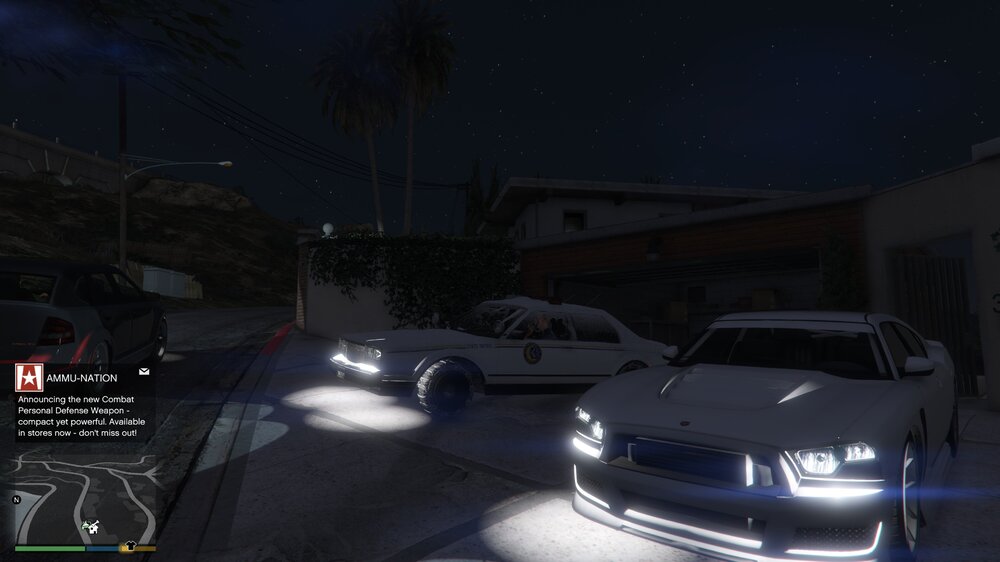
  2. Okay so this has been causing me a headache all week. Recently I did a clean install of GTA V because of too many mods. Now my lights look like this, even with no mods installed. Looked around but didn't see anybody else with this issue. Please help me because i am truly desperate here. As you can see headlights beam down a light, but they work normally. Also all the lighting on every emergency vehicle is dark for whatever reason. Did try installing some visual mods but it made no difference. Please note that in the picture shown below, the emergency lighting is turned on.
Account

Navigation

Search

Search

Configure browser push notifications

Chrome (Android)
  1. Tap the lock icon next to the address bar.
  2. Tap Permissions → Notifications.
  3. Adjust your preference.
Chrome (Desktop)
  1. Click the padlock icon in the address bar.
  2. Select Site settings.
  3. Find Notifications and adjust your preference.