Josh L
Members
-
Joined
-
Last visited
Everything posted by Josh L
-
I open the game and it loads for a couple of seconds I am using Windows 10 Fresh Install of LSPDFR (Added in mods Before First Start Up) Up to date on GTA V Here is the Crash Report
-
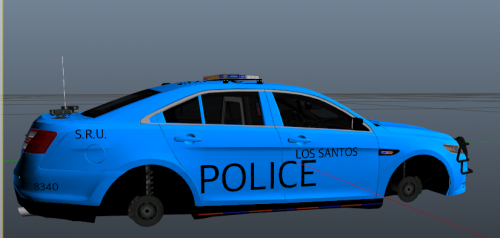 These are Skins I Made I know there not the best But I am Starting off Doing So I will Make Edit's to these as i feel fit and when i learn to do more. I do Plan on Doing BCSO With almsot the same Name (Patrol, TEU SRU Ext). Theses Skins Are for the Ford Tours DO NOT COPY OR ALTER THESE SKINS WITH OUT COMMING TO ME FIRST. Fell Free to Use them In a Five M server or LSPDFR if you are going to rec wih my skins I would like if you should credit of me. Join my Discord to Give Suggestions https://discord.gg/X3sufegST3 If you need Help Put these textures on your car join my discord and I will asst. you I know its Balnd But Its was My First Time And I think the Look Good I have And 16 Explore Comming Soon
 -
OK i got it back working
-
I installed my plugins they worked so i hoped out to add car then got that How would i How would I do that OK I did that and it still craches
-
kEEP GETTING THIS ON START UO nOW
-
ok
-
I got it Fixed *LOCKED*
-
I just got LSPDFR I got to open in and i got this I installed the Newset Rage Hook turned off the Anit Veris I dont know what to do anymore
-
Hello So First it was Crash on Start Duty Now Every time I get to the Loadding Screen For a a Bit then My game Just craches can someone help me with this