


Grizz87
Members
-
Joined
-
Last visited
Everything posted by Grizz87
-
-
anyone? I can get the car to spawn but the second I start driving it crashes.
-
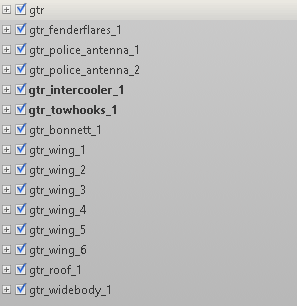
I am new to making custom vehicles for GTAV let alone making a police vehicle at all. I am trying to understand how the Hierarchy/Structure and naming works but I can't really find any info on it. The car will have mods as well. Any information is greatly appreciated! Attached is an image of what the Hierarchy/Structure looks like right now.
-
I created a cop cruiser from a free GTR model. When I upload it in to test it the game just closes when I spawn it in. If I don't spawn it in then the game works perfectly fine. Anyone get an idea on what could be the cause? This is the first vehicle that I have modded and uploaded to GTAV/FiveM so im still a newbie at it xD
2020-01-319_12_33PM.thumb.png.30c36f4f2ce846bab3e6a81112ff92bd.png)
