


Gibezz
Members
-
Joined
-
Last visited
Everything posted by Gibezz
-
hope this helps
-
You also have to add the vehicle's model name inside "agency_eupfr.xml" under the agency you want them show up in.
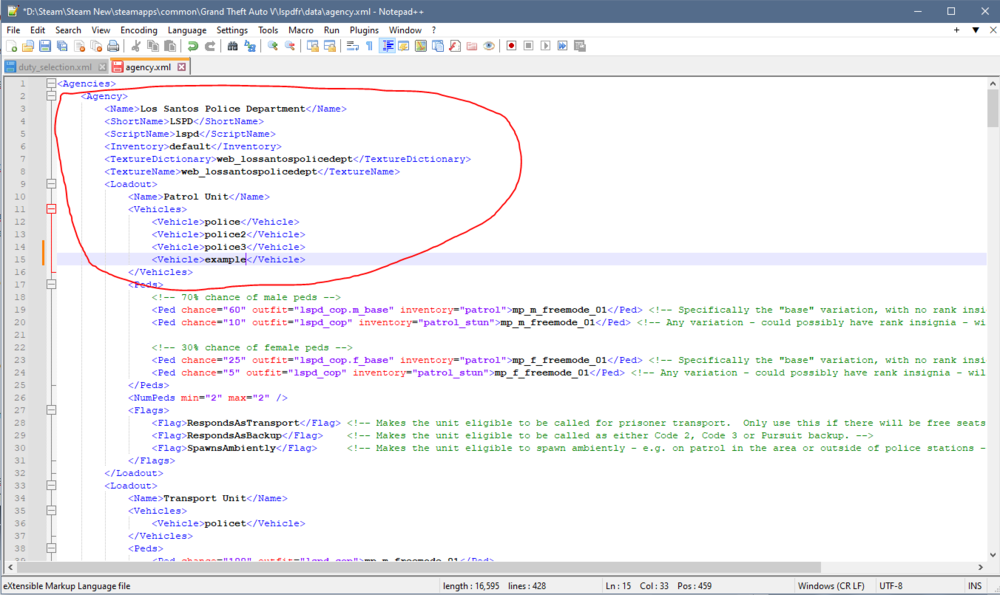
-
After messing around quite a bit, i figured it out with help from another forum. If you don't use EUP: 1. Locate your LSPDFR's "data" file. (Grand Theft Auto V > lspdfr > data) 2. Edit "agency.xml" with Notepad/Notepad++ 3. Add the vehicle(s)' model name under the agency you want it appear under. (ie. "Los Santos Police Department") 4. Add the model name under the last model. (ie. <Vehicle>police3</Vehicle> \\ add <Vehicle>yourvehiclemodelname</Vehicle> below it.) 5. Save and close. 6. Edit "duty_selection.xml" which is also in the data folder. 7. Add this line: For General Agencies (ie. LSPD, LSSD, etc.): <Description name="the short name for your vehicle" fullName="the full name of your vehicle" agencyRef="the agency name">the vehicle's model name</Description> For FBI: <Description name="short name of your vehicle" fullName="full name of your vehicle" agencyName="Local & Federal Agencies">the vehicle's model name</Description> Notes: 1. You can put anything for the names. They will display under the agency you set during the vehicle selection screen. (You can refer to "agency.xml" for the appropriate agency names. (ie. Los Santos Sheriff Department is "lssd" \\ <ScriptName>lssd</ScriptName> ,,this is where the name will be in "agency.xml")) 2. The model name can be anything you desire as long as it's a valid model! If you want to add slots for police5, custom28, etc., you'll have to add the vehicle models as an Add-On. (Youtube Tutorial by "ShaynePlayz Gamez" below if you have not done it or don't know how to.) If you use EUP: 1. Locate your LSPDFR's "custom" folder which will be under LSPDFR's "data" folder. (Grand Theft Auto V > lspdfr > data > custom) 2. Do the steps above. The files' name will be "agency_eupfr.xml" and "duty_selection_eupfr.xml")


