mybuttstinks
Members
-
Joined
-
Last visited
Everything posted by mybuttstinks
-
-
I think this is a dead project.
-
Hi, everyone. It's been a while since I've last log into LSPDFR. I was wondering is there any new plugins in development such as CAD, license plate display, and etc.
-
Hi RelaperCrystal, the LSPDFR that i have been trying to install is the latest version.
-
MattexD, I have tried re-installing Lspdfr and I am still having the same issue. E:\GTA V\LSPD First Response\LSPD First Response\Mod\Apartments\ApartmentHelper.cs:line 19 E:\GTA V\LSPD First Response\LSPD First Response\Mod\Apartments\Apartment.cs:line 86. E:\GTA V\LSPD First Response\LSPD First Response\Mod\Apartments\ApartmentManager.cs:line 42. E:\GTA V\LSPD First Response\LSPD First Response\Mod\LSPDFR.cs:line 209. E:\GTA V\LSPD First Response\LSPD First Response\Mod\LSPDFR.cs:line 167. It appears the issues are coming from the lspdfr data files. according to the rage plugin hook log. But I cannot tell which data file to look at. RagePluginHook.log
-
Hi MattexD, No files has been edited. All the files are default that was downloaded through the LSPDFR website. What is strange about this issue is that, I have no issues installing mods and playing the the game storymode. The problem occurs when I try to install LSPDFR and load the lspd first response.dll manually through the rage plugin hook console.
-
Hi MattexD, I downloaded the lastest version of RageNativeUI and I am still having the same issue. RagePluginHook.log
-
I did a fresh installation of GTAV and installed LSPDFR and all of its files into the GTAV file directory. When I tried to load lspd first response.dll file through the game story mode. The lspd first response.dll file crashes! The game story mode starts up and runs fine with no issues. I checked all of the installation and dependency files to make sure that I had all of the files necessary for LSPDFR to run correctly which I do. The rage plugin hook setting is set to F4 and threshold is set at 60000. I cannot pin point the issue that I am having. It's a fresh installation with no mods and no plugins except having the lspd first response.dll and PDB file in the plugins folder. The GTAV directory is only consist of the game core files and the LSPDFR files. No other files are listed in the directory. Any assistance is appreciated! Also, the rage plugin hook log file attachment is listed below. RagePluginHook.log RagePluginHook.log
-
 Hey! i am a callout developer. I enjoy using this plugin even though it's buggy as heck. I have a question could anyone show me an example of how i would be able to integrate my callout plugins with computer+?
- 1,743 comments
- 172 reviews
-
 Great mod! But i have come across an issue. Whenever, I respond to a call. It gets canceled when Ai cops responds back to dispatch thus resulting in a lspdfr crash. Also, on the next update is it possible to prevent Ai cops from driving recklessly when responding to calls?
- 347 comments
- 43 reviews
-
-

- 2
-
-
Hello everyone, I am currently in the process of creating a new speed radar system and computer aid dispatch. Since i am done with college, I now have more time on coding. I have a few questions in regards to the plugins created for LSPDFR. For the speed radar and computer aid dispatch like computer+ and compulite. Is it created in CSharp or C++? I feel like there's alot of plugins for callouts but not enough for speed radar and computer aid dispatch. Sincerely, ButtSmasher
-
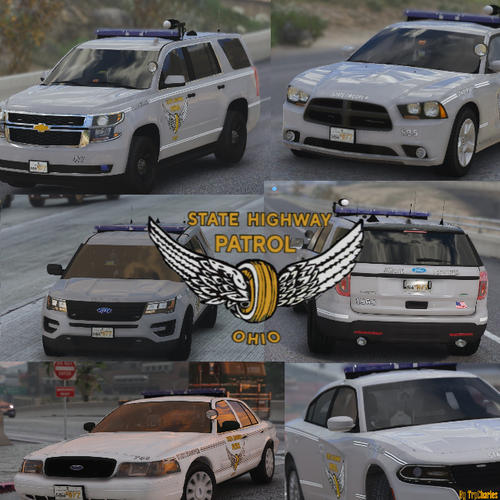 I love this pack. Is it possible you could create and oiv installation for it? Also, could you tried doing a pack for North Carolina Highway Patrol?
- 28 comments
- 6 reviews
-
I got a question to all lspdfr developers. I know that plugins created for lspdfr are done in C# programming. I am very knowledgeable in C#. I create my own callout plugins. But recently, I've been having news ideas on trying to challenge myself like try to create a new computer aid dispatch for lspdfr like Computer+ and Compulite and a realistic speed radar with doppler return sound rather than just callouts. So, what tools do you guys use to create a computer aid dispatch and speed radar for lspdfr? I know it takes more than C# to get it done. . Any advice or suggestions will be appreciated. Thanks!
-
-
Skold, I solved this problem by processes of elimination. When the game gets an update. The update file in the game's directory gets updated but the mods folder does not. Therefore, you need to go back and update the update.rpf file in the mods folder in the gtav directory and re-install all of the textures and addons that you added into the game because these textures and addons that you install are not hard coded into the game that's why these textures and addons do not get updated with the game. My issues were plugins causing the game to have an infinite loop of loading. So, I re-install all of my mods along with lspdfr after resetting the gtav directory back to default. The game loaded up fine. But as soon as i install plugins the game terminates by itself stating scripthookv is not found in the game's directory. Scripthookv is a library that allows asi plugins and native scripts to work with gta. When i install scripthookv 1.2060 into the game with plugins, I ended up getting and infinite loop of loading. Remember the game version is 1.2060.1 Meanwhile, scripthookv is 1.2060. Therefore, scripthoookv cannot work with the plugins that uses this file due to rockstar updating the game to 1.2060.1. Scipthookv needs to be updated to 1.2060.1 to work successful with the latest game version. Scripthookv developers will take the existing file and tweak the coding to make it compatible with the game version. Bad developers will start from scratch and this might cause instability. I deleted scripthookv from the directory and the game loaded up fine with all the mods and addons. This is how i fixed the issues that I was having. If you are having an infinite loop of loading starting the game. This is due to a coding issue. A couple of issues causing this will include the update.rpf file being updated in the directory but not the mods folders in the directory. Mods that's outdated that you installed into the game can cause infinite loop loading and lastly scripthookv being outdated along with other files that you add into the gtav directory that requires other dependencies. Rescue 920, yes scripthookv is outdated at the moment please give the developers a week to update it. But for the meantime, you can use Asi support 0.4.2. This is an alternative to scripthookv. But it can cause the game to be a little unstable. I've tried and it works. Give this a shot. But once scripthookv is updated. I would advice you to use scripthookv and not the Asi support 0.4.2 due to the nature of this program being a beta in the early stages of development.
-
Please disregard this post. The problem has been fixed. I do appreciate your feedback.
-
I was in the same shoes as you were with an infinite loop of loading. The way that i fixed it was to remove scripthookv from the directory. Since Rockstar updated the game to 1.260.1. You are going to have to wait for scripthookv to updated to 1.2060.1. For the time being your els for you addon cars will not work.
-
Hey guys sorry for the late reply. I have been so busy working and going to school. This issue has been resolved. I would like to thank all of you for responding and giving your insights on this problem.
-
I have installed a mod folder with a few mods and re-install lspdfr into the GTAV directory. I start the game and it runs fine with no plugins. But as soon as I install a few plugins into the LSPDFR folder. I get an infinite loop of loading from the rage plugin hook with no ending to it. The mods folder update.rpf file is up to date as well including scripthookv. I am fresh out of options on why a few plugins is causing this infinite loop of loading. Below is the rage plugin hook file. Any suggestions would be great. RagePluginHook.log
-
Yes, and that's the problem as well. If i create a new mods folder with nothing in it. The game will still quit on its own.
-
Thanks guys for the reply. The funny thing is. If i go to Open IV and disable ASI loader. LSPDFR loads up fine with all plugins. But as soon as i activate the ASI loader in Open IV with a mod folder with no mods install. the game will exit out un unexpectedly. I also checked and verify all of the game data using rockstar launcher and the game data files are fine as well.
-
Hi i need some help. I played lspdfr one time after the update and everything was fine. The next time i tried playing it the game exit out on its own. I removed the mods folder from the directory of the game. I re-install lspdfr 0.4.7. again and everything worked fine. The problem occurs when I add a new mods folder again to the directory including the update and x64 files. The game exit out even in storymode and lspdfr mode (with no plugins and mods activated). I am fresh out of options. I don't know why the game is exiting out all of a suddenly when i try modding it. This is the first time i had this issue. The rage plug in hook, lspdfr and scripthook v are at the latest version as well. Any help or advice will be appreciated! RagePluginHook.log
-
-
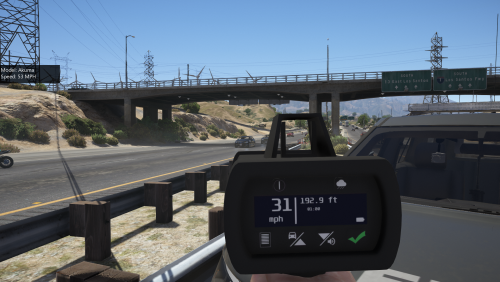 Okay I installed this into the patchday 8 and I can't seem to find it anywhere in the game. Am i doing something wrong?
- 79 comments
- 17 reviews
-
I am getting a error pack 3 code whenever the game is loading up on story mode and even in lspdfr mode. What could be the problem? I went to load up the rockstar program and the program even verified and fix the corrupted files. Afterwards, while I went back to verify to see if it fix the problem. It didn't! So, my question is what could the problem be! What does an error pack 3 means anyway?