



Royal Modifications
Members
-
Joined
-
Last visited
Everything posted by Royal Modifications
-
 Great mod to the game! In FiveM, it only works up to game build 2699, is there any plan of updating it to be supported on newer game builds on FiveM?
- 342 comments
- 20 reviews
-
 This texture would commonly be used for Fire and EMS vehicles, to replicate the gold leaf pattern, whether it be text or the overall design!
 -
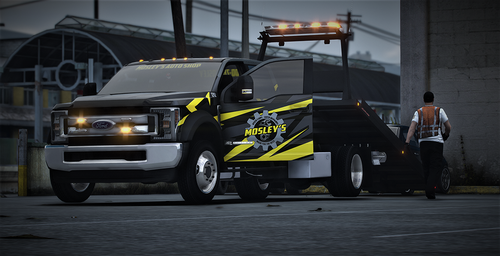 https://redneckmods.com/products/2018-crew-single-cab-rollback-tow-trucks
 -
This is only a skin for Trucks released by Redneck Modifications. These trucks I believe are able to be purchase on Rednecks Modifications' Website.
-
Included: Mosley's Auto Logo (Recreated by Royal) Window Skin and Skin for Redneck's 2018 Ford F550 Crew Cab and Single Cab Tow Trucks Disclaimer: This does not include the vehicles, only skins. Do not claim as your own or redistribute. Other: Mosley's Auto Shop: https://www.gta5-mods.com/maps/mosley-s-auto-shop-interior-sp-fivem
-
It can be used for things like detail lines along Fire and EMS vehicles, along with some text and some logos.
-
This Gold leafing is an amazing tool that can be dragged and dropped onto their ongoing project. I use this on my fire liveries. This is formatted as a .png file, so it works for many livery making platforms.

