



DraculaFX
Members
-
Joined
-
Last visited
Everything posted by DraculaFX
-
it says outback gaming in the top left i presume its there fivepd server
-
an i cant apologize enough
-
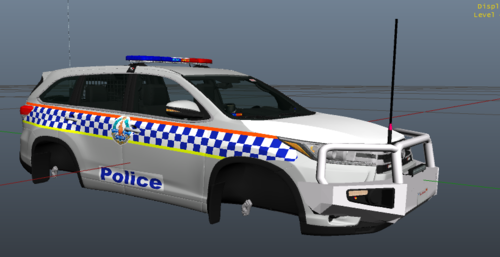 Hey Most of my skins for NTPF Is gonna be fictional because 99% of there cars aren’t available so i went around it and used mainly off road cars to go around their theme
Please use the at your own risk Model Credit: @Low202 Skin Credit: Me ELS Credit: @Low202 This is one of the many to come ive started to work on a bunch of these fictional skins but ill be putting a pack out soon with this skin has come a lot of effort and work and this pack as well
Hey Most of my skins for NTPF Is gonna be fictional because 99% of there cars aren’t available so i went around it and used mainly off road cars to go around their theme
Please use the at your own risk Model Credit: @Low202 Skin Credit: Me ELS Credit: @Low202 This is one of the many to come ive started to work on a bunch of these fictional skins but ill be putting a pack out soon with this skin has come a lot of effort and work and this pack as well
.thumb.jpg.cb6f58d6144e37a7ea77fb0738ae4274.jpg)
