


John Lead
Members
-
Joined
-
Last visited
Everything posted by John Lead
-
Hello Everyone, I haven't played GTA V or LSPDFR in quite some time. I have a temporary setup as I've moved, but the biggest reason is because of GTA V being updated constantly. I don't play much online, just single player LSPDFR. I don't play very often so modding the game, playing it for a few times, being away for work for a while, then coming back to having to update everything gets very annoying. I currently have GTA V on steam so I know I don't have a choice but for it to update, but would switching to GTA V store bought disc solve that problem? I will still leave GTA V steam installed for when I want to play online but If I had to get rid of it to avoid conflicts, it wouldn't be a great loss. Any information on this would be greatly appreciated.
-
@Charlie686 my apologies again for the late reply. This may become a regular thing. I went into the RAGE settings and set it to not load any plugins. This time it loaded into the game as Michael. Just to confirm, the mods folder is still labeled "_mods" in the directory and vfs.dll is still removed from the directory.
-
I had previously updated LML when you previously stated that it needed to be updated. I went ahead and removed vfs.dll to the desktop. it loaded a little further than what it was, but still crashed. attached is the current crash log for this session. RPH Crash 01.13.2022.log
-
Sorry for the confusion, I am currently using the new gameconfig. I just renamed the mods folder to "_mods" and still having the same issue. it crashes at the loading screen shortly after "Loading & Populating Game World". Attached is the current RPH crash log. RPH Crash 01.12.22.txt
-
Sorry for the late replies @Charlie686, I've been very busy at work. What gameconfig.xml is needed? I am currently using V27 for v1.0.2545 by cabe47(For more mods > 0,1x traffic 0, 1x peds).
-
I just updated the update.rpf in my mods folder as OpenIV gave a warning it was outdated. I replaced the the dlclist.xml and the gameconfig.xml from before and now it crashes instead of just staying on the loading screen. Here is the log. RPH Crash 010722.txt
-
We're making some progress here. I updated LML and updated GameConfig.xml as I was getting the "ERR_MEM_EMBEDDEDALLOC_ALLOC" error. With the dinput8.dll file, It just sits on the loading screen. with the dunput8.dll file removed it still brings up the "ERR_MEM_EMBEDDEDALLOC_ALLOC" error. Here are the logs with and without the dinput8 files in the directory. rph log wo dinput8.log rph log w dinput8.log
-
I just tried this and it's starting to look a bit more positive. GTA V is now launching and getting to the load screen to the point where it reads "Loading & Populating Game World" then crashes. This is the crash log. RPH Crash Log.txt
-
I just tried that. Same thing happened. I updated yesterday to LSPDFR 0.4.9 build 8037 by downloading the LSPDFR_049_8037_Manual_Install.zip and moving everything over except Licenses. Then I downloaded ScriptHookV_1.0.2545.0 and moved over dinput8.dll & ScriptHookV.dll. is this all that is needed?Yes, Game files have been verified with no successHello Everyone, Just curious if anyone else is experiencing the same issue. When I go to launch LSPDFR via RAGEPluginHook, the RPH splash screen starts and reads "launching game via steam". Then the black rockstar square pops up and shows "Connecting to rockstar game services". that one closes then the gray/black screen shows up that traces the rockstar logo for just a few seconds then closes showing the RPH splash screen reading "Waiting for game window". I just updated LSPDFR, RPH, and ScriptHook V today. I'm thinking the problem is with steam because I have also opened up steam and tried to launch it that way but again, it only shows the two rockstar box's then closes. This has happened once before and I just reinstalled the game and all my mods (Which I have a lot of!). I know the simple answer is to just install and reinstall everything but I really dont want to have to go through that process again. I'm hoping someone has some information as to why this is happening and how to prevent it or has a simple solution so I don't have to do this every time an update comes out.Sorry to get back to you so late. I just uninstalled all of these and the game is working flawlessly. Thank you so much for your help.Hello everyone, I am lost as to why lspdfr keeps crashing. While I was playing for 30 minutes, it crashed twice. I have updated everything I can think of and this keeps happening. I'm sure the answer is right in front of me but I can't seem to find it. I have attached the RPH log if anyone would be kind enough to look at it and see if they can find anything. Thank you in advance and any help would be greatly appreciated. Thanks. rph log 102421 lspdfr crash.txt
.thumb.png.9d0943161b37f863c291d6d6664edefb.png) Is there anyway to change the helicopter model to use something other than Polmav?
Is there anyway to change the helicopter model to use something other than Polmav?- 368 comments
- 33 reviews
 Hello Everyone, Has anyone been able to successfully find a key table that works? I'm trying to use different keys other than the letters (I.E: "," "." & "/" keys) and have seen others trying to as well. I know this one was posted (Keys Enum (System.Windows.Forms) | Microsoft Docs), but does not work.
- 168 comments
- 29 reviews
I do have a scripts folder but it is emptyI followed the directions from the link given in the error: 1. Right click the game in the “Library” tab. 2. Click “Properties”. 3. Click the “Local Files” tab. 4. Click “Verify integrity of game cache…” It mentions checking the launcher.log but I have no idea how to decipher that. launcher.logJust verified via steam and same problem.Well were making a little bit of progress. With dinout8.dll delete the game loads into the lights/siren screen and then crashes. I get "ERR_GEN_INVALID" error. it says: "Corrupt game data. please reboot, verify the game data, or reinstall the game. For more information, please visit: http:rsg.ms/verify". Here are the screen shots for the directory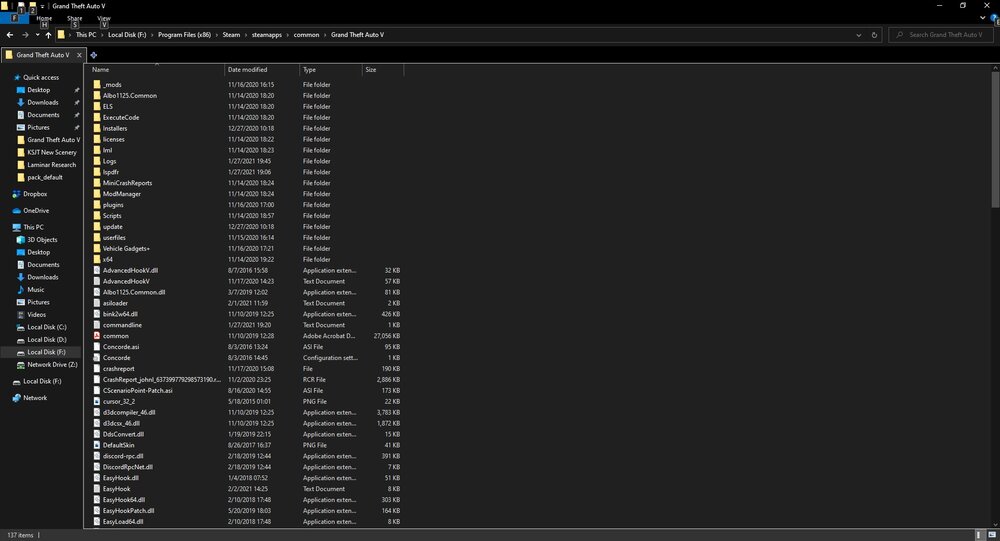
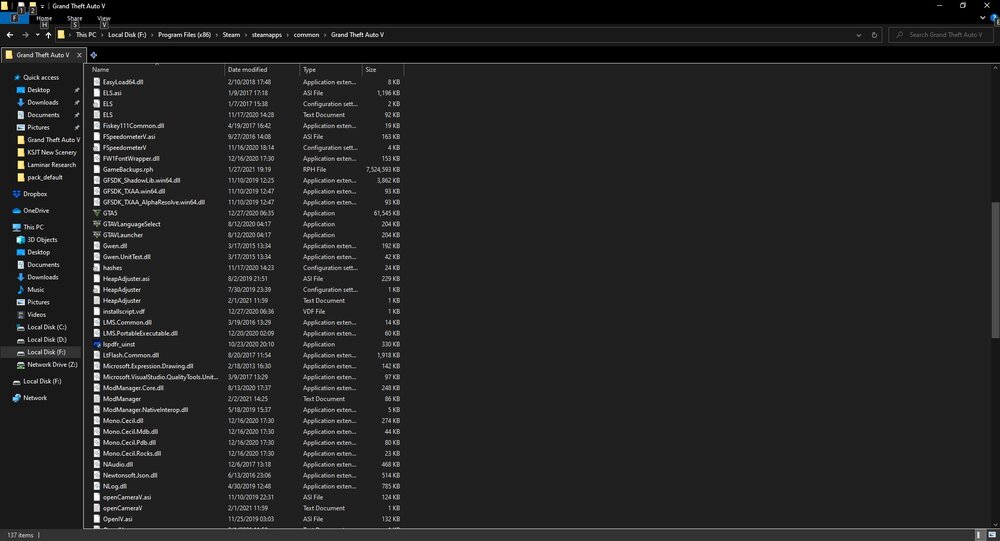
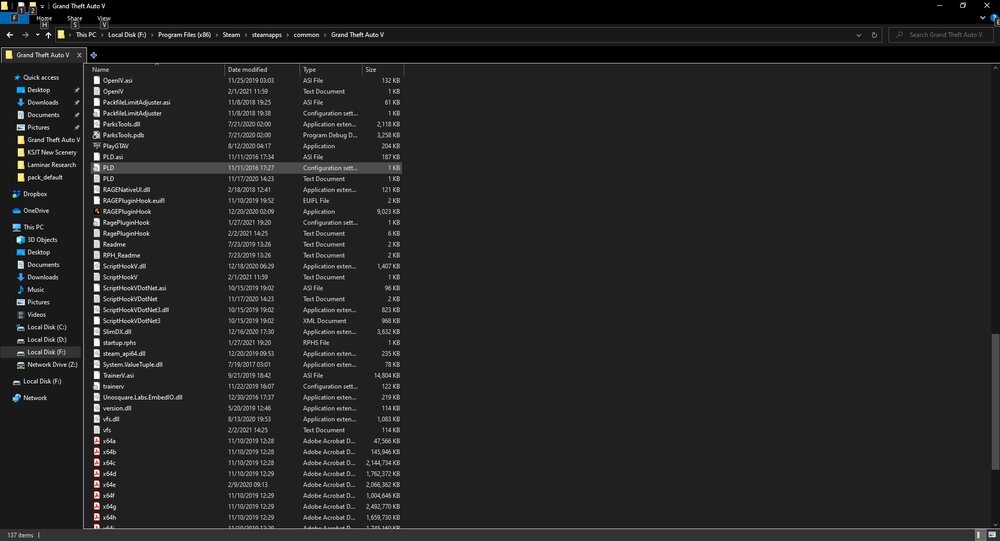
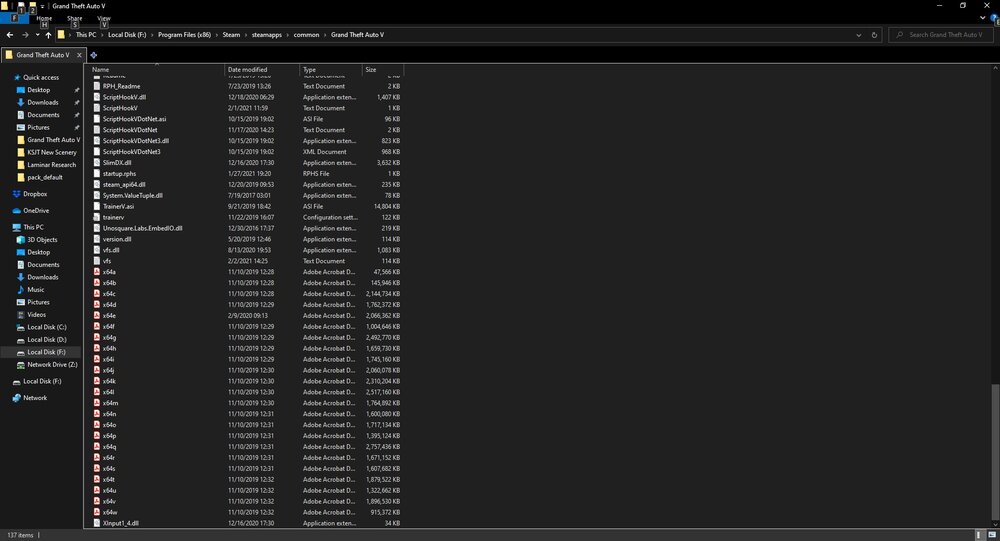 I just tried this and no luck. The same thing happens.I can not. when I try to launch GTA V via the green icon, or through steam, or through Rockstar Games Launcher, I have the same problem. Or are you saying to delete scripthookv.dll & dinput8.dll?I created F:\Program Files (x86)\Steam\ and moved it via steam.I just tried that. I guess the problem is with Rockstar Games Launcher. I tried clicking on the icon to play GTA and it gets to the same point with the launcher then quits, I've also tried clicking the "PLAY" button on steam and the same thing. I opened Rockstar Games Launcher, and I click "PLAY ON STEAM", steam opens up. The launcher then says loading then quitting. I have uninstalled and reinstalled Rockstar Games Launcher with no success. I should add that some time ago I did move all files from D drive to F drive, but I'm pretty sure I have played the game since then before it became out of date with the Cayo Parico update. At any rate, before updating script hook V, the actual game would load and crash once past the lights/siren screen. I have attached my RPH Log but I noticed that it is outdated.. It shows the log from last night in the date modified field in the folder view, not from my most recent attempt at opening RPH. RagePluginHook.logHello Everyone, I am kind of late to the party with updating LSPDFR but I finally did it last night. I downloaded the manual files for build 7688. I copied everything over except the licenses folder. I then updated script hook V to version V1.0.2189.0 released 12/18/2020. When I launch LSPDFR it starts up fine, but during the loading process both Rockstar Games Launcher and Rage Plugin Hook just exit and that's it. The RPH logo screen pops up and says "Launching game via steam" then runs through a whole bunch of stuff, Then the Rockstar Games Launcher starts with the little black box saying "Connecting to Rockstar Games Services" then loads into the larger screen with the Rockstar logo being traced. That window then closes, rage plugin hook reads "Waiting for game window" then closes too. I'm not sure what is causing this problem, any information to fix this would be greatly appreciated. Thank you!


.thumb.png.9d0943161b37f863c291d6d6664edefb.png)


