.png.6d9e1403e33245743a93d0d769413ae9.png)

SGT Fozzy
Members
-
Joined
-
Last visited
Everything posted by SGT Fozzy
-
-
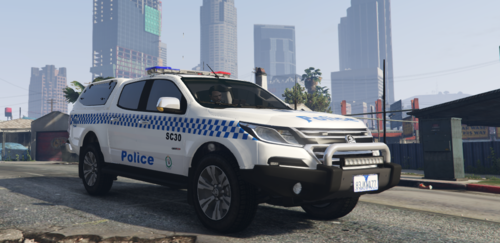 NSWPF GD Holden Colorado - Texture Texture by SGT Fozzy Made for Macgregor's Victorian Police Holden Colorado Link: I DID NOT HAVE ANY INVOLVEMENT IN THE MAKING OF THE MODEL OR THE PUBLISHING OF THE MODEL Inside: This texture file incudes a Sydney City General Duties skin for Macgregor's Vic Police Colorado. This is a great model and very well detailed so I decided to create a NSW GD's texture so that all the NSW players got a chance to use it and enjoy it. Also features a replacement window decal as the one that comes with the skin stands out from the NSW style design. The decal can also be toggled on and off in the mod menu. INSTALL INSTRUCTIONS: 1. Install Macgregor's Holden Colorado Twin Pack (Link above) 2. Launch OpenIV 3. Follow path = Mods -> Update -> x64 -> dlcpacks -> colorado -> dlc.rpf -> x64 -> Levels -> gta5 -> Vechicles.rpf 4. Turn on edit mode in OpenIV 5. Open "colorado.ytd" 6. Scroll until you find texture named "colorado_sign_1". Replace this image with the one provided under the same name. 7. (OPTIONAL) Scroll up to texture named "colorado reflective". Replace this with the image with the same name in this folder. This is my first texture so any feedback (both positive and negative) would be greatly appreciated! If there are any issues with the texture, please inform me so I can fix it ASAP If you need to contact me my discord is "Fozzzy#8772" PLEASE DO NOT reupload or modify this texture anywhere