K1Ng122
Members
-
Joined
-
Last visited
Everything posted by K1Ng122
-
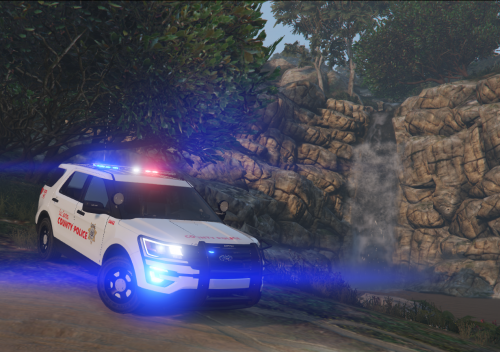 Thank you for the advice, much appreciated! As it was my first I didn't want to over do it, and I now feel confident enough to try new things which I am working on now! I will add the link to the model used! Thank you again, K1Ng 🙂
 -
This is a Los Santos County Police texture designed for TheHurk's Ford Police Interceptor Utility however this is not exclusively for Hurk's 2016 FPIU, if you can find another 2016 FPIU that it fits then go ahead! This is my first texture so if there is anything that can be done to improve it please don't hesitate to give constructive criticism! Texture is roughly based on St. Louis county police, however there are some big differences such as no stripes etc.! Usual install procedure. 1) Download Hurk's FPIU. 2) Follow his install instructions. 3) Go into the .ytd file. 4) Either delete the current texture then drag and drop or rename the png file in the download file. Please DO NOT republish. Please DO NOT edit the skin and claim as your own. Please DO enjoy the skin! Any request just let me know and I'll try my best to do it! Thank you again and enjoy, K1Ng! 🙂 Disclaimer - I am not responsible for any issues that this may cause to your PC! TheHurk's 2016 FPIU -