giosu777
Members
-
Joined
-
Last visited
Everything posted by giosu777
-
Asher try menyoo trainer maybe it will work 🙂 i had same situation with simple trainer but when i play lspdfr i just move the files out of the gta director. Anyway without trainer on lspdfr you'll have a more realistic experience
-
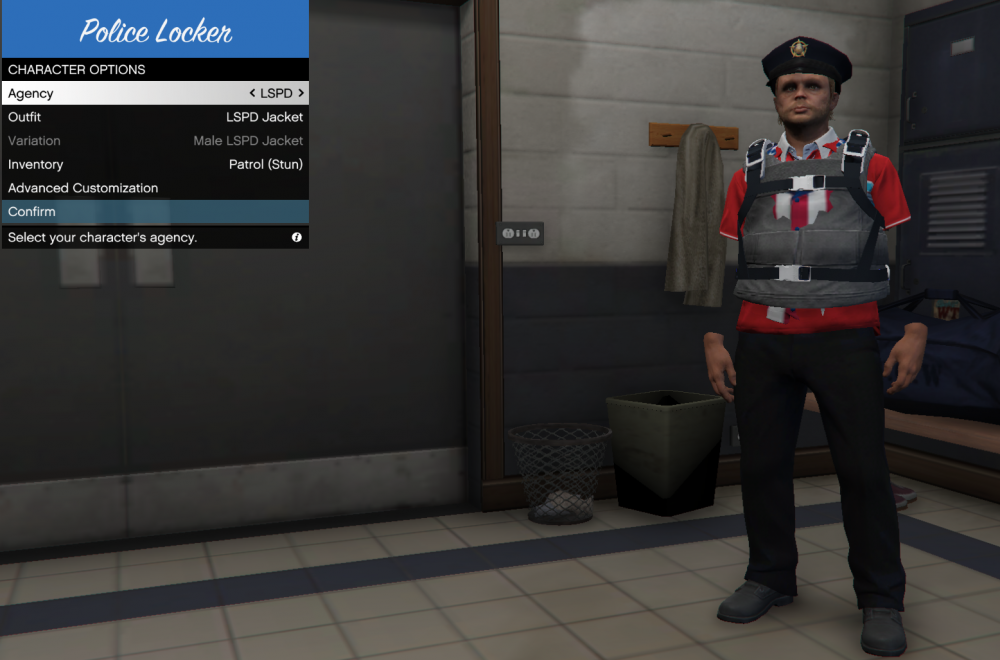
Since i installed lspdfr i got just the cop uniform.Other departments had no other uniform so i installed eup menu , rescue and service and law and order and when i go to the closed it shows me exactly same thing as in this photo.i found the photo on google it doesn’t belong to me but it’s the same situation.i tried a lot and i downloaded all stuff i found which should fix that problem. The clothes are from multiplayer and i really don’t know what to do. Please help me find a solution because i really love lspdfr mod,it’s amazing.
-
tried it but it doenst make any change.its same.all have parachutes coats etc. if i dont have any costum uniform i can play just with the cop on lspd. i cant choose anything else.
-
i tried it but all uniforms looked bad.i had uniforms but with the clothes from multiplayer if u understand what i mean