.jpg.ee261af684c7c6eea1b80c290fdd65be.jpg)
JFavignano
Members
-
Joined
-
Last visited
Everything posted by JFavignano
-
Yes sir! I love it!
-
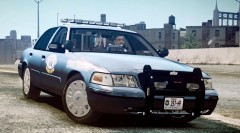
Not a problem! Realistic Driving and Flying http://www.gta4-mods...flying-27-f9020 Neolux Enb http://www.mediafire...3841a1blx9jhqka Found Here LCPDFR Braveheart Policing script Indiciator script ELS v6 Less Overtaking Mod Vdh Police Helper and Towing mod Spotlight Mod CVPI MN State Patrol Slicktop DKT70's Road textures http://www.mediafire...jbxrosmmn0tke66 Livery By Fartknockr69 http://www.4shared.com/rar/ECgasNWJ/WoodstockCA.html
-
I am at work right now on a tablet, gimme a few hours and I will.
-
Yep I use the indicator mod, thanks for the comments! I know, I wanted to shoot him badly! Yes sir, I use the realistic driving and flying mod. Not sure what version.
-
Hey guys, I started a series of GTA videos showcasing LCPDFR. Enjoy! Episode 1 http://www.youtube.com/watch?v=qOl6FsF18AY&feature=plcp Episode 2 http://www.youtube.com/watch?v=cih-g63q-sY&feature=plcp Episode 3 (4 Parts) more to come http://www.youtube.com/watch?v=shc_Dt_jLaY&feature=plcp Episode 4 http://www.youtube.com/watch?v=aXnSpNncN2E&feature=youtu.be
-
Yes not a Harrier, but it still can hover and perform VTOL (Vertical Take-off and Landing) as well as STOL (Short take-off and Landing). Most people will remember the 35 from the Movie "Live Free or Die Hard."
-
Notice the bigfoot walking on that logo too? Bet Rockstar put it in this time round!
-
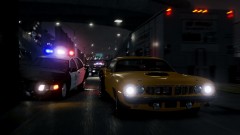 No worries, I didn't know these weren't edited. I have icehancer myself and get great results without having to color correct. What settings are you using for your police lights?
 -
Why do people speculate a bad PC port? Just give them the time to make the game, developers sometimes learn from their mistakes...GTA IV being one of them. I can't wait for this trailer, best day ever!
-
-
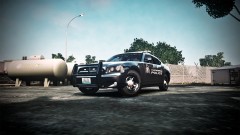
From the album: JFavignano
-
I disagree, anyone that takes the time to try this will be in for a treat. You cannot use LCPDFR until the AI paths are implemented, GTAIVSA creates a new game folder and shortcut to avoid confusion of installations so it is identical to GTA IV folder wise etc. I believe if you were to throw LCPDFR into it when they have AI paths, you would be able to use the traffic stop feature. I can't imagine any calls or anything would make much sense when they are not mapped for the map. I have ELS working in it, as well as any other mod I use in GTA IV. Because it is the same game engine, just with a different map. When you get into LC map specific mods you are gonna run into trouble. I am pleased with how this mod came out and the guys behind it obviously worked very hard on it. Even th BETA showed a professional clean installation method. If your pc doesn't have the power to run an empty SA world, I wouldn't bet on it ever going so well when they finish the final project. Give it a shot Kate ;)
-
AA or Anisotropic? I have a Anisotropic filter setting, but I thought that was unrelated to Anti Aliasing. I know they try to acheive the same thing, but perhaps that was the misunderstanding we had from the get go. I will try AA off with ice and bump AF to max.
-
That's the whole problem, I don't have settings for that inside GTA IV. How do you have an option for that?
-
I would try that but I know Nvidia is the only one with force AA? My Ati catalyst won't do anything in that department for GTA. Am I doing something wrong? I have been out of the loop with video cards since 2008, sorry for the ignorance there.
-
Oh I understand that, I was referring to other games on my current card. GTA IV runs great with AA disabled, but I love the look of AA and it's hard to go back. I get awesome AA in FSX and ARMA. In the Ice config, I see options to bring AA down a tad. I really do hate the Ati interface though with the Multisampling.
-
Ah gotcha thanks.
-
Awesome, thanks guys for helping understand the new line of cards. 300 bucks seems a bit much, but I am just bottlenecking my system right now with the HD5770 don't you think?
-
Okay, so GTX 570 is a good suggestion for my system then? I am just confused with the GTX series since I knew the GT series cards.
-
Looks great! Thanks for finding the files and editing them. Hey Break what fuel mod are you using?
-
Awesome, must be a website my works Barracuda filter won't let me go to. I hate Barracuda. 15 minutes is plenty long enough for filming.
-
Wow I feel like a noob, I didn't know that GTA could even use AA. How do you enable it through that and not Ice? I am a Nvidia person but this computer came with the Ati card installed. What would be a good Nvidia card to get? I am lost when I was looking at best buy at the GTX series. Last Nvidia card I owned was a GT4500.
-
Hey guys, I posted this at GPM without much of a response so I am looking for anyone that can give some advice on this. I am wanting to get a new video card but I want to move to Nvidia without bottlenecking my system. I have a Dell XPS 8100 Studio, 860 @ 2.80 ghz i7, 8 gb ram , Ati HD 5770, on Windows 7 64 bit. I haven't been over the moon about the Ati HD 5770 and everywhere I turn it seems that nvidia wins running gta iv properly. Right now I get about 20-25 fps @ 1920 x 1080p on my 32 inch hd tv monitor. That is with the icehancer enb mod with aa enabled. Any suggestions, or should I not even bother? I game mainly GTA IV, FSX-FS2004 , ARMA 2 OACO. Thanks.
-
Yeah, I will probably do as you mentioned using non ELS for the police and police2 slots, that will make online playing much more fun without CTD.
-
I will be online around 18:00-20:00 GMT today.
.jpg.ee261af684c7c6eea1b80c290fdd65be.thumb.jpg.b324845a66c599bb1884aa1e13d2e339.jpg)