Skip to content
View in the app

A better way to browse. Learn more.

LCPDFR.com

A full-screen app on your home screen with push notifications, badges and more.

To install this app on iOS and iPadOS
  1. Tap the Share icon in Safari
  2. Scroll the menu and tap Add to Home Screen.
  3. Tap Add in the top-right corner.
To install this app on Android
  1. Tap the 3-dot menu (⋮) in the top-right corner of the browser.
  2. Tap Add to Home screen or Install app.
  3. Confirm by tapping Install.

kristopinator

Members
  • Joined

  • Last visited

Everything posted by kristopinator

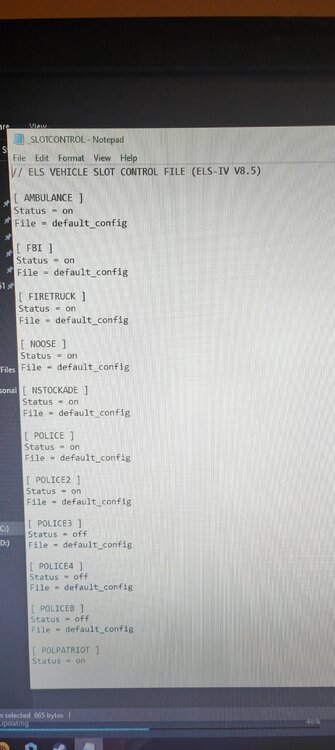
  1. I've not changed the els it's the original default config
  2. Ok so I decided to reinstall GTA 4 and LCPDFR. I downgraded my version to 1.7.0 to run LCPDFR and set it all up added my vehicles, peds, sirens, ELS etc and it was all working fine. I then shut down my computer which needed an update (not sure if that caused the problem or not) then I come back on and go to restart I get in the game my ALT+P isn't starting the mod anymore and then I exit to see if that works and it wont let me into the game anymore comes up with an error message. Below is my Log Book

Account

Navigation

Search

Search

Configure browser push notifications

Chrome (Android)
  1. Tap the lock icon next to the address bar.
  2. Tap Permissions → Notifications.
  3. Adjust your preference.
Chrome (Desktop)
  1. Click the padlock icon in the address bar.
  2. Select Site settings.
  3. Find Notifications and adjust your preference.