


Samppa8316
Members
-
Joined
-
Last visited
Everything posted by Samppa8316
-
-
 Is it possible to change the Dispatch response when they don't understand what you're saying (the "10-9 repeat your transmission" line)?
- 259 comments
- 7 reviews
-
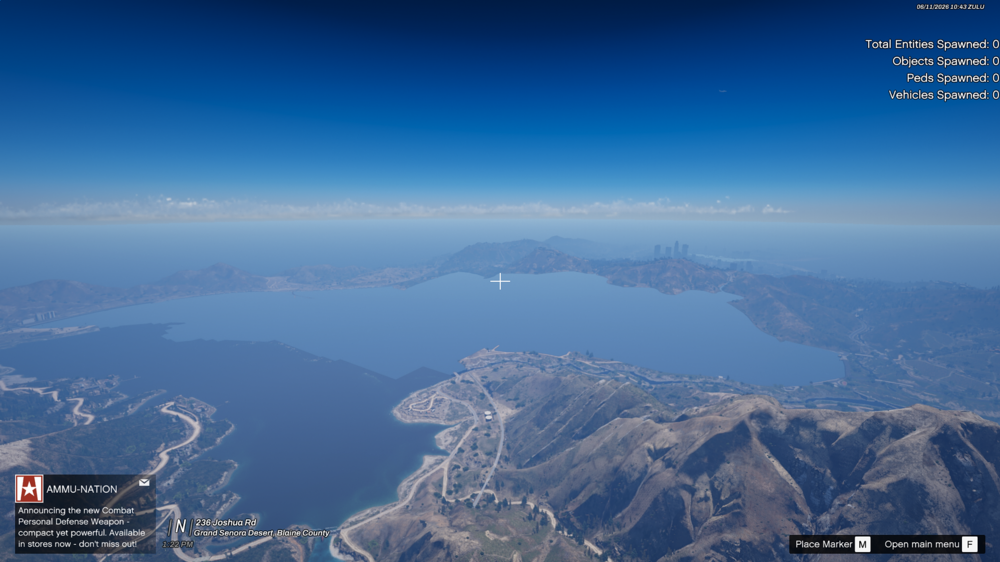
The whole area of the Grand Senora Desert seems to be missing/unrendered for all the time. Alamo Sea, however, is rendered as seen in the photo. You can still walk on the unrendered area normally and some of the vegetation (such as grass) is rendered on the hills and on the ground. NPC's are driving normally there too but no buildings, roads or ground other than vegetation can be seen. I use NaturalVision Evolved and tried installing it again, which didn't fix the issue. Everything else in the map is working though. I am suspecting that maybe one of my realism mods I downloaded before NVE is causing this issue but haven't figured it out yet. If this has happened to someone else or you know which mod might do this, please let me know! In addition, it's not about not having ResourceAdjuster, Packfilelimitadjuster or any of that. I have all of them and also I set "preloadallmodels" to false from LSPDFR ini file so that shouldn't cause the problem.
-
I found out that it's when you like double tap or hold whatever key opens StopThePed so it's that but I use Policing Redefined so I guess I'm missing out on that now. Atleast found it out.
-
I have seen alot of videos where people arrest the peds just by pointing a gun at them without holding E to arrest. Then the suspect goes on their knees with hands up. I was wondering how to get this animation as it is more realistic than the vanilla where you hold E and they run for a second and after that raise their hands and go laying on the ground. I tried searching up for different arrest animations but didn't find much. How can I do it? Additionally, if it's possible to arrest just by pointing with a gun, not holding E it would be great. Thanks in advance!
-
To clarify, I believe it conflicts only on plugins, not in-game GTA V. It likely exits the vehicle because I have KTFDO installed which probably does it. Is there a way to make them not overlap without deleting the plugins or changing their keys?
-
 How do I fix that the in-game keys are being pressed when typing on the pdComp? Like when I type F, it exits the vehicle and if I type J for example, the ELS lighting will change?
- 422 comments
- 48 reviews
-
-

- 2
-
-
Any Police Computer mod that I use does this. When I start typing in the computer, the keys I press will affect the game too. For example when I type F it leaves my vehicle and messes up my thing on the Computer. When pressing keys like R, T, 1, J etc. will change my lighting. Speaking of ELS, when I am on my other monitor (irl) and press J or any els button, I can hear the sounds from my game. How do I fix these problems? Tjtim0tysg75t0TV9laHjbK (1) (1).mp4
-
 I am getting this error after running the two SimpleHud installer .oiv files. I know that it's discontinued but is there a way to fix this?
- 560 comments
- 28 reviews
-
-

- 1
-
-
 Guys I might've found the solution for the ELS.asi error! I was fighting against this for hours and all it got from me is to completely delete only the AdvancedHook.dll and reinstall the ELS 1.05, take the AdvancedHookV.dll from there to your game directory and that's it for me. Hope this works for you too!
- 2,706 comments
- 242 reviews
-
-
- 1
-
-
I found the solution. I don't exactly even know it though but I completely deleted the AdvancedHookV.dll and installed the ELS 1.05 again and took the AdvancedHook.dll to the game directory and that fixed it. I believe I had that same file before but that still fixed it. I feel so stupid I spent like 5 hours finding the problem(s) but thanks for the help!
-
I do have the latest scripthook yeah
-
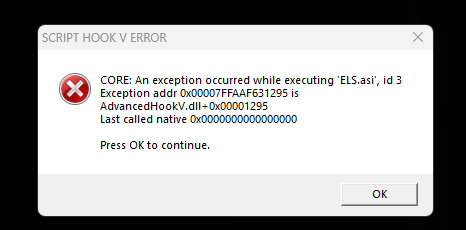
Moved on with the errors. This is a classic one I had this couple of years ago and couldn't find a solution to this other than uninstall ELS, but I like ELS and don't want to play without it. Please someone help.
-
Ah that makes more sense! I found out that ELS.asi AND ExtendedCameraSettings.asi are causing the crash. Without them the game works fine AS SOON AS you hit F4 trying to open the menu. Everything I've tried so far is tried with GTA V main, not RPH. At this point RPH won't let me even choose story mode before crashing. "Could not hook game process. Insufficient permissions or bad anti-virus." But this isn't important now, GTA alone needs to work first. I am It's hilarious that fixing the problem always leads to a new one but atleast I'm learning something new everytime 😄
-
I did some research and found out that dinput8.dll is causing the crash. Without it works fine, however, ScripthookV doesn't work. I tried downloading a different dinput8.dll file but it doesn't make ScripthookV work. What should I do?
-
Without.
-
This didn't help either. It loads me to story mode but after a second or two the game crashes. No black screen, no errors just straight up crash.
-
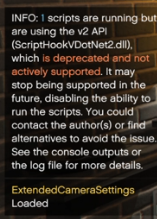
I actually downloaded a backup gameconfig file and now it loads me to the game. However, right after I get to story mode in like 2 seconds the game crashes. I ran GTA not RPH at all. It gave me this notification which might cause the crash. I already renamed the mods folder and it did not help.
-
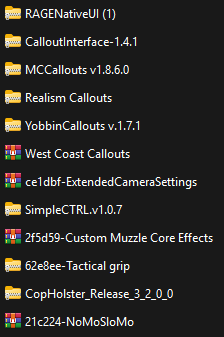
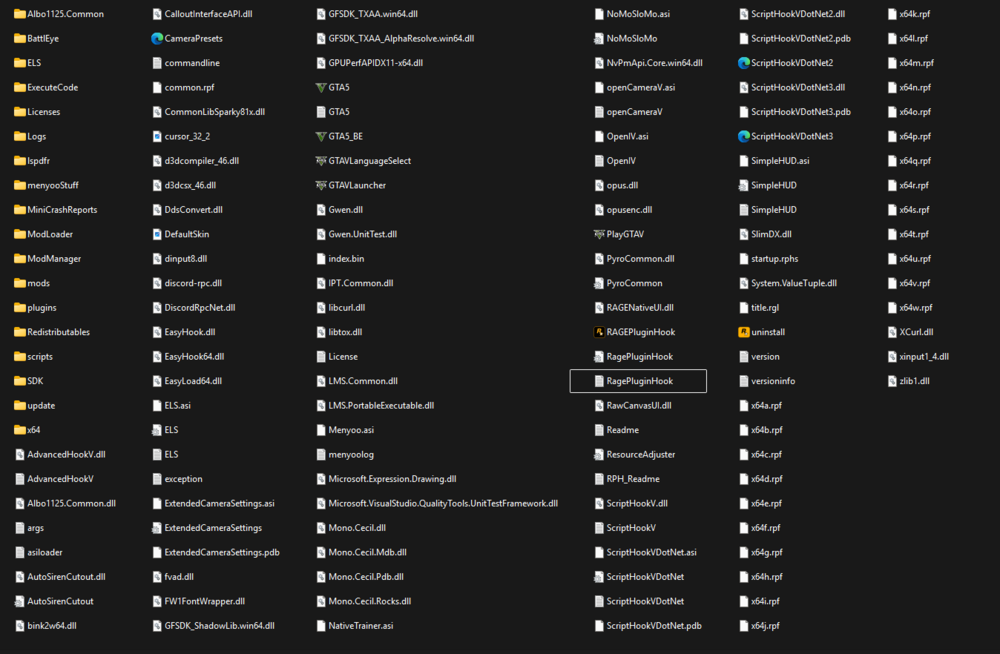
So after I press "Story Mode" or "Launch Story Mode with RPH" whatever it is, after like 15 seconds the game crashes. It crashes in the same spot every time. It crashes even when trying to launch GTA V alone. I tried to disable mods, plugins and scripts folder with no success and since the GTA V itself crashes too, I suspect the problem is in the game directory, not in "plugins" or anything, however, I'm not sure. This happened after downloading a couple of mods from which I have a screenshot of pinned. I also give you the RPH log which always has the same last lines when crashing. What could be the problem? Thanks in advance. RagePluginHook.log
-
Also to add, the AdvancedHookV fix from ELS website didn't help and so didn't an older version of ELS.
-
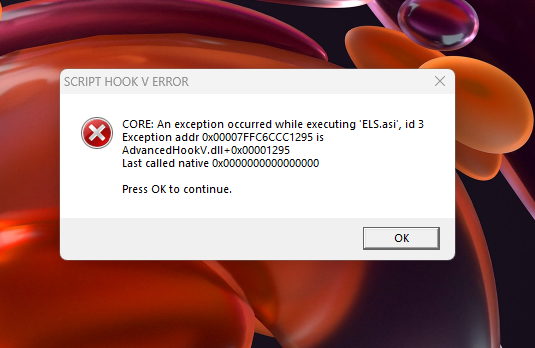
So I've recently downloaded Lspdfr and Rph and some mods (callouts, vehicle mods, sound mods etc.) including ELS. Now I've gotten this error which I will attach into this topic. I'll also add the I've tried to Change the ELS folder to "_ELS" that gave me the same error. I've also tried to change mods folder to "_mods" but still the same error. Any help would be appreciated! Thank you in advance. ELS.log asiloader.log RagePluginHook.log
-
So when I launch GTA V with RagePluginHook, it crashes in about 30 seconds without leaving any error message or anything. I even renamed my mods folder to _mods so the problem can't be there. Can anyone tell me whats wrong? EDIT: I just found out that the problem was in dinput8.dll but why? Before it worked fine but now it makes my game crash. If I delete it many things will stop working, Scripthook V Menyoo etc. Help! RagePluginHook.log
-
Okay, I will try these. Thanks!
-
It works, but then I don't have any custom vehicles, any solution to that?
-
When I launch Rage Plugin Hook it stays in the loading screen about 30 seconds then it suddenly freezes and then the Rage Plugin Hook crashes to my desktop. Please help! RagePluginHook.log


