


RyanMeme
Members
-
Joined
-
Last visited
Everything posted by RyanMeme
-
So today I decided to add some map mods which lowered my FPS a little. That was some road addons and the LS forest. whenever I am doing callouts I seem to get random crashes, below is my crash log, please fix it.
-
Hey all, whenever I load up the game it crashes, I installed some car mods and they were correctly installed, don't see the issue. Below is my crash log.
-
I am redownloading GTA V and then gonna do the same with all the mods and hopefully download LSPDFR and the mods and cars but I don't get it, what caused the glitch in the first place?
-
How do I fix up the car mods, I am lost with what I have done
-
What do you mean car saved at my house? I have nothing saved in the house, I changed a few police cars, pack defults but that shouldn't effect LSPDFR
-
Tried that nothing happened, calloutsv worked fine previously
-
Sometimes when I load LSPDFR it sometimes work or crashes the game, however when I go on duty it crashes and I get this error: Now I have also changed the limit of the timeout and stuff but it isn't working, neither have I added any plugins. Below is the screenshot of what message I get too

-
Damn, what can I use since peter wont work do you think? Also I removed peterucallouts and my game is still freezing when loading lspdfr After the "thread marker 1" it freezes
-
When does it come out?
-
So I am waiting until the 4.2 for it to be fixed?
-
Where can I find the logs? If it is right I think this is it:
-
Yea I am also having an issue with the peterucallouts, I downloaded the extra, LSPDFR worked fine but said they had missing files so I downloaded the "main" files and when I extracted them it crashed LSPDFR everytime on startup

-
Thanks, can you send me a link to the force a callout that works on 0.41, as when I tried earlier it crashed my game.
-
These are the options: TRAFFICSTOP_START_Key=LShiftKey TRAFFICSTOP_START_ModifierKey=None TRAFFICSTOP_START_ControllerKey=A TRAFFICSTOP_START_ControllerModifierKey=None TRAFFICSTOP_INTERACT_Key=E TRAFFICSTOP_INTERACT_ModifierKey=None TRAFFICSTOP_INTERACT_ControllerKey=DPadRight TRAFFICSTOP_INTERACT_ControllerModifierKey=None Do I set them all to "None"
-
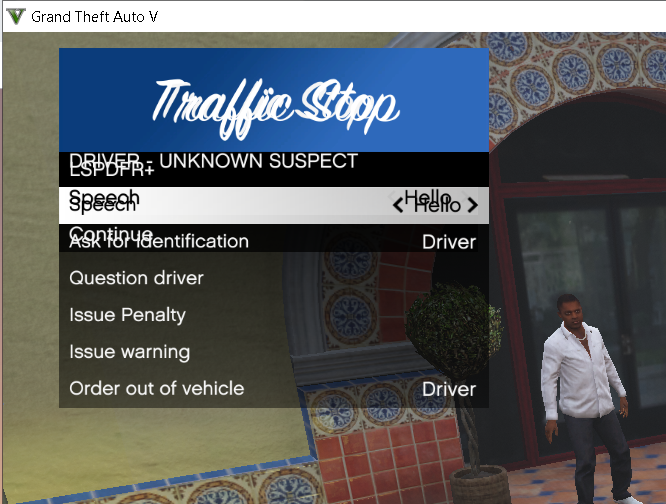
I also get another keybind error, I use "e" when doing a traffic stop and talk with the ped and it shows two boxes, one behind it has more options but idk what plugin it is from. I got a screenshot listed below for it.
-
I know they cannot be done on their own but the "ForceAcallout" doesn't work for 0.41
-
Hi there for the O.41 I cannot find a keybind for forcing a callout please can someone help me 🙂
-
Hello, I went into the locker room on GTA V and then when I clicked on duty a few seconds later my application froze and then did that wierd noise and said LSPDFR stopped working, below is the error log.

-
can you recommend me any good mods to download that aren't so common such as LSPDFR+ and traffic policer etc?
-
I read it however it said nothing about the error I am getting.
-
So how do I fix this?
-
This is the error I get


-
Hello all, I started up today using new Rage Hook Plugin and LSPDFR at the latest version, I came across some errors. Whenever I start loading up the LSPDFR rage hook plugin stops it because "it caused the game to freeze" after that it said the reason had something to do with "fiber", "main" to be the cause of the crash. Any idea to solve this?


