


aRragingCanadian
Members
-
Joined
-
Last visited
Everything posted by aRragingCanadian
-
Is there a way to edit/change your character? Change his hair, facial hair, etc?
-
This is very common when playing LSPDFR. Plugins and mods will affect your FPS. There isn't too much you can do to fix it (in my understanding anyways). And if you are getting 50 to 55 fps in the city that's pretty good. I too get between 43 to 55 in the city and 60 to 70 in Blaine County. I just turn off my FPS counter and have fun playing LSPDFR.
-
Did you install the cars in the "Mods" folder of OpenIV... if not that will cause you game to crash and you have to do a fresh install of GTA V.
-
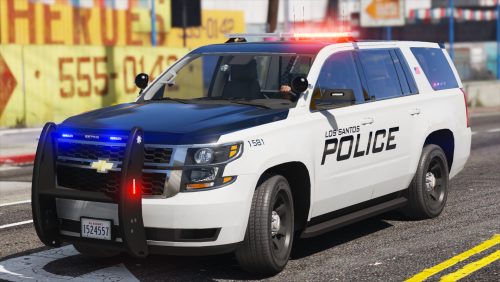 I would love to use this pack.. the cars/SUV's look outstanding. I have police3 & police4 handling lines set for gresley (SUV's) & police & police2 set for fugitive and when I opening the folder there is no idiction of which car belongs to what slot.. and I really don't want to go through each car and keep exiting and entering the game until I get it right. So if someone could tell me which is which I would really appreciate it. Example: FPIU = police3 Thank you.
- 51 comments
- 22 reviews
-
Ensure you have the following: Latest Version of RPH - 1.68.1248.15551 Latest Version of ScriptHookV - v1.0.1737.0 Latest Version of LSPDFR - 0.4.3 Latest Version of GTA V Some AntiVirus programs will prevent LSPDFR/RPH from starting correctly. Try disabling it.
-
Hello everyone So I tried to install BetterDispatchAudio 2.2 into LSPDFR and it didn't work. I followed installation instructions in the provided ReadMe file and when I launched LSPDFR nothing changed over dispatch. Do I have to install "Plate Check" too? There was also a secondary download called B.D.A. 2.2 Standard Dispatcher does that need to be installed instead?
-
Thank you
-
Hello all. I hope you are doing well this evening. I was wondering if I really need to update my LSPDFR with today's update? I am (at the moment) having no issues with crashing.
-
Worked for me.. thank you.
-
You're welcome. Yes reinstalling EUP Menu worked. Thank you.
-
Not yet... but I will and let you all know. BTW I absolutely love you videos dude.
-
SOLVED: Reinstalling EUP Menu worked! Hello. I have updated ScriptHookV, RageHookPlugin, OpenIV, and LSPDFR to their latest versions. So everything seems to work good... however when I hit F11 to bring up the EUP Menu it doesn't appear. I have both EUP Menu and LSPDFR selected to start when the game loads. Even if go to type "LoadPlugin" EUP Menu doesn't seem to be there. Will I need to reinstall or wait for an update.
-
Make sure you have the latest versions of the following: RagePluginHook Version 1.68.1248.15551 [Updated: July 26th, 2019] - https://ragepluginhook.net/Downloads.aspx LSPDFR - Currently not updated. Once everything is updated you SHOULD be able to play.
-
ScriptHookV has now been updated. Now we need LSPDFR to update. 🙂 http://www.dev-c.com/gtav/scripthookv/
-
Now what do I do? I updated both GTA V & Ragehook yesterday before the newer message about LSPDFR needs an update. So does this mean I can no longer play LSPDFR permanently or will I be able play it once LSPDFR and scripthookv is updated.
-
lol
-
Where did you get this? When I give to the script hook website it says it was updated in February 2019.
-
After ScriptHookV updates (hopefully that will be soon) will all the callouts/plugins/mods work.. or will they have to be updated too?
-
So now Rage supports 1734 which is the Casino update and no longer supports 1604 *which is what I reverted too*.... So I was able to upgrade GTA V back to 1734... however when try and launch LSPDFR it crashes right way. It says "ScriptHookV" is incompatible. So we now have to wait for an updated version of SHV to play... hopefully it will be updated soon. I love playing LSPDFR.
-
Steam... what happened was I reverted the game back to 1604 which is now no longer support by Rage. So I went into Steam and click on "Validate game" or something along those lines.. so after about 5 mins it said something about 3 file could not be validated and it was fixing them. So now I have the current version of GTA V 1704 (which is now supported by Rage)... the issue is now ScriptHookV not being updated yet. So LSPDFR will work once ScriptHookV is updated.. hopefully that is soon.
-
PLEASE DELETE THIS POST... SORRY.
-
I saw an update when starting RageHook, thought it was the update for the new game... but it wasn't... now I can't play LSPDFR anymore. 😞
-
@Pennopwer - Its unclear. Whenever RagePluginHook is updated. Hopefully sooner than later.
-
Thanks. Somehow I was able to revert back the the previous game version. Instead of having just the "OK" in the Unsupported Game Patch popup like pictured above, I had a "YES" or "NO" option. I clicked yes.. and it reverted the game back.
-
Do you know how long does that normally takes?

