


aRragingCanadian
Members
-
Joined
-
Last visited
Everything posted by aRragingCanadian
-
LSPDFR is for single player only.
-
I haven't tried ALPR Lite yet. As for TrafficPolicer I barley use it... I just have it for a few things. I too enjoy playing LSPDFR... it is so much fun. It has it's moments of annoyances... but so does everything else in life. 😄
-
Hold down back/select on your controller to bring up the normal LSPDFR menu, go to "radio" and hit request call. A much better option is to install "Force a Callout" this will allow you to hit a key on your keyboard to request a callout rather then going through the menu which can be annoying because if you select whatever option in the menu next to a car it will blip the car which can be really annoying. It will also allow you to make yourself available or unavailable for calls. As you know once you arrest or kill someone the call ends.. but I do like to conutine to search them or whatever... and I don't want to be called to another call. To fix the overlapping menus, simply go into which ever .ini file you want and change the menu key there.
-
Random crashes will happen. Its not easy to avoid them.
-
If you are using a controller you can't press "A" otherwise it will cancel the traffic stop. I am not sure what Computer Lite uses as it's default key to open up.. but if it's like Computer+ it requires you to press "E" on your keyboard which activates the horn, thus cancelling the traffic stop as well. Instead of going into the files .ini file and changing the command there, just pause the game go to where your "Keybindings" options are and change the horn key (E) to whatever is allowed. I changed it to a numpad key.
-
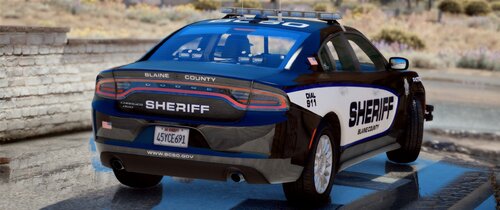 Okay I installed both the marked and unmarked versions of the FPIU & Dodge Charger. I renamed the marked vehicle's and the .XML files to: sheriff & sheriff2 placed them in their designated patchday folder and placed the renamed .XML file to the ELS folder. No issues with the marked units.. they are outstanding... can't wait to try them out more. I renamed the unmarked vehicle's and the .XML file to: fbi & fbi2, again placed them in their designated patchday folder... yet when I spawn them they spawn as their marked counterparts. What did I do wrong?
- 54 comments
- 5 reviews
-
When you pull over a car DON'T get out of your car right away... wait a few seconds then get out.
-
Just update to 6.6.4.0
-
Make sure your AntiVirus or Windows Defender isn't blocking RPH.
-
Totally forgot that I made this post... yes I found that out a day after I posted this and forgot to edit this post. 🙂
-
You don't actually NEED it... it just makes it easier to call in transport or whatnot. I have never used Police Radio because of compatibility issues. You may need TrafficPolicer though.
-
No you don't.
-
Hello everyone. So I haven't had this bug in a while, but it decided to raise its annoying head. So I got called out to a person with a knife when I arrived on scene normally the subject while run toward me with the knife or start running off, but this time as I was approaching him in my vehicle he did the animation where he picked up his phone and immediately put it back into his pocket, so when I arrested him there was no "Code 4" message. His icon was still red on the map... so I brought him to the police station and "Past him off to another cop", but his red blip stayed on the map and would never go away. Even on another call his red blip was still there. Anyone else this bug from time to time?
-
Hello ladies and gentlemen I have two questions. 1. Is there a way to run faster? I do have Simple Trainer installed and it was the "Fast Run" option is this the only way or is there another mod. 2. Is there a way to change the gun's reticle color.. it is so hard to see sometimes and I am keep missing my target. Thank you.
-
Hello fellow officers. First off I just want to say that this isn't a huge deal.. it doesn't affect my game or LSPDFR, just merely sharing this to see if anyone else is having this issue. So after I am done my play session of LSPDFR I exit the game normally... it exits to the desktop but a few seconds later it brings up the "GTA V has exited unexpectedly" error. This happens EVERY time. Like I said above this does not affect the game in away.. I can relaunch the game and everything will be okay, no save loss. No damage. Just wanted to see if this is a common error.
-
I have Player Location Display installed for quite sometime. I guess I need to pay better attention. 😄 Thanks for the help. chadc78 & Scaarus
-
Hello fellow officers As you all know we love role playing in LSPDFR. I role play as LSPD, BCSO, also do unmarked patrols... I've always wondered.... where is Los Santos County? There a some vehicle packs set Los Santos County... but where is it exactly? Thanks.
-
How do I do this? Is it in the vehicle.meta or what?
-
Hello all I hope you are all doing well. So a lot of the time when I install a new vehicle or vehicle pack that has red and blues (which is most of them...LOL) I've noticed that the red lights look more of an amber/light orange color. This is more visible during the day then at night where the lights MAY turn slightly more red. Most of my graphics settings are set to high or above, with some set to normal... but the ones that "affect" the red/blue's (ex: Post FX) are set to high or above. I've made sure the window/light bar tint is set to None or Stock via Simple Trainer which sometimes improves some models, but not all. I have a Radiance V variant installed. I ensure I always put the ELS files in the ELS folder. Here is one pack I installed that no matter what I try and change the lights always look Amber/Light Orange https://www.gta5-mods.com/vehicles/els-lspd-pack-add-on-replace There are some car packs that I really enjoy that are not super affected with this issue, but I always like to switch up now and then. I highly doubt my monitor has anything to do with this... but here is my monitor: ViewSonic VX2457-MHD 24 Inch 75Hz
-
When playing LSPDFR I like to roleplay by calling out police codes (just like most of use on LSPDFR do), I only know an handful, but like to know more for future LSPDFR roleplaying. So I was hoping someone could either link me to a site that has a lot of police codes (Los Angles (Los Santos) based) or maybe write some on here that I could print out. Ones I know... correct me if I am wrong... 10-4 = Acknowledgement 10-6 = Busy, Call Only if Necessary 10-7 = Not Available for Calls 10-8 = Available for Calls Thank you for your time.
-
 I was about the ask the same thing. I really would like to use this, but its not worth installing right now because all it does is crash my game.
- 1,196 comments
- 127 reviews
-
You're welcome. And I don't blame you... it takes a lot longer then it should to play that opening mission.
-
1. As far as I know you don't have to do any missions if you want to play LSPDFR... but I started playing it after I beat the game. 2. No you don't have to install previous versions... just install 0.4.3.
-
-
 Installed this callout pack today and my game kept crashing during the loading screen. Once I removed it, my game loaded correctly. Please update this... looks to be a fun callout pack.
- 200 comments
- 27 reviews



