


aRragingCanadian
Members
-
Joined
-
Last visited
Everything posted by aRragingCanadian
-
Yes I have EUP Menu and it works perfectly with the current version of LSPDFR.
-
I installed Force a Callout and it works great. The latest comments on Callout Manager are mostly about LSPDFR crashing. I still may try it to see if its an isolated thing or not.
-
Thanks I will wait until these get updated... I don't need them per say, but it would be nice to have them once in awhile. Thanks for the info.
-
Bejoijo has removed his content from this site... but you can find all his mods on his own site. https://bejoijo256.wixsite.com/bejoijo
-
I have a few questions about callouts. 1. Is there mod or a way to control/manage callouts? For example -- Sometimes I'll get the same call out a few times in a row. 2. Is there a button I can press (or a mod which gives me a button to press) that can force a callout. I know I can go through the menu and click on "Request Callout" or press RightCtrl+Delete to choose an Agency Callout, which I do.. but if I don't pull off the road or if I am near a car I hit "A" which blips a vehicle causing me to get out of the menu and starting over again. 😄 Note: I've read that Police SmartRadio has a option to request a callout, but I can't seem to get Police SmartRadio to install correctly.
-
I merely wanted Police SmartRadio for reading license plates.. so I don't have to type them out in Computer+... hopefully someone will make a mod sometime that can do that.
-
No, I uninstalled TrafficPolicer because I have StopThePed. So if that's the issue, I'll just let it be. Thanks for your help. 🙂
-
Not sure if LSPDFR is affected by the games story mode but if you are at the mission where Micheal and Franklin are not allowed in the city because they messed with the mob boss maybe that's why enemies are spawning.
-
Hi everyone. I can never seem to install Police SmartRadio on LSPDFR 4.3. I watched both Albo1125's & Kane Jr (who did/does a lot of LSPDFR installation videos) step by step, and when I load LSPDFR it crashes. I will try again and let you all know... but am I the only one that can't seem to install it?
-
You're welcome.
-
Hi everyone. So I've been wondering is there a way to get in your car faster? It's pretty annoying sometimes when a suspect runs or drives away when you are approching him/her only to run over to your car and have your character take his/her sweet time opening the door and climbing inside 😄.
-
Compatibility warnings are really nothing to worry about. It just means mods creator hasn't updated it for the current version of LSPDFR... I get those with my mods and they work perfectly fine.
-
For all uniforms you need to install this: How to install:
-
-
What are your current favourite vehicles and/or vehicle packs? Mine are: Los Santos Police Department [LSPD]: Blaine County Sheriff's Office [BCSO]: FBI: [Set to FBI] FBI: [Set to FBI2]: Park Ranger: *All Blue Lighting has been added to POLICESCO'S 2016 Dodge Charger*
-
I noticed when I use to use Arrest Manager they would get out of the car all the time. It was quite annoying.
-
As far as I know... yes I always put them in the folders I listed. I know some many say "Place in patchday21" but I never do that.. I always put them in the folders I know they work in.
-
Arrest Manager is fairly similar.
-
Seems to work now. Disregard this post. Hello all Whenever I start to chase either a car I've pulled over or a ped that starts running from me, it tells me to hit "B" or hit said thumbstick to report crime (start pursuit) I do so and nothing happens.... even tried to hold down the button and nothing happens. Then I went into the keys.ini file and changed the button to "V", and still nothing happens. Is there a way to fix this?
-
Disclaimer: Ensure you put all replacement cars inside the MODS folder of OpenIV... if you place them outside of the mods folder it will cause your game to crash you will have to do a fresh install of GTA V. When playing LSPDFR this is where I put my cars and they appear in the garage (expect for police4, which you have to manually spawn) police, police2, and police3: All cars spawn in police garage OpenIV > GTA V > mods > update > x64 > dlcpacks > patchday4ng > dlc.rpf > x64 > levels > gta5 > vehicles.rpf Police4: You must manually spawn car by hitting "F4" and type "Spawn police4" OpenIV > GTA5 > mods > x64e > levels > gta5 > vehicles.rpf fbi & fbi2: Cars will spawn in police garage OpenIV > GTA V > mods > update > x64 > dlcpacks > patchday11ng > dlc.rpf > x64 > levels > gta5 > vehicles.rpf sheriff & sheriff2: Cars will spawn in police garage OpenIV > GTA V > mods > update > x64 > dlcpacks > patchday3ng > dlc.rpf > x64 > levels > gta5 > vehicles.rpf pranger: Car will spawn in police garage OpenIV > GTA5 > mods > x64e > levels > gta5 > vehicles.rpf
-
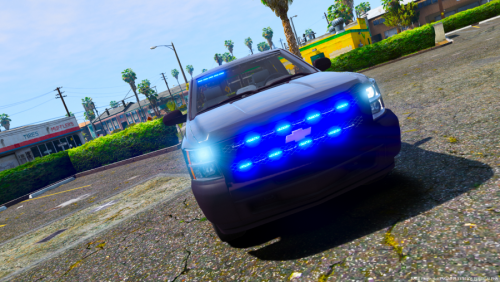 Very nice pack. Just wish you included what year the Charger was. Just an FYI to all who want this pack. FBI is the Chevy Silverado Police4 is the Charger
- 17 comments
- 6 reviews
-
-
That's kinda sucks.. thanks for the help.
-
Can someone tell me what police vehicle pack is being used in this video.. https://www.youtube.com/watch?v=QLiAARqMts4&t=695s Thank you.
-
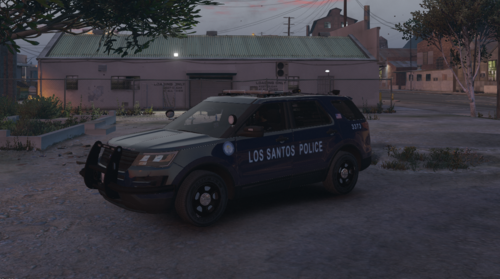 Just a heads up. Stage one lighting doesn't appear anywhere on the Charger and FPIU... only stage 2 and 3 do. I put the XML files in the correct folder and everything is installed correctly. Not the biggest deal.. but something might want to check out. 😉
- 57 comments
- 5 reviews




