
Sangmi
Members
-
Joined
-
Last visited
Everything posted by Sangmi
-
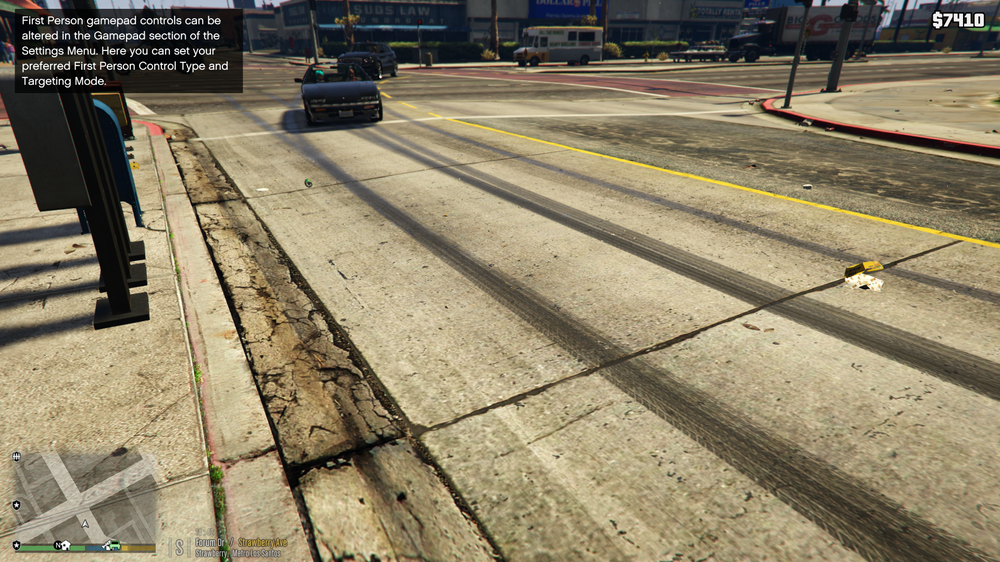
Hello, Lurker for years, never really posted before. I've been playing LSPDFR since at least 2017 but I've only recently encountered this issue. Whenever I mod in patrol cars (via replace or DLC), all vehicles in the game have an infinite track following behind them from all four tires, as if you've tapped the space bar to e-brake. Additionally, the braking sounds are completely absent as well, if I jerk the car hard one way to spin it out, there is no kind of tire squealing or anything of the sort. It impacts both vanilla cars as well as any replacement/DLC cop cars, and for obvious reasons takes me out of my immersion. This only impacts replacement cars, when I turn off my ASIs and play vanilla GTA 5 or GTA online everything functions normally. It only seems to happen with car mods, and it happens with any car mods that I install. I have tried self diagnosing, but I'm not sure where exactly to look. I even completely deleted my mods folders and re-installed everything to no effect. Additionally, all of the relevant vehicles.meta handling lines were replaced, but this effect persists regardless of changes to vehicles.meta, which also confuses me. Basically, what should I do? I've done this stuff for years without any effect, so I'm not sure what's going wrong this time. Any thoughts or suggestions are greatly appreciated.