Skip to content
View in the app

A better way to browse. Learn more.

LCPDFR.com

A full-screen app on your home screen with push notifications, badges and more.

To install this app on iOS and iPadOS
  1. Tap the Share icon in Safari
  2. Scroll the menu and tap Add to Home Screen.
  3. Tap Add in the top-right corner.
To install this app on Android
  1. Tap the 3-dot menu (⋮) in the top-right corner of the browser.
  2. Tap Add to Home screen or Install app.
  3. Confirm by tapping Install.

sayalex3

Members
  • Joined

  • Last visited

Everything posted by sayalex3

  1. I've been using the same car pack for a few days, no issues, but just launched and now suddenly all reds, blues & headlights do not work, for any car. I've tried installing a new, different car pack but no avail.
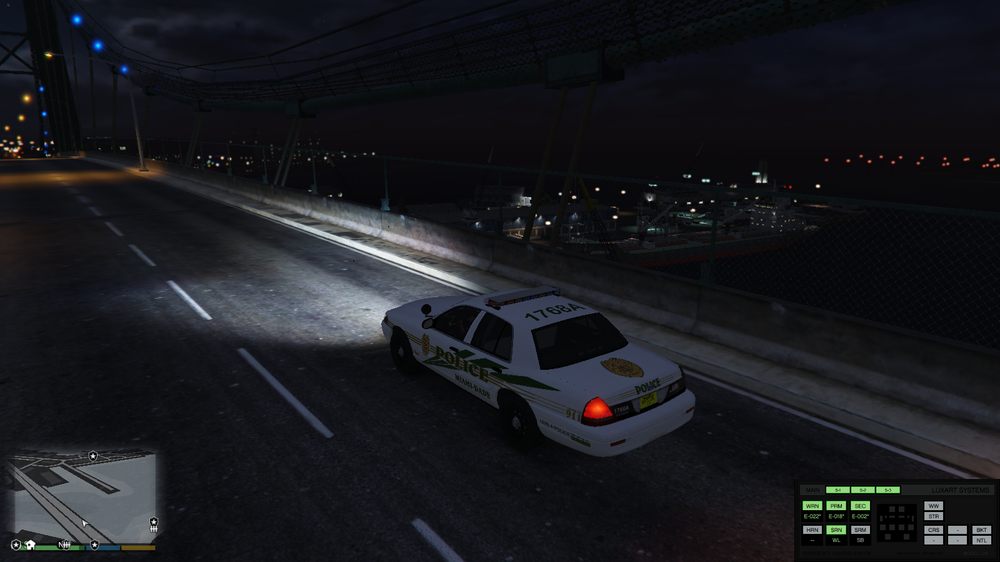
  2. Alright I'm gonna try disabling the Anti-Virus. Let's hope for the best! It worked! Thanks alot!
  3. I've just installed LSPDFR 0.4.1 using Kane Jr's tutorial (Link at end of text), but when I run RPH as administrator, nothing happens for one minute. After waiting a minute it finally launches GTAV, except it doesn't even get as far as showing the flashing blue and red lights loading screen, it just goes black, does nothing for 10-30 seconds then crashes to the screen that's in the image. All help appreciated.


Account

Navigation

Search

Search

Configure browser push notifications

Chrome (Android)
  1. Tap the lock icon next to the address bar.
  2. Tap Permissions → Notifications.
  3. Adjust your preference.
Chrome (Desktop)
  1. Click the padlock icon in the address bar.
  2. Select Site settings.
  3. Find Notifications and adjust your preference.
