Skip to content
View in the app

A better way to browse. Learn more.

LCPDFR.com

A full-screen app on your home screen with push notifications, badges and more.

To install this app on iOS and iPadOS
  1. Tap the Share icon in Safari
  2. Scroll the menu and tap Add to Home Screen.
  3. Tap Add in the top-right corner.
To install this app on Android
  1. Tap the 3-dot menu (⋮) in the top-right corner of the browser.
  2. Tap Add to Home screen or Install app.
  3. Confirm by tapping Install.

DiizeTV

Members
  • Joined

  • Last visited

Everything posted by DiizeTV

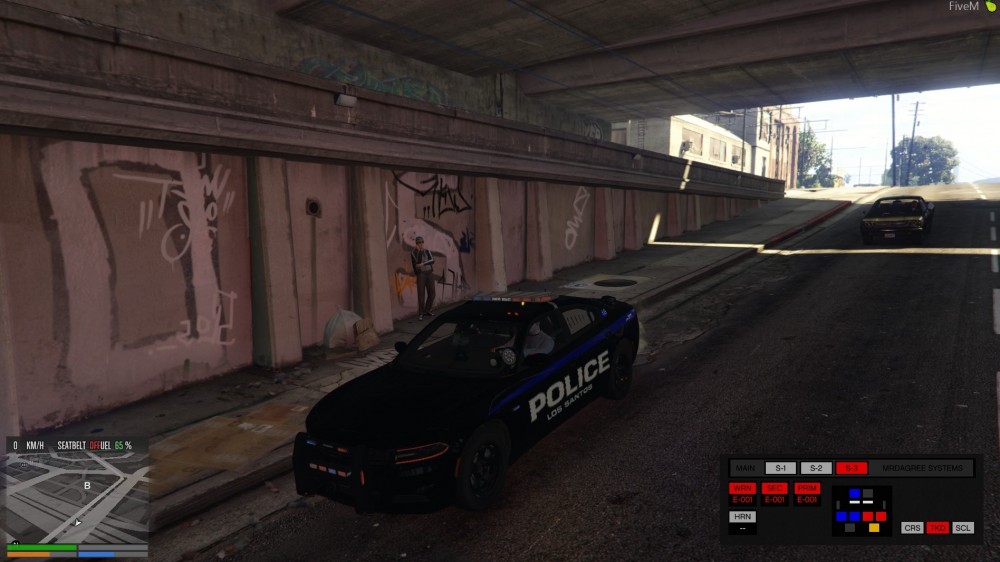
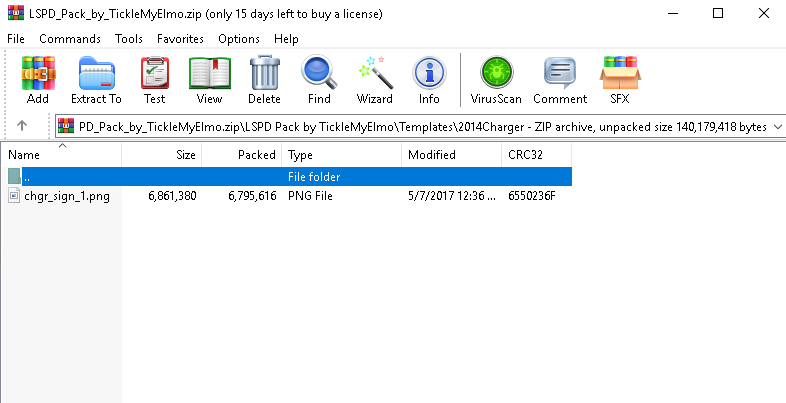
  1. Hey guys, ive been having problems installing new car models for my FiveM server. I downloaded ELS and the panel is working perfectly etc, but ive noticed my cars i install dont have any strong lights uptop? Ive tried several different models and same on everyone. Im posting a picture so you can see how there is barely any lights uptop in stage 3. I wanna add that ive already put the XML files where they should be.. Also, where is "templates" files soppused to go? Here is an example for the Dodge Charger, where do this file go? Would love to get some help and would really be grateful. Thanks
Account

Navigation

Search

Search

Configure browser push notifications

Chrome (Android)
  1. Tap the lock icon next to the address bar.
  2. Tap Permissions → Notifications.
  3. Adjust your preference.
Chrome (Desktop)
  1. Click the padlock icon in the address bar.
  2. Select Site settings.
  3. Find Notifications and adjust your preference.