
Universal Jewel
Members
-
Joined
-
Last visited
Everything posted by Universal Jewel
-
From the album: LSPDFR COPSTV
-
-
bandicam 2019-10-07 23-34-26-547.png
-
 bandicam 2019-10-07 23-31-42-234.png
-
 bandicam 2019-10-07 23-31-28-308.png
-
 bandicam 2019-10-06 02-55-23-571.png
-
 bandicam 2019-10-06 02-53-08-505.png
-
 bandicam 2019-10-06 02-07-41-495.png
-
 bandicam 2019-10-06 01-45-04-569.png
-
 bandicam 2019-10-06 01-29-53-763.png
-
 bandicam 2019-10-06 01-23-25-612.png
-
-
From the album: LSPDFR COPSTV
-
From the album: LSPDFR COPSTV
-
From the album: LSPDFR COPSTV
-
From the album: LSPDFR COPSTV
-
From the album: LSPDFR COPSTV
-
From the album: LSPDFR COPSTV
-
From the album: LSPDFR COPSTV
-
From the album: LSPDFR COPSTV
-
Ill add you on discord shortly Just added you
-
Here is a detailed crash report CrashReport_Joshu_637056615487204002.zip
-
Do you have a discord?
-
Hey thank you! Here you go RagePluginHook.log
-
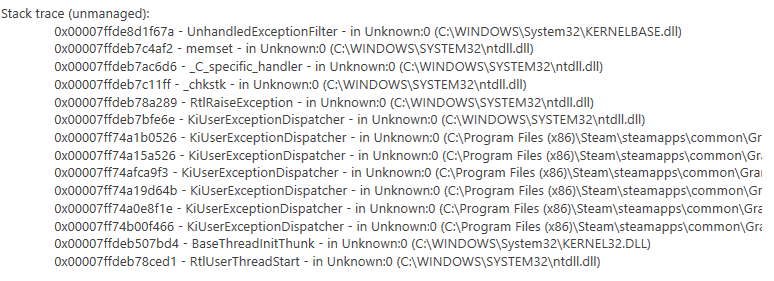
Hey so I did as you instructed and it worked! But yet another issue, my ragehook just randomly crashes while on patrol usually when interacting with people or things. Got a fix for that? LOL Maybe the attached photo could help? Generated from the crash report.
-
AMD Ryzen 5 1600 Six-Core Processor 3.20 GHz w/ 8GB Ram I've been running LSPDFR and FiveM on this computer since last year with no issues until 4.4 now I have issues with LSPDFR but FiveM is still fine
-
Here you go. RagePluginHook.log
-
Hi, so recently I updated my LSPDFR on to a fresh copy of GTA5, I proceeded to reinstall the plugins I've used from Albo. GTA5 and RageHook load with out an issue so do the plugins/ LSPDFR etc. Once I go on duty, however my entire game with the exception of my emergency vehicles added in from LSPDFR website, begins to "De-Render". Immediately the map starts to disappear. Over the past night or two I've tried taking out different plugins assuming because they weren't up to date with 4.4 that was the issue that did nothing. I lowered my GTA5 graphics and population density, distance scaling, and nothing worked. As long as I'm off duty there are no issues. only when I'm on duty. If anyone can help that would be appreciated