Nexon911
Members
-
Joined
-
Last visited
Everything posted by Nexon911
-
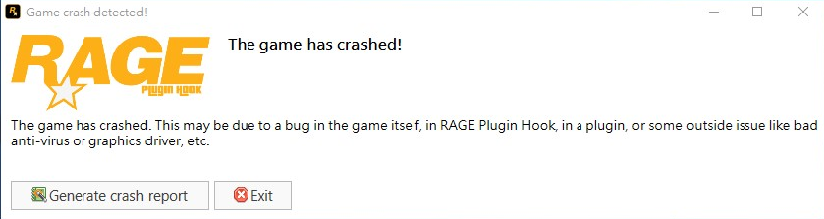
Hello, here's what it looks like, I turn on the game and play for about 15-30 minutes and suddenly I get this message RagePluginHook.log if it helps, I use the NVE graphics mod
-
-
RagePluginHook.log
-
RagePluginHook.log
-
however it doesn't work. it was fine the first time, but when I started the game a second time, it still crashed
-
Thx it worked
-
RagePluginHook_17112023_162410.log
-
you have to wait for script hook v and rage plugin hook updates
-
 Does the game work for you?
 -
You welcome Unfortunately, we will wait a bit for this update, it is not known at all whether it will last a week
-
I could be wrong but Basic Callouts is out-of-date. It is using 0.3 API which could be causing the issue. there is a new update you will have to wait until they update the rage plugin hook and script hook V