


vardazed
Members
-
Joined
-
Last visited
Everything posted by vardazed
-
 Then does Grammar Police redirect e.g. backup request to Ultimate Backup and so forth?
- 1,366 comments
- 87 reviews
-
This plugin is way better than Vocal Dispatch, which took me hours to configure properly (as I'm not english) and despite that it didn't work. Can I also ask, where can I find "DefaultToNative" setting, mentioned in config.txt?
- 1,366 comments
- 87 reviews
-
-

- 2
-
-
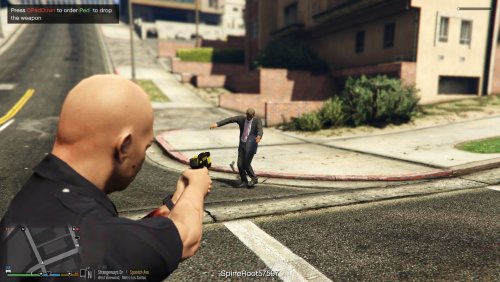 Cool plugin but I also noticed FPS drop. I have many other plugins, but when I start Drop The Weapon I unfortunately observe about 10 fps drop. Unfortunately, because I really wanted to use this plugin but at this point I can't afford a 10 FPS drop. I'm keeping my fingers crossed for you that you will manage to minimize it. My specs: Win 10 x64 16 GB RAM i5-8400 @ 2.8Ghz to 4Ghz with Turbo NVIDIA Geforce GTX 1060 6GB GDDR5
- 39 comments
- 15 reviews
-
 Hey guys. I have a problem with loading the .ini file. Actually, not loading. When I change BeginListeningKey to 88 (X key) and X for controller, in the game I can still start listening only with RMenu and DPadUp. The same with the PanicModifierKey. Also I've turned off the PTTSound to see if it's really a problem with the .ini file and there was still beep sound when I was pressing right alt key. I'm from Poland, but I set everything correctly and I'm not complaining about recognition. Addons from other plugins also work fine. Maybe that's something with the location. Does anyone have the same problem? Edit: Ohh man I solved it, it was my own failure. I've had probably a copied word in memory and I've accidentaly pasted it before [General] mark. I noticed it by accident when I was comparing my .ini file with the original.
- 587 comments
- 106 reviews

