snakeisekans
Members
-
Joined
-
Last visited
Everything posted by snakeisekans
-
-
Do you mean the Manual folder? I already have, except i'm a bit confused with (Create a new folder in your dlcpacks (locate below) and name it lspdpack (GTA V directory)/mods/update/64x/dlcpacks and locate your latest patchday) ) Do I make the lspdpack folder in my patchday20 folder, or just on update>x64>dlcpacks?
-
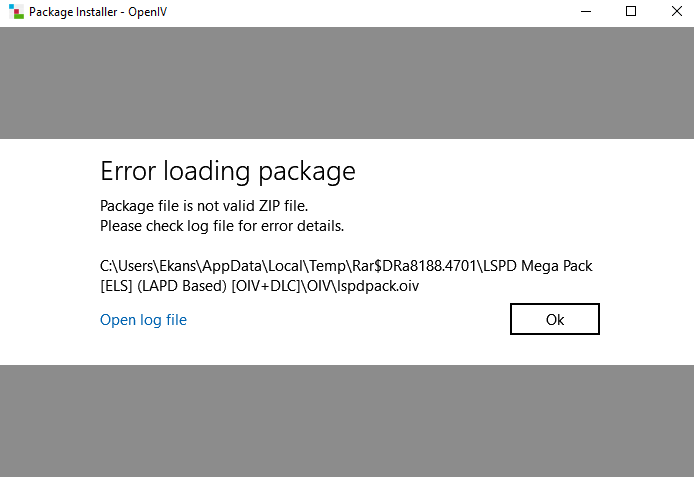
Hello, I recently downloaded 0sc4r's lapd pack and while using the .oiv for the LSPD Mega Pack [ELS] (LAPD Based) [OIV+DLC].rar it gives me the error as seen in the picture, is there any way I can fix this? -------------------------------------------------------------------------------- [4/4/2019 2:19:47 AM] [1636] INFO -> Current GameId: "Five" [4/4/2019 2:19:47 AM] [1636] INFO -> Current GamePlatform: "pc" [4/4/2019 2:19:47 AM] [1636] INFO -> Current GamePath: "C:\Program Files (x86)\Steam\steamapps\common\Grand Theft Auto V\" [4/4/2019 2:19:47 AM] [4140] INFO -> Loading package [4/4/2019 2:19:47 AM] [4140] INFO -> Loading package from "C:\Users\Ekans\AppData\Local\Temp\Rar$DRa8188.4701\LSPD Mega Pack [ELS] (LAPD Based) [OIV+DLC]\OIV\lspdpack.oiv" [4/4/2019 2:19:47 AM] [4140] ERROR -> Unable to open package file: ZIP Archive is not valid