Kirik
Members
-
Joined
-
Last visited
Everything posted by Kirik
-
 Thanks for reporting this! From your description, it sounds like different lighting extras are being enabled when the vehicle spawns. As mentioned in the mod description, the current ELS configuration only activates the native emergency lighting; it doesn’t control the individual extras. This means some lights can remain hidden unless their extras are enabled through a trainer. We’re planning either a DLS V2 version that can control those extras and switch the traffic advisors properly, or a simplified version without traffic advisors, with all emergency-light extras enabled by default for more consistent operation with ELS.
 -
The vehicles use native GTA V lighting and work without ELS. The optional ELS configs let you activate those lights through ELS, but they don’t control the extras or provide ELS flash patterns. That’s what I mean by “ELS hybrid,” and why I listed the pack under Non-ELS.
-
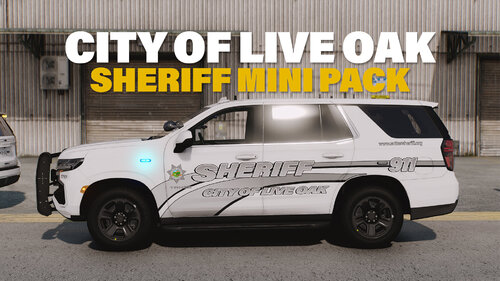
DLS v2 Configuration — Community Testing We’re currently testing a DLS v2 configuration for the Singleplayer version of this pack in our Discord! It provides Code 3 lighting control and Traffic Advisor switching on supported vehicles. Small vehicle pack with liveries inspired by real sheriff vehicles from the City of Live Oak in Sutter County, California. The liveries take inspiration from their real-world counterparts, while the vehicle configurations, lighting setups, and all interior and exterior equipment are entirely fictional. The pack features detailed interior equipment and additional equipment in the trunk. Vehicle modkits allow you to customize several parts through your trainer. Both marked Tahoes have separate driver and passenger spotlight options, allowing you to select their deployed positions. License plate options let you install a plate or remove it completely. The unmarked Tahoe also has optional interior equipment, including a dash camera, Stalker radar, and a partition. Visit our Discord for more free releases. Included vehicles: 2023 Chevrolet Tahoe — marked patrol version with a roof lightbar (oakso); 2023 Chevrolet Tahoe — marked slicktop version without a roof lightbar (oaksos); 2023 Chevrolet Tahoe — unmarked version (oaksou). The unmarked Tahoe is included in the Singleplayer download here on LCPDFR. Its FiveM version is available separately in our Discord, completely free. How to install: Singleplayer — GTA V Legacy Requirements: OpenIV with OpenIV.asi enabled, a vehicle trainer, and SirenSetting Limit Adjuster with 32-siren support. Start OpenIV and enable Edit mode. Navigate to the mods folder. Move the provided liveoaksheriff folder into mods\update\x64\dlcpacks. Open dlclist.xml inside mods\update\update.rpf\common\data. Add <Item>dlcpacks:/liveoaksheriff/</Item> before the closing </Paths> tag and save. Start the game and spawn the vehicles using the names listed above. Optional ELS compatibility files are included. If you use ELS, copy the supplied XML files from ELS\pack_default into your game's ELS\pack_default folder. They allow you to activate the vehicles' native emergency lights through ELS, using J by default. Lighting extras, including Code 3 and Traffic Advisor configurations, must still be selected through a trainer. FiveM Copy the LiveOakSheriff folder into your server's resources folder. Add ensure LiveOakSheriff to your server.cfg. For ULC support, add LiveOakSheriff to Config.ExternalVehResources in your ULC configuration. The vehicle configuration is included in the resource. The included ULC configuration provides Code 3 for all three vehicles and Traffic Advisor modes for the marked versions. Terms of use: Extracting parts from the models or unlocking them is prohibited. Do not present these vehicles or this pack as your own work. Redistribution and uploads to other websites are prohibited. Do not use this pack or its contents for commercial, financial, or personal gain.
-
-
-
 Expedition is now available on discord and is free, I believe it will be part of an update on the website when I make more cars for this pack
 -
it is els hybrid version. you can activate your lights by pressing j, but you can`t control stages with it
-
I haven't started this yet, but for some reason my single-player game doesn't work and keeps crashing. If anyone can help with the tests, please message me on Discord
-
-
-
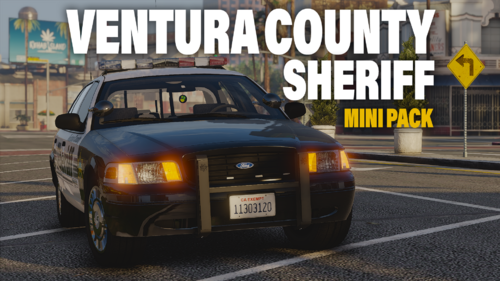
Small vehicle pack inspired by Ventura County Sheriff Office. Exterior equipment of the cars and most of the lighting modes roughly correspond to the real prototypes of the models. Interior equipment is completely fictitious and may not correspond to the real prototypes. Cars in the pack have equipment in the trunk, detailed and detailed interior equipment. Antennas on the roof of the cars are dangling. Spotlights are activated using modkits through the trainer. Using modkits, you can also put a glass of coffee cup or cola in the cup holder in the car console. Video with lighting patterns. Check our discord for more free releases. Include vehicles: - 1998 Ford Crown Victoria; - 2006 Ford Crown Victoria; - 2014 Chevrolet Tahoe; - 2012 Dodge Charger (Undercover version); - 2010 Dodge Charger (Undercover version); - 2013 Ford Expedition (Undercover version) - available for free in our discord All marked vehicles in the pack has both standard liveries in the style of the Ventura County Sheriff's Office and lore version (Ventura County / Blaine County). How to install: Singleplayer 1. Start OpenIV. 2. Navigate to the 'mods' folder 3. Move the provided "vcsopack" folder inside: mods\update\x64\dlcpacks 4. Locate 'dlclist.xml': mods/update/update.rpf/common/data 5. Add the following line to the bottom: dlcpacks:/vcsopack/ 6. It's done! FiveM - Drag and drop "VCSOPack" in the resource folder in your FiveM Server; - Add "VCSOPack" to your ULC config. If anyone can help with converting for singleplayer, please PM me on discord. Terms of use: - Do not rip parts from the vehicle or unlock it; - Do not claim the vehicles as yours; - Do not reupload this file to other websites; - Do not exploit content of this pack for commercial, financial or personal gain.
-
 Так автор пака изначально предоставил текстуры SAHP как дополнительные, разве нет?
 -
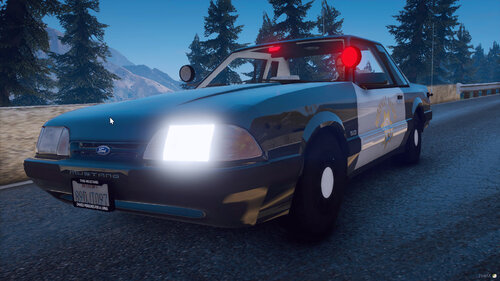 Ok, but what about tint on explorers? And this happened, if i delete chp logo :
- 93 comments
- 3 reviews
-
Great pack, but real white chp cars doesn`t have "HIGHWAY PATROL" logo on back of car. Can you do this logo as extra? And you can do tint on the rear windows on explorers, like tahoe?
- 93 comments
- 3 reviews
-
LSPDFR Crashes after running. I try run it in game console, but it anyway crashes. RPH Log :